A robot vacuum cleaner can take care of some regular cleaning if it can access the rooms and fitting it into your routine, including preparation and maintenance, works for you. Choose a robot vacuum and mop mainly if washing hard floors is a frequent task; keep a manual vacuum cleaner as your main option or as a back-up for stairs and hard-to-reach areas. Que Choisir notes that robot vacuum cleaners perform differently on different floor types, while Les Numériques highlights their limitations on stairs.
Which option is right for you?
Busy households looking to delegate regular cleaning
If you want to set your floors cleaning while you get on with something else, check the scheduling options, room access and how often the dust bin needs emptying. Que Choisir presents automated vacuuming as an option, but not as a replacement for every manual clean.
Households that regularly wash hard floors
A robot vacuum and mop can combine two jobs, as long as you check how it performs on your floor types and are happy to maintain the mopping system. Que Choisir assesses vacuuming and mopping separately in its tests.
People living in multi-storey or cluttered homes
Measure your thresholds, note where rugs and objects are on the floor, then check the instructions for the model you’re considering. Les Numériques points out that robot vacuum cleaners can’t climb stairs. ECOVACS guidance also shows that getting over a threshold and avoiding certain objects depend on the conditions they encounter.
Which features should you check first?
To cut down on manual cleaning, first check where the robot can go, then what jobs it can handle and what maintenance you’ll still need to do. If stairs or inaccessible areas are a key concern, a manual vacuum cleaner is still the answer for those spots.
| Feature |
What to check |
What matters to consumers |
| Regular cleaning |
Cycle scheduling and any emptying or maintenance needed between cleans. |
When my days are busy, I want to delegate everyday vacuuming without having to spend ages preparing each long cycle. Around 36% of consumers put this at the top of their list. |
| Washing hard floors |
Floor compatibility and maintenance of the mop pads, tanks or docking station. |
If I often wash tiles or another compatible floor, I want to cut down on this job too, while still having time to maintain the device. This is the top priority for around 29% of consumers. |
| Access to rooms |
Threshold height and shape, rugs, obstacles and stairs; check the conditions specified for the exact model. |
With tricky doorways or multiple floors, I need to know which areas I’ll still have to clean by hand before relying on a robot. Around 21% of consumers put access at the top of their list. |
| Connected features |
App and network compatibility, as well as how the model is updated. |
To schedule cleaning and access my settings without any hassle, I want my phone and network to work with the device. Ease of use is a priority for around 14% of consumers. |
Mistakes to avoid
-
Assuming a robot will reach every room
Stairs are out of reach, and results vary depending on the floor type, according to Les Numériques and Que Choisir. Thresholds, rugs and objects on the floor can also make it harder to get around.
Identify these areas in your home and plan to use a manual vacuum cleaner wherever the robot can’t reach.
-
Assuming a docking station means no maintenance
A docking station can reduce how often you need to empty the dust bin, but you’ll still need to carry out the recommended maintenance. Que Choisir also recommends looking at the differences between mopping systems.
Check the instructions for the exact model to find out how to clean the brushes, tanks and mop pads, and which consumables and spare parts are available.
-
Choosing based solely on app control
Connected features depend on the specific model and network conditions. Roborock support notes, for example, that devices covered by its connection guide don’t support 5 GHz Wi-Fi.
Before you buy, check that your phone is compatible, find out which Wi-Fi band is required and check how updates work.
-
Treating a stated threshold height as a guarantee
For one of its models, ECOVACS explains that the shape and width of a threshold, along with the approach angle, affect whether the robot can get over it.
Measure your thresholds and compare them with the conditions specified in the instructions for the model you’re considering. Keep a manual option for rooms the robot can’t access.
Brands to know
There are no brands to feature in this section.
Robot vacuum and mops on Joybuy
These models combine vacuuming and mopping for households looking to automate regular cleaning. Compare their advertised features with your floor types, thresholds and the maintenance you’re prepared to do. This selection doesn’t replace the need for a manual vacuum cleaner in areas the robot can’t reach.
 Image unavailable
ECOVACS DEEBOT X11 Pro Omni
Worth considering if you want to combine vacuuming and mopping in your regular cleaning routine.
The product name indicates an Omni station, OZMO Roller 2.0 mopping and advertised threshold climbing of up to 4 cm. Measure your thresholds and check the conditions for getting over them in the instructions. You’ll also need to maintain the station.
View on Joybuy
 Image unavailable
Black ECOVACS DEEBOT T30C OMNI Gen2
Consider this if mopping is part of your routine and you’re happy to maintain a docking station.
The product name mentions an Omni station, an OZMO Turbo 2.0 mopping system and mop pad washing at a stated 75 °C. Check that it can access your rooms, particularly around thresholds and rugs, and find out what maintenance is required.
View on Joybuy
 Image unavailable
Q8-Max robot vacuum and mop with auto-empty station
Worth considering if you want to schedule everyday cleaning and empty the dust bin less often.
The product name indicates LiDAR navigation, a Wi-Fi app and an automatic emptying station. Check that it’s compatible with your network and phone, as well as the conditions for getting over thresholds.
View on Joybuy
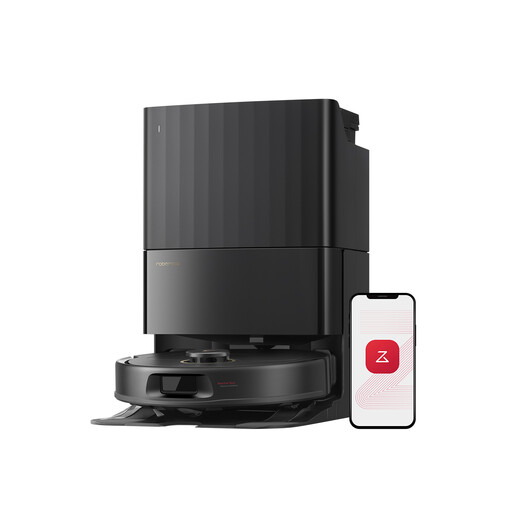 Image unavailable
Black Roborock Qrevo S5V with station
Consider this if you want to combine vacuuming and mopping with a docking station.
The product name mentions FlexiArm mop pads and hot air drying. Check how much space you’ll need around the station, how it handles rugs with long pile and whether the app is compatible with your network.
View on Joybuy
 Image unavailable
ECOVACS DEEBOT X9 PRO Omni
Worth considering if you want one device to vacuum and mop the areas of your home the robot can reach.
The product name indicates OZMO Roller mopping and an Omni station with hot water washing and hot air drying. Check the connection requirements, access to your rooms and what maintenance you’ll still need to do.
View on Joybuy
Frequently asked questions
Can a robot vacuum cleaner completely replace a manual vacuum cleaner?
Not in every home: a robot can’t clean stairs or surfaces such as furniture. Que Choisir also notes that results vary by floor type, so keep a manual option for awkward areas and occasional cleaning jobs.
How do I choose a robot if my home has thresholds and rugs?
Measure your thresholds and check the conditions for getting over them and mopping with the exact model you’re considering. ECOVACS support explains that the shape and width of a threshold, as well as the approach angle, can affect whether the robot gets over it. A stated height alone doesn’t guarantee access to every room.
Do I need compatible Wi-Fi to schedule a robot?
It depends on the model and the scheduling feature you choose. Before buying, check the app, the permissions it requests and the required network band. Roborock support says that devices covered by its connection guide don’t support 5 GHz Wi-Fi.
What should I check to keep using the connected features?
Check the app and software update requirements for the exact model, along with the availability of the parts needed to maintain it. Que Choisir notes that spare part availability varies between brands, so don’t assume one model will receive the same support as another.


