Households looking to cut down on manual cleaning
If you’d like to delegate regular cleaning in high-traffic areas, a robot could become part of your routine. You’ll still need to deal with corners and surfaces it can’t reach.


In a single-storey home, a robot can take care of regular cleaning runs if the rooms are accessible and the floors are reasonably clear, but it won’t replace every manual clean. A robot vacuum and mop is worth considering for hard floors if managing the water, mop pads and dock fits your routine. Keep a manual option for areas the robot can’t reach and occasional messes.
If you’d like to delegate regular cleaning in high-traffic areas, a robot could become part of your routine. You’ll still need to deal with corners and surfaces it can’t reach.
Cables, shoes and clothing can disrupt cleaning cycles. iRobot and Ecovacs advise clearing obstacles that could block the robot, including when it’s mapping your home.
A robot vacuum and mop can add mopping to your regular cleaning routine, provided that managing the water, mop pads and dock remains practical day to day.
Consider it: if you want to schedule frequent cleaning runs in accessible rooms where the floor is generally clear.
Bear in mind: you’ll still need to tidy up beforehand and tackle specific areas yourself.
Consider it: if your hard floors also need regular mopping.
Bear in mind: water, mop pads and the dock mean extra maintenance, and mopping may not remove every stain.
Consider it: as your main appliance if your floors are often cluttered, or as a back-up for areas a robot can’t reach.
Bear in mind: you’ll need to operate it yourself for every cleaning run.
| Criterion | What to check | What matters to consumers |
|---|---|---|
| Room layout and obstacles | Check thresholds, clearance beneath furniture, and whether your chosen model can map your home and set no-go zones. | If cables and small items are often left on the floor, I want to know what I’ll need to put away before each cycle. Around 31% of consumers put reliable navigation first. |
| Routine maintenance | Check what you’ll need to do by hand to maintain the robot and dock, and how easy it is to access consumables. | To make regular cleaning easier, I need to be able to fit the remaining tasks into my routine. Around 25% of consumers put reducing hands-on tasks first. |
| Floor types and mopping | Compare performance on your floor types. For a robot vacuum and mop, also check how it handles rugs and mop pads. | With hard floors and rugs, I want to choose vacuuming and mopping separately, without assuming that one guarantees the other. Around 25% of consumers prioritise finding a model that suits their surfaces. |
| Manual back-up | Identify corners, narrow spaces and occasional messes that you’ll still need to clean yourself. | When some areas need immediate attention, I’d rather keep a suitable manual appliance. This remains a priority for around 19% of consumers. |
iRobot and Ecovacs advise that cables, laces and clothing can still obstruct the robot or get caught in it.
Check what’s usually left on your floors, measure your thresholds and read the limitations of the exact model before scheduling unattended cleaning cycles.
A dock can take care of some tasks, but the robot, charging contacts and mopping components still need checking, depending on the model. For example, Roborock support advises cleaning the charging contacts if an issue arises.
Check the maintenance steps in the manual, which consumables you’ll need and how much space to leave for the dock.
Depending on the equipment, you may also need to replace bags, brushes or mop pads periodically.
Mopping and rug-management features vary between models. Simply adding a mop pad doesn’t solve the question of which surfaces the robot should avoid.
Check how to set no-mop zones and how the model handles rugs, then decide whether managing the water fits your routine.
UFC-Que Choisir tests robots on different floor types, as well as around the edges of rooms and in corners. Coverage of these areas matters when choosing a model, beyond the features advertised.
Identify the nooks and occasional cleaning jobs that will still need a manual vacuum cleaner.
For some Roomba models, the brand lists mapping, zone configuration and an AutoWash dock among the available features.
Depending on the model, the range includes robots with mapping, no-go zones and dock features.
Dreame offers robot vacuum and mop models with dock features that vary by series.
Roborock support provides maintenance instructions for specific robots and docks.
These models combine vacuuming with mopping for regular cleaning runs in a single-storey home. Compare their listed features with your floor types, obstacles and the maintenance you’re prepared to do. Keep a manual option for tasks a robot can’t handle.
 Image unavailable
Worth considering if you want to combine vacuuming and mopping, while checking whether it can cross your thresholds.
The product listing specifies 19 500 Pa suction, OZMO Roller 2.0, an Omni dock and a maximum threshold height of 4 cm. Compare this last figure with your actual thresholds rather than assuming the robot will cross them all.
You’ll also need to clean manually in areas the robot can’t reach.
 Image unavailable
Consider it if obstacles and cleaning time are important factors in your household.
The product listing specifies 8 000 Pa suction, up to 180 minutes of run time, DuoDetect AI, an anti-tangle feature and an automatic-emptying dock. Check the conditions behind the stated run time against the area you need to clean.
You’ll still need to prepare the floors, especially where cables and small objects could get in the way.
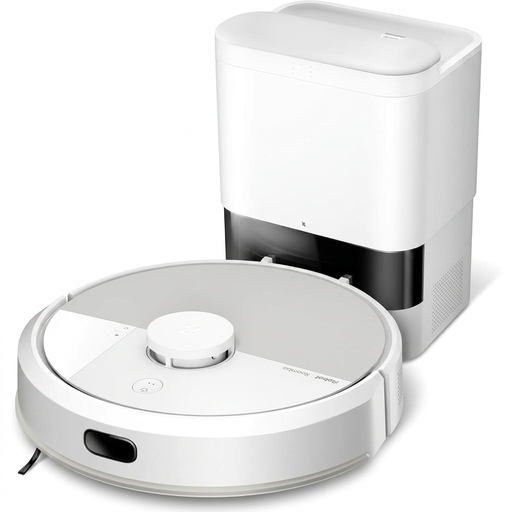 Image unavailable
Worth considering if you want to combine vacuuming and mopping with a robot from the Roomba Combo range.
The product name confirms that it has a mopping function. To see whether it’s right for your home, check the available results for the floor types, edges and corners that matter to you.
You may still need to clean manually in areas the robot can’t reach or to tackle occasional messes.
 Image unavailable
Worth considering for combined vacuuming and mopping on hard floors, if maintaining a dock fits your routine.
The product listing specifies 16 600 Pa suction, OZMO Roller, an Omni dock, mop-pad washing with hot water and hot-air drying.
Check the run time and coverage per charge you’ll need for your rooms, and allow for managing the water tanks.
 Image unavailable
Consider it if you want to schedule vacuuming and mopping on hard floors.
The product listing specifies 25 000 Pa suction, OZMO Turbo 2.0, an Omni dock and mop-pad washing at 75 °C.
Check the coverage you’ll need for your floor area and allow for maintaining the tanks and brushes.
Yes. At the very least, remove anything that could block it. iRobot’s instructions mention clothing, laces and cords in particular. When creating a map, Ecovacs also advises opening doors, clearing obstacles and ensuring there’s enough light. Check the instructions for your chosen model.
No. Depending on the model, it automates some tasks, but you’ll still need to check the robot and its dock. For example, Roborock advises checking and cleaning the charging contacts on the robot and dock if there’s a charging issue. Also check what’s required to maintain the brushes and, if your robot mops, the mop pads and tanks.
In France, check the repairability index if one is displayed for the robot vacuum you’re considering. ADEME says robot vacuum cleaners are among the appliances covered. Also check the model-specific information on spare parts and maintenance.