What should you check before choosing?
Start with the rooms and floors you need to clean, then decide which tasks you actually want to hand over: cleaning runs, emptying the dustbin, or both.
| Criteria | What to check | Your needs |
|---|
| Rooms and obstacles |
Check room-by-room mapping, no-go zones and multi-floor support for the model you’re considering. Measure thresholds and clearance under furniture; plan to pick up cables and small objects before a cleaning run. |
I want to schedule cleaning runs without sending the robot into cluttered or fragile areas. |
| Flooring and finishing |
Compare results on your carpets, tiles or wooden floors, as well as along walls and in corners. UFC-Que Choisir assesses these situations separately; a claimed suction power figure doesn’t tell you how well it performs in each one. |
If dust builds up in the corners or I have carpets, I want to know which areas will still need to be vacuumed manually. |
| Emptying and maintenance |
Decide whether a self-emptying station would be useful, then check how much space it needs, which consumables it uses and what maintenance is still required for the brushes, filters and sensors. In France, the repairability index for robot vacuums can be compared by model, according to the ministry responsible for the ecological transition and the decree published on Légifrance. |
I want to empty the dustbin less often, without overlooking robot cleaning or access to replacement parts. |
| App and updates |
Check which features require an app, an account or a Wi-Fi connection. Read the privacy policy and look for release notes and support information for the model; the CNIL recommends weighing the benefits of connected features against the personal data they involve. |
I want to schedule cleaning runs while understanding the permissions requested and how the device will be supported after purchase. |
What can brands tell you?
These range examples can help you identify which features to check. They don’t represent every model from a brand or guarantee that the products are available in the selection below.
Roborock
The Q10 range shows how mapping navigation can be combined with a self-emptying station on some versions.
- Roborock describes the Q10 S5+ Set as having LiDAR navigation and says the Q10 series supports maps for multiple floors.
- Check the features of the version you’re considering, the space its base takes up, its consumables and the terms of use for the app.
Rowenta
The brand offers useful information for buyers comparing repairability alongside navigation features.
- Rowenta says it keeps technical spare parts available for 15 years after purchase for almost all products covered by its commitment.
- Check the specific model: Rowenta describes the X-Plorer Série 45 RR8227WH as having random navigation, not room-by-room mapping.
iRobot
Support information may be useful if you want to keep track of software updates for your Roomba.
- iRobot Customer Care publishes release notes for several Roomba series and apps.
- Look for information specific to the model you’re considering, and check its accessories, parts and applicable privacy settings separately.
Robots for different needs
These Joybuy options offer robot vacuuming with mapping or a self-emptying station. If you’re still deciding between a robot and a conventional vacuum, consider which cleaning runs you want to automate and which areas you’ll still need to tackle yourself.
 Image unavailable
EUREKA E20 Plus robot vacuum cleaner
Worth considering if you want to schedule vacuuming and account for obstacles. The product name mentions app control, 3D obstacle avoidance and an anti-tangle brush; 8,000 Pa is a claimed suction power, not a measure of how well it will clean your floors. Check that it has the scheduling features you need and find out what’s involved in maintaining the dustbin, brushes and filters.
View on Joybuy
 Image unavailable
ECOVACS Deebot T30C OMNI Gen2, black
This model comes with an OMNI station and may suit homes looking for mop-related features too, although these don’t replace the need to assess its vacuuming performance. The product name lists 25,000 Pa, an OZMO Turbo 2.0 feature and mop washing at 75 °C. Check the space needed for the station, how to maintain the water tanks and how well it performs on your floors.
View on Joybuy
 Image unavailable
Q8-Max robot vacuum cleaner with self-emptying station
LiDAR navigation and a self-emptying station meet two different needs: planning cleaning runs and emptying the dustbin less often. The product name lists 8,000 Pa and 200 min of runtime; these figures don’t tell you how well it performs on carpets or in corners. To use the app, check that you have a 2.4 GHz Wi-Fi network, and find out which consumables the station needs.
View on Joybuy
 Image unavailable
roborock Q7 L5+, black
According to its product name, this robot combines LiDAR navigation, automatic dust emptying and app control. Its 8,000 Pa suction power is a claimed figure. If room-by-room cleaning or saving maps for multiple floors matters to you, check that the Q7 L5+ specifically offers these controls. You’ll also need to maintain the filters and brushes.
View on Joybuy
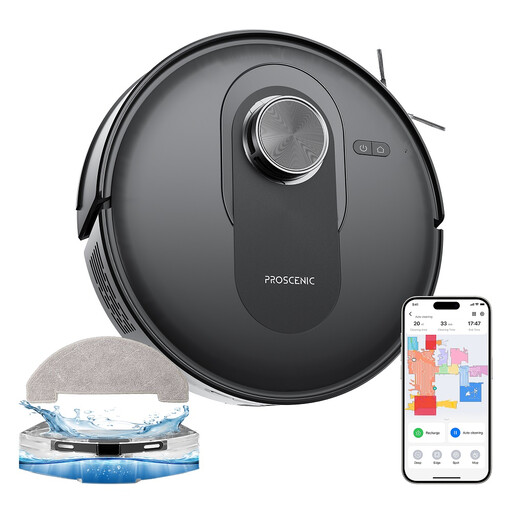 Image unavailable
Proscenic Q8 LiDAR robot vacuum cleaner
LiDAR navigation and app control may appeal to households looking to schedule regular cleaning runs. The product name lists 6,000 Pa, but that doesn’t tell you how well it will clean the floors in your home. Check which room-by-room settings you need, whether you have a 2.4 GHz Wi-Fi connection for the app, and what’s involved in emptying and maintaining the robot.
View on Joybuy
Frequently asked questions
Can a robot vacuum completely replace a conventional vacuum?
Not necessarily: a robot can take care of regular cleaning runs, while a conventional vacuum is still useful for stairs, cluttered areas and finishing touches. UFC-Que Choisir assesses vacuuming on different floor types, along walls and in corners separately. Check the results for the types of flooring in your home before deciding how much cleaning to hand over.
What should you measure before buying a robot vacuum with mapping?
Measure the clearance under furniture and note any thresholds, carpets and obstacles on the floor. Then check whether the exact model can save maps, set no-go zones and avoid obstacles. Even if obstacle avoidance is listed as a feature, plan to pick up cables and small objects before each cleaning run.
How can you check the app and its privacy settings?
Read the privacy policy for the robot and its app, then check the requested permissions, sharing settings and how to delete your account. The CNIL recommends considering whether connected features genuinely meet your needs, given the risks to your personal data.
How can you find out about a robot vacuum’s updates?
Look for a support page and release notes that mention the model or its series, then check whether a support period is specified for it. For example, iRobot Customer Care publishes release notes for several Roomba series and apps. However, the existence of this page alone doesn’t establish how long updates will be available for each device.
What is a robot vacuum’s repairability index for?
In France, it lets you compare how repairable the models covered are: the ministry responsible for the ecological transition includes vacuum cleaners among the categories covered, and a decree published on Légifrance sets out the criteria for robot vacuums. Compare the index for the exact model and separately check whether the parts you may need are available.


