People who are out during the day
You’d like to schedule cleaning of accessible floors between manual cleans and can prepare the robot’s route.


A robot vacuum can keep accessible floors clean while you’re out, provided you can prepare its route. A docking station reduces some of the work, but doesn’t eliminate maintenance. Keep a conventional vacuum cleaner for stairs, furniture and spot cleaning. Before choosing a connected model, check the terms of use for its app and what information is available about software support.
You’d like to schedule cleaning of accessible floors between manual cleans and can prepare the robot’s route.
You’re considering a docking station to reduce how often you empty the bin, while bearing in mind that the brushes and base will still need cleaning.
Rugs, cables or items on the floor make navigation important. If you can’t clear the way, a conventional vacuum cleaner may be better suited to your needs.
To choose between a robot and a conventional vacuum cleaner, start by looking at your floors and any obstacles, then consider how much maintenance you’re prepared to do. A robot can complement a stick or cylinder vacuum, but it won’t clean stairs or furniture.
| What matters | What to check | Who prioritises it most |
|---|---|---|
| Scheduling and route | Room-by-room mapping and schedules; navigation tests for the exact model. | If I’m out during the day, I want the robot to follow a prepared route through accessible rooms. Around 33% of consumers prioritise scheduled cleaning. |
| Emptying and maintenance | The docking station’s exact functions; any remaining work on the bin, brushes and base. | If emptying the bin after every clean is a nuisance, I also check what needs cleaning or replacing. Around 25% of consumers prioritise reducing how often they need to empty the bin. |
| Floors and obstacles | Test results for different floor types; how it handles cables and small objects. | If my home has rugs or items on the floor, I want to know how the model handles these obstacles. Around 17% of consumers put floors and navigation first. |
| Additional manual cleaning | Areas the robot can’t reach; how easy a stick vacuum is to manoeuvre or test results for a cylinder vacuum. | If I want to clean a piece of furniture, a staircase or a missed area straight away, I’ll keep a conventional vacuum cleaner suited to these tasks. Around 17% of consumers prioritise targeted manual cleaning. |
| App and digital support | Phone and network compatibility; access to data and information about the model’s software support. | If I plan to control the robot remotely, I check the connection requirements and how my data is managed before choosing. Around 8% of consumers prioritise these digital features. |
Mapping doesn’t guarantee that a robot will detect cables or small objects. In its independent test of the DEEBOT N20 Plus, Les Numériques reports that it struggled with obstacles.
Check navigation tests for the exact model and clear its route before scheduling a cleaning cycle.
Preparing the floor can take time, and an interrupted clean may require you to step in.
A docking station collects dust, but the station’s bin or tank, brushes and filters may still need attention.
Compare the maintenance tasks and compatible parts rather than relying solely on the advertised emptying frequency.
Allow time to clean the station’s tank and replace the brushes or filters when needed.
A robot won’t clean stairs or furniture. A stick or cylinder vacuum can cover areas that need direct attention and lie outside its route.
Decide whether you need a cleaner for everyday upkeep or an additional appliance for hard-to-reach areas.
You’ll need to keep or buy a suitable appliance for stairs, furniture and targeted cleaning.
The DEEBOT N20 Plus combines mapping with a bagless emptying station. It’s a setup worth considering if you want to reduce how often you empty the bin.
The Qrevo S5V product page lists LiDAR navigation and a station that handles dust emptying and mop maintenance.
The models reviewed illustrate different configurations: an emptying station for the X-Plorer Série 75S+ and an accessible bin for the X-Plorer Série 120 AI RR7875WH.
The L10s Ultra Gen 2 is worth considering if you’re comparing robots with a docking station and vacuum-and-mop functions.
Compare these robots if you want to schedule cleaning of accessible floors, plan their routes or reduce some emptying and mopping tasks. Stations and features vary by model, and you’ll still need to carry out the maintenance they require.
 Image unavailable
Worth considering if you want to schedule cleaning and reduce how often you empty the bin.
The product title lists 8000Pa suction power and a dust container advertised to hold up to 45 days’ worth of dust. Product information mentions mapping and scheduling via an app.
The instructions recommend clearing cables, small toys and lightweight fringed rugs, and leaving space around the station.
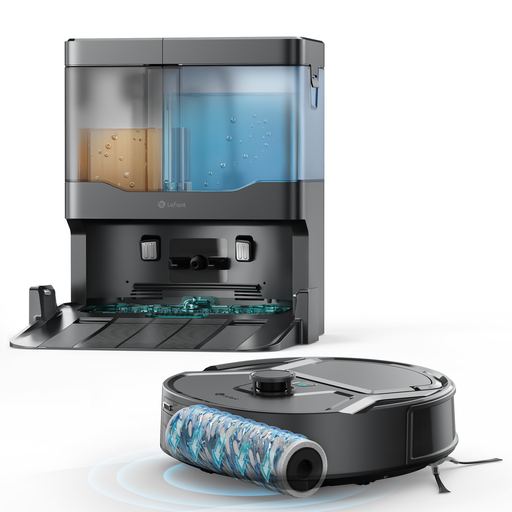 Image unavailable
Worth a look if multi-floor mapping and a mopping function suit your home.
The product title lists 20000 Pa of suction power, a 20 cm cleaning width, multi-floor mapping and an anti-tangle brush.
 Image unavailable
Compare this model if you want a station that empties the bin and washes and dries the mop pads.
The product title lists 16200 Pa of suction power and hot-water cleaning at 75°C. Product information mentions an automatic maintenance base.
You’ll also need to empty the dirty-water tank, refill the clean-water tank as required, and clean the brushes and filters regularly.
 Image unavailable
Worth considering if you want to schedule cleaning cycles and automate some mop maintenance.
The product title lists 16,600Pa of suction power and a station that washes the mop pads with hot water before drying them with hot air. Product information mentions mapping and scheduled cleaning cycles.
You’ll need to empty the dirty-water tank, refill the clean-water tank, and clean the brushes and filters regularly.
 Image unavailable
Worth a look if you want to schedule cleaning and let the station handle some mop maintenance.
The product title lists 8150Pa of suction power, laser navigation, obstacle recognition and an anti-tangle side brush. Product information mentions mapping and route planning.
The instructions say to empty the dirty-water tank and dust bag, and check the side brush and sensors regularly.
Clear cables and small objects from its route, then check the areas it’s due to clean. In its independent test of the DEEBOT N20 Plus, Les Numériques reports difficulties with some obstacles, so mapping doesn’t guarantee an uninterrupted clean.
No. It collects dust, but its tank and the brushes still need maintenance. Les Numériques says the N20 Plus has a bagless station tank. Check separately whether the station for your chosen model also takes care of mop maintenance.
Read the instructions for the specific model and check that it’s compatible with your phone and network. In its general guidance, Ecovacs describes a 2.4 GHz Wi-Fi connection; this doesn’t guarantee compatibility with every model. The CNIL recommends securing access to connected devices and checking how you can manage your data.
For a purchase from a trader, the DGCCRF states that you have two years from delivery of the goods to bring a claim under the statutory guarantee of conformity; the conditions depend on the circumstances. The DGCCRF includes domestic robot vacuums among the products covered by the repairability index display requirement. Also ask what information is available about spare parts: current availability doesn’t guarantee future availability.