A robot vacuum is a good choice for regular cleaning if you can clear the floor and are happy to empty its dust container. An auto-empty station is a more specific solution if you want to empty it less often. For hard floors, a mopping function can help with maintenance, provided you check how it handles rugs. Keep a stick vacuum for spot cleaning and areas the robot doesn’t clean as effectively: UFC-Que Choisir tests rugs, tiles, wooden floors, edges and corners separately.
Which homes are these appliances suitable for?
The right level of automation depends as much on your floors as on the tasks you still want to do yourself.
Households looking to schedule routine cleaning
A robot can clean between manual cleans, as long as its routes are clear enough. If you have several types of flooring, check the results for each one: UFC-Que Choisir tests cleaning performance on rugs, tiles and wooden floors, as well as along walls and in corners.
Homes with rugs, thresholds or pet hair
Measure your thresholds and check how the model you’re considering handles rugs, picks up pet hair and allows you to clean its brush. A feature advertised for rugs doesn’t, by itself, tell you whether the robot can get over every threshold.
People who want to empty the dust container less often
An auto-empty station can reduce how often you need to empty the robot’s small dust container. You’ll still need to maintain the brushes and filters, and buy consumables compatible with your chosen station.
What should you look for before choosing?
Start with the surfaces and routes around your home, then decide which tasks you want to cut down on: emptying the dust container, mopping or spot cleaning.
| Criterion | What to check | My needs |
|---|
| Flooring and coverage |
Look for tests on the floor types in your home, and check results along walls and in corners too. UFC-Que Choisir’s test protocol assesses rugs, tiles, wooden floors and room edges separately. |
I have several types of flooring, or dust gathers near the skirting boards: an advertised power figure alone isn’t enough to distinguish between models. |
| Getting around |
Measure your thresholds and check how the exact model handles rugs and navigates around obstacles. |
At home, the robot needs to move between rooms without me having to move objects or the appliance every time. |
| Emptying the dust container |
Compare emptying the robot manually with using an auto-empty station. Check which bags or other consumables it needs, and what maintenance is still required. |
If I find it a nuisance to empty the small dust container often, a station addresses that specific task, but I’ll still need to clean the brushes and filters. |
| Mopping |
Check which surfaces the model is designed for, how it handles rugs, and what’s involved in maintaining its water tanks and mop pads. |
I want to maintain my hard floors regularly, without assuming the robot will remove every mark or mop without any input from me. |
| Controls |
Check scheduling, zone controls and app compatibility with your phone; features vary between product ranges. |
To start cleaning cycles when the floor is clear, I need controls that suit the way I actually use the appliance. |
| Spot cleaning |
Identify where you’ll still need to clean manually. If you’re considering a stick vacuum as well, check its accessories and brush maintenance. |
I’d like to be able to clean a particular area when needed, without relying on the robot’s route or map. |
| Compatible parts |
Make a note of the full model number before looking for filters, brushes, bags and other parts. Rowenta and iRobot offer spare-parts searches or catalogues by range or model number. |
I want to find consumables that fit the appliance I choose, rather than assume that a part from the same brand will be compatible. |
What mistakes should you avoid?
-
Choosing based only on the advertised suction power
A Pa figure alone doesn’t tell you how well a robot collects dirt on every floor type or along edges. UFC-Que Choisir assesses these situations separately in its test protocol.
Compare results for the floors in your home, then check navigation and whether the robot can get over your thresholds.
-
Assuming a station means no more maintenance
A station reduces the need to empty the dust container manually, but the brushes, filters and any mopping components still need regular attention.
Read the instructions and check which consumables fit the exact model before you choose.
If the station uses bags, you’ll need to replace them; check which bags are suitable for your chosen model.
-
Confusing rug handling with getting over thresholds
These are two different capabilities, so check both for the model you’re considering.
Measure your thresholds and check separately how the robot performs on your rugs, especially if they’re thick or have tassels.
-
Overlooking the app and spare parts
Scheduling, mapping and updates can vary between product ranges. For example, iRobot says its wireless updates take place when the robot is docked and not cleaning.
Check which features are available for your chosen model, whether it’s compatible with your phone, and the model numbers of any accessories you’ll need.
Which brands are useful points of comparison?
These examples can help you compare specific features. A feature advertised for one model won’t necessarily be available across the whole brand.
Roborock
According to Roborock France, the Q10 S5+ comes with a RockDock Plus auto-empty station and rug detection.
- Worth considering if emptying the dust container less often and having rugs are important to you.
- Check the model number, accessories and app features; these details don’t apply to every Roborock model.
Rowenta
Rowenta France lists the X-PLORER Série 70+ as featuring an automatic emptying system, and lets you search for spare parts by model number.
- Searching by model number helps you find accessories that fit the robot you’re considering.
- Check how easily your chosen version gets around, and which parts are available for it.
iRobot
iRobot France’s documentation explains scheduling and activity tracking in the iRobot Home app, as well as the conditions for wireless updates.
- This information can help you check whether the controls you need for regular cleaning cycles are available.
- Connected features and accessories depend on the product range; check they’re compatible with your chosen model.
Dreame
Dreame France lists the L10s Ultra Gen 3 Kit as featuring a multifunctional PowerDock station and 10,5 mm mop-pad lifting.
- This model offers specific features to explore if you want to combine mopping with cleaning rugs.
- The stated lift height doesn’t tell you how the robot will perform on every rug; check what’s involved in maintaining the station too.
Robot vacuums to explore on Joybuy
These five models combine vacuuming and mopping for routine floor care, and several also include a station. Compare their advertised features with your rugs and thresholds, and consider what maintenance you’re happy to keep doing. A stick vacuum is a separate option for spot cleaning.
 Image unavailable
ECOVACS Deebot T30C OMNI Gen2 with OMNI station
Worth considering if you want to combine vacuuming and mopping for regular floor care. Its name indicates advertised suction of 25 000 Pa and mop-pad washing at 75 °C; these figures don’t tell you how it will perform on your floors. Check how it handles rugs, and be prepared to maintain the water tanks, brushes and filters.
View on Joybuy
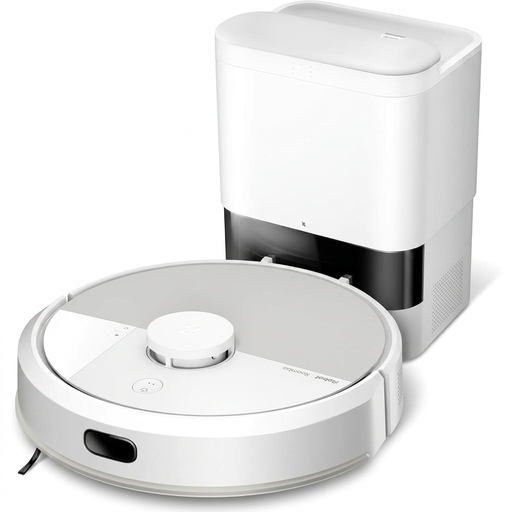 Image unavailable
White iRobot Roomba Combo 115 AE with mopping
Consider this if you want a robot mop and plan to check that its scheduling features suit your cleaning routine. Confirm app compatibility, how it handles rugs while mopping, and which bags or parts fit the exact Roomba Combo 115 AE model.
View on Joybuy
 Image unavailable
Eureka J15 Pro Ultra with 75 °C mop washing
Consider this robot mop if mop-pad maintenance is an important factor for you. Its name mentions 16 200 Pa, an anti-tangle system and hot-water cleaning at 75 °C. Check its performance on your floor types, how it gets over thresholds and which consumables are compatible separately.
View on Joybuy
 Image unavailable
Black Roborock Q7 L5+ with auto-empty station
Worth considering if you want to combine mopping with a station that empties the dust container. The Q7 L5+ name indicates LiDAR navigation and advertised suction of 8 000 Pa. Before choosing it for a home with rugs or thresholds, check how this model handles them and which accessories are compatible.
View on Joybuy
 Image unavailable
White Roborock Qrevo S5V with station
This model combines a station with FlexiArm mop pads for vacuuming and mopping. Its name indicates 12 000 Pa and hot-air drying. Check the scheduling, how it handles mopping near rugs and its performance on your floors before relying on these features.
View on Joybuy
Frequently asked questions
Can a robot vacuum replace all manual cleaning?
Don’t assume it will take over completely without considering your home. UFC-Que Choisir tests rugs, tiles, wooden floors, edges and corners separately. Compare the results that matter for your floors, and keep a manual option for spot cleaning or areas the robot doesn’t clean as effectively.
Does an auto-empty station mean you don’t need to maintain the robot?
No. It mainly reduces how often you need to empty the dust container manually. Any bags, brushes, filters and sensors still need maintenance as described in the instructions. A robot mop also needs its mopping components looked after.
What should you check in a connected robot’s app?
Check that it’s compatible with your phone and, for the model you’re considering, that it offers the features you’ll actually use, such as scheduling, maps or zones. Check the update requirements too: iRobot, for example, says its wireless updates take place when the robot is docked and not cleaning.


