
Livraison le jour même ou le lendemain

Qualité garantie

Débloquez vos offres de bienvenue: Livraison GRATUITE | Jusqu'à -80 % | 30 jours d'essai gratuits à JoyPlus
Téléchargez l'application
A robot vacuum and mop with a self-emptying station can take a lot of the hassle out of your daily cleaning routine. But you need to pick a model that genuinely works for your home. Between the stated suction power, the claimed battery life and the AI-powered features, marketing hype can sometimes overshadow the criteria that really matter in everyday use.
Whether you live in a city flat, a multi-room house or a home shared with pets, here are the points to consider before you place your order.
A high Pa figure naturally catches your eye, but it doesn't tell you how well the robot will perform on carpet, wooden flooring or tiles. The brush design, airflow, filtration quality and how well the robot stays close to the floor all play a crucial role too.
A robot vacuum advertised at 16,000 Pa can be effective on ingrained dirt. However, do check the available modes, how it handles carpets and how easy the brush is to clean.
A self-emptying station doesn't necessarily mean the robot also washes and dries its mop pads. On some models, the station simply transfers the dust into a bag or bin. Others also handle hot-water mopping, hot-air drying, refilling the water tank and even cleaning the base.
Before you order, look closely at exactly which tasks the station performs and which ones you'll still need to do manually.
Even a robot vacuum marketed as self-cleaning requires a certain amount of upkeep. The dirty water tank, filters, sensors and brushes all need regular attention. In a home with pets, hair can still wrap around the axles despite an anti-tangle brush.
Also make sure you have clear space around the station and an easily accessible power socket.
LiDAR navigation maps out your rooms and allows the robot to plan efficient cleaning routes. It's particularly useful in homes with multiple zones, long hallways or furniture placed close together. A camera or structured light system can complement this technology to identify cables, toys and other objects left on the floor.
Obstacle detection doesn't mean you can skip picking up small items, thin wires and clothes before starting a cycle. In a multi-storey house, also check how the robot handles multi-level maps and whether it has drop sensors.
To choose a robot vacuum that works well on both carpets and hard floors, consider the following:
An anti-tangle brush can make a real difference with a robot vacuum for pet hair, but it won't always eliminate the need to clean the ends and bearings. A liftable mop pad is also valuable to avoid soaking your carpets when running a combined vacuum and mop programme.
If you're looking for a robot vacuum with hot-water mopping, look into the stated temperature, the drying system and the tank capacities. Hot-water mopping reduces the need for manual intervention after each run, but it won't save you from emptying the dirty water tank or cleaning the base regularly.
The app should let you set no-go zones, schedule cleaning sessions, select which rooms to clean and choose between vacuuming, mopping or a combined mode. Also check Wi-Fi compatibility – some models only work on 2.4 GHz.
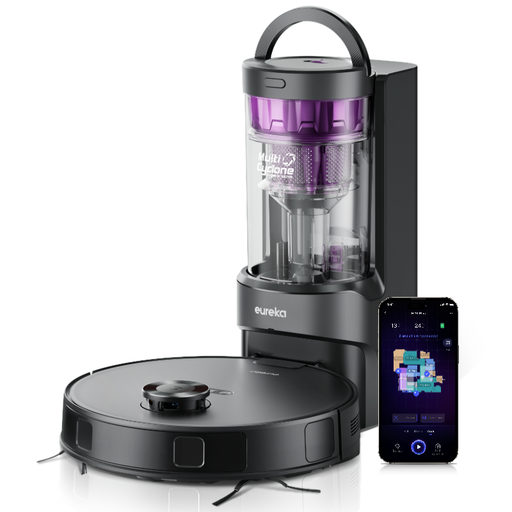
Why this suits this profile: Its bagless station, claimed battery life of up to 180 minutes and app control make it an easy-to-use model for everyday cleaning of hard floors and carpets.
The mop pad lifts by a claimed 10 mm, limiting contact with carpets. The 2-litre dust bin also means fewer manual empties.
Claimed suction of 8,000 Pa, LiDAR mapping, 3D obstacle avoidance, no-go zones and voice control.
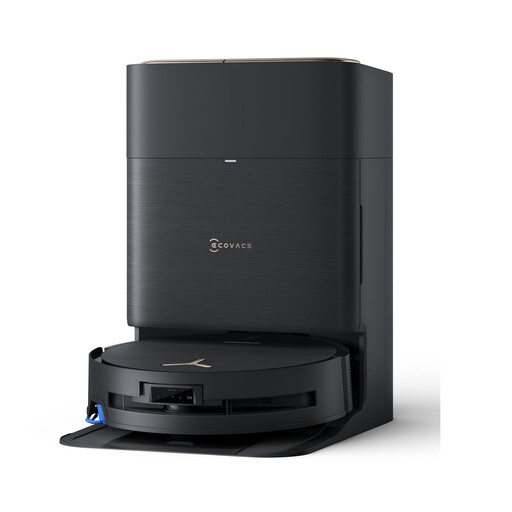
Why this suits this profile: Its all-in-one station is designed for households that want to automate vacuuming, mopping and drying as much as possible, especially on larger floor areas or with multiple floor types.
According to the product page, the station empties the robot, washes the mop pads at 75 °C and dries them with hot air. You'll still need to keep an eye on the tanks though.
Claimed suction of 16,600 Pa, OZMO roller, 3D obstacle detection, multiple liftable components and multi-storey mapping.
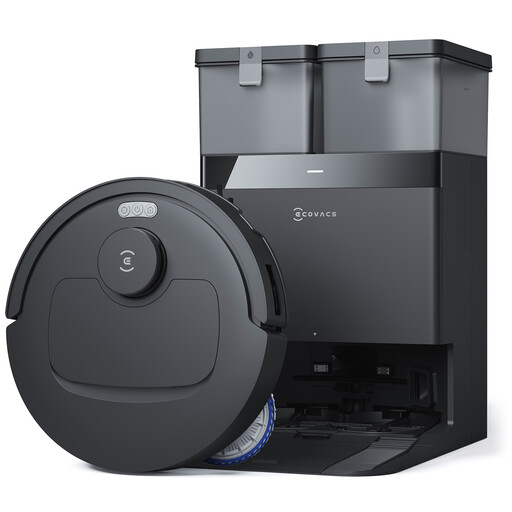
Why this suits this profile: Households with pets, carpets and frequent cleaning sessions can benefit from strong suction and a station designed to reduce daily handling.
The anti-tangle design and automatic carpet detection address the challenges of pet hair. Depending on the mode selected, the mop pad can be lifted.
Claimed suction of 25,000 Pa, mop pad washing at 75 °C, drying at 45 °C, 4-litre clean water tank and edge cleaning.
We've put together a comprehensive, real-time updated selection of products that meet these demanding criteria and European safety standards.
Place the station against a wall on a level surface, leaving enough space in front and on the sides. For the first run, do a full mapping of your home and clear the floor of cables, small toys and fringed rugs.
To keep performance consistent:
It depends on the power consumption, how often you run it, the recommended cleaning solution and the price of replacement parts. A bagless model can reduce spending on consumables, whereas a station that washes and dries the mop pads will use more water and electricity. Before you buy, check the cost of replacement filters, brushes and mop pads.
This varies depending on how often you use it, the quality of the battery and how well you maintain it. Regularly cleaning the brushes, filters, wheels and sensors helps to reduce wear. Also check the availability of spare parts and the warranty terms that apply in the UK.
Yes. LiDAR navigation and obstacle detection make moving around easier, but no system can handle every cable, small object or spill. A clear floor reduces the risk of the robot getting stuck and allows it to cover the cleaning area more effectively.