How do the options compare?
In a home with mostly hard floors but some rugs or delicate surfaces, first decide where water is safe to use. Then consider how much cleaning you want to automate and which tasks you’re happy to do by hand.
Robot vacuum and mop
Consider it if: mopping is suitable for your hard floors and the model can keep your rugs dry.
Bear in mind: rugs won’t be mopped, and depending on the model, the mop pads, water and docking station will need maintenance.
Robot vacuum without a mop
Consider it if: you want to automate vacuuming while avoiding water on delicate surfaces.
Bear in mind: you’ll still need to mop hard floors by hand, and the robot must be able to move around your rooms.
Cordless or cylinder vacuum cleaner
Consider it if: rugs, stairs, thresholds or delicate flooring mean you need to direct every pass yourself.
Bear in mind: you can’t schedule everyday cleaning, so you’ll need to do it by hand.
Robot and dedicated vacuum cleaner
Consider it if: you want to automate hard-floor cleaning while keeping a separate appliance for rugs and awkward areas.
Bear in mind: you’ll need to store and maintain two appliances, and still clear the floor before the robot starts.
| Factor |
What to check |
Who is this for? |
| Water and flooring |
Check the flooring manufacturer’s guidance and whether rugs or delicate areas can be excluded from mopping. |
If my wooden floor or rugs could get wet, I want precise control over which areas are mopped; around 33% of consumers in this group put this protection at the top of their list. |
| Automating hard-floor cleaning |
Tell the difference between a charging dock and a station that also empties the robot or maintains its mop pads, depending on the model. |
For regular cleaning of hard floors that can safely be mopped, I’d prefer to keep hands-on tasks between cycles to a minimum; this is the main priority for around 25% of consumers in this group. |
| Obstacles and docking station |
Measure the space required according to the manual and check thresholds and access between rooms. |
With cables, doors or limited space for the station, I mainly need an appliance that can actually follow its route; around 25% of consumers in this group prioritise these practical considerations at home. |
| Manual cleaning |
Consider how much of your home is taken up by rugs, stairs and awkward corners before giving up a vacuum you can control by hand. |
If my rugs and awkward areas need targeted cleaning, I want to stay in control of vacuuming; this is the top priority for around 17% of consumers in this group. |
Robot vacuums and mops at Joybuy
These models are robot vacuum and mop options for hard floors with rugs. Compare their advertised features, then check each manual to see how your rugs are handled, whether water can be used on your floors and how much space the docking station needs.
 Image unavailable
EUREKA E20 Plus robot vacuum cleaner
For hard floors with a few rugs, check how its settings can keep wet cleaning separate from surfaces that need to stay dry.
- Advertised suction power: 8 000 Pa; app control.
- Check the manual to see how it handles rugs of your rugs’ thickness and material.
View on Joybuy
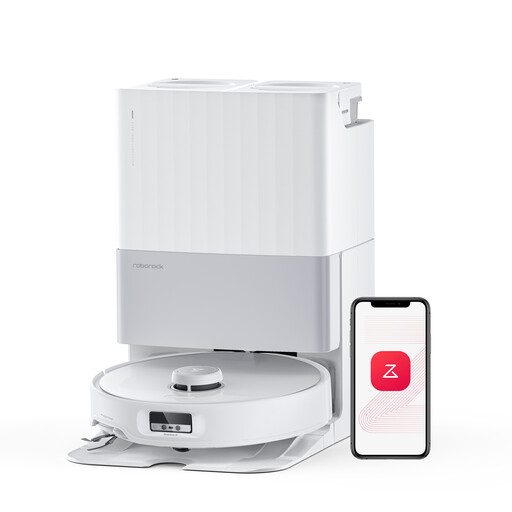 Image unavailable
Roborock Qrevo Edge, white
If you want to automate hard-floor cleaning, check how the mop retracts over your rugs before scheduling a mopping cycle.
- Mopping function, adaptive lifting chassis and advertised suction power of 18 500 Pa.
- Hot-water mop washing at 75 °C is advertised in the product name.
- Measure the space required for the docking station according to this model’s manual.
View on Joybuy
 Image unavailable
ECOVACS DEEBOT X9 PRO Omni with OZMO Roller
For hard floors with rugs, read the manual before using the rug-management and mopping features.
- Advertised suction power: 16 600 Pa; Omni station.
- Hot-water mop washing and hot-air drying are advertised in the product name.
- Check the conditions for using the Carpet First feature with your rugs.
View on Joybuy
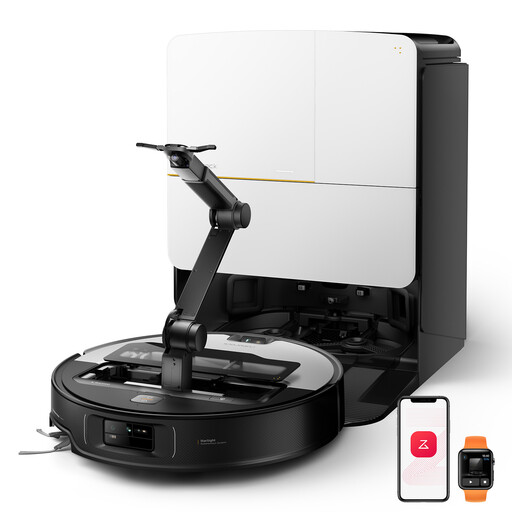 Image unavailable
Roborock Saros Z70 with OmniGrip arm
If low furniture is a factor in your decision, compare the robot’s advertised height with the space you actually have, then check separately how it handles your rugs.
- Mopping function; advertised height of 7,98 cm and advertised suction power of 22 000 Pa.
- The OmniGrip arm sets this model apart; check the manual to confirm the features you’re interested in.
- Check the conditions for mop lifting and the clearance required around the docking station.
View on Joybuy
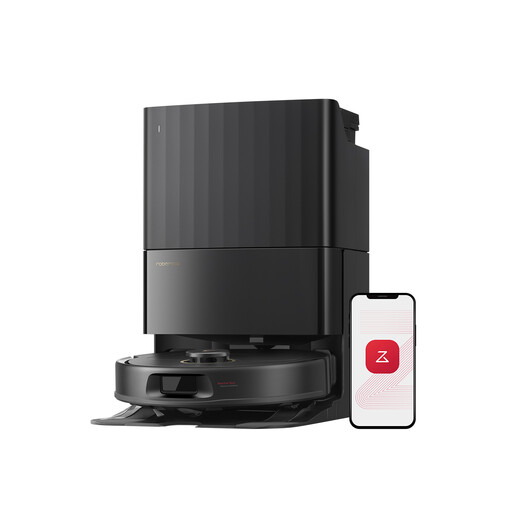 Image unavailable
Roborock Qrevo S5V, black, with docking station
If your home has deep-pile rugs, plan to check no-mop zones before starting automatic cycles.
- Advertised suction power: 12 000 Pa; FlexiArm mop pads.
- Docking station and hot-air drying are mentioned in the product name.
- Check the manual for the clearance required around the docking station.
View on Joybuy
Frequently asked questions
Can a robot vacuum and mop wash a rug?
No. As Darty’s guide explains, the mopping function doesn’t clean rugs, seagrass mats or fitted carpets. Some models lift or detach their mop pads when moving over rugs. Check the model’s manual to see which surfaces this applies to and what settings are needed.
Can you use the mopping function on solid wood or porous stone?
Only if the flooring manufacturer’s guidance and the condition of the surface allow it. Darty warns that water can seep into solid wood flooring and stain some untreated porous floors. Keep these areas out of the mopping zone until you’ve confirmed the right way to care for them.
Do you need an app to use a robot vacuum and mop?
It depends on the model and the features you want. For compatible series, iRobot France’s Roomba Home app lets you choose vacuuming, mopping or both. Before buying, check the manual to see which controls require an app and what type of connection they need.
How do you choose a place for the docking station?
Follow the clearance requirements for the exact model and leave enough access for maintenance. The guidance published for the Dreame X40 Ultra on Joybuy France differs from Roborock’s instructions for the Saros 10R. The dimensions required for one station won’t necessarily apply to another.
What should you do before an automatic cycle?
Clear cables and small objects, make sure routes are free and open the doors to the rooms you want cleaned. Darty’s customer support community notes that low light or certain dark objects can also cause problems for some robots. Watch the first few cycles in these areas before relying on the robot to clean them on its own.


