Who is a robot vacuum suitable for?
A robot is best suited to regular cleaning. Your floor coverings and the layout of your home determine what it can take care of.
Households looking to schedule vacuuming
If you want to reduce the amount of manual vacuuming across several rooms, look at how the robot performs on your main floor type. Don’t expect it to handle every occasional clean. Que Choisir tests vacuuming on carpets, tiles and parquet separately, as well as cleaning along edges and in corners.
Homes with carpets, thresholds or objects on the floor
If the robot needs to move between cluttered rooms, measure each threshold and note any carpets in its path. Ecovacs guidance gives a 2 cm climbing limit for the DEEBOT model it covers, while iRobot recommends removing obstacles before a cleaning cycle. Check the instructions for the specific model you’re considering.
Households interested in mopping for everyday upkeep
If your compatible hard floors need frequent cleaning, a robot mop can complement vacuuming, as long as you’re prepared to maintain the mop pads and water tanks. Tests published by Que Choisir in December 2024 suggest you shouldn’t rely on this feature to replace manual cleaning of stubborn stains.
What should you check before choosing?
Start with the route the robot needs to take, then decide which cleaning tasks you’d like it to handle.
Robot vacuum
Worth considering: if you want to schedule vacuuming and don’t mind emptying the dustbin regularly.
Bear in mind: Que Choisir points out that a robot’s dust container needs emptying very regularly.
Robot vacuum and mop
Worth considering: to complement regular upkeep of hard floors that are suitable for mopping.
Bear in mind: the mop pads still need maintenance and, according to Que Choisir tests published in December 2024, many models have limited mopping performance on stubborn dirt.
Robot vacuum with docking station
Worth considering: if going longer between dustbin emptying matters to you; some stations also take care of tasks related to the mop pads.
Bear in mind: the station takes up space, and you’ll still need to deal with its bags, tanks or mop pads, depending on the model.
| Consideration | What to check | Your needs |
|---|
| Floor coverings |
Compare test results for your main floor type and carpets. Check performance along edges and in corners too: Que Choisir assesses these areas separately in its testing procedure. |
I want scheduled cleaning to be useful in the places where dust builds up in my home, without assuming that results on tiles will be the same on my carpets. |
| Navigation |
Measure thresholds and the clearance under furniture, then compare them with the limits for the exact model. Check how it handles entrance mats and what the instructions say about objects on the floor. |
To clean several rooms, the robot needs to be able to follow the actual route between them, and I need to be able to clear any obstacles mentioned in the instructions. |
| Mopping |
Check that each floor type is suitable for water and find out how the robot avoids carpets or lifts its mop pads. Que Choisir advises against using robot mopping on wood, particularly solid wood. |
I’m looking to keep compatible hard floors clean regularly, while still having another way to tackle ingrained stains. |
| Docking station |
Check exactly which tasks the station handles: collecting dust, washing or drying the mop pads, depending on the model. Make sure you have space for it and find out what you’ll still need to do yourself. |
Going longer between dustbin emptying appeals to me, but I can also maintain the brushes, filters and, if needed, the tanks. |
| App and spare parts |
Check which app works with the model number and your phone, whether it offers the scheduling features you want, and what the update arrangements are. Ask the retailer what information is available about spare parts. |
I want to start cleaning cycles and access useful settings on my phone, then be able to find the parts needed to maintain the robot. |
Which brands should you consider?
These pointers apply to specific ranges and models. They don’t necessarily reflect the features of every model in each range, or mean that they’re included in the product selection below.
iRobot
The Roomba range includes vacuum-only and mopping robots, with different docking station set-ups depending on the model.
- iRobot says the Roomba 115 Combo has no-mop zones to keep carpets clear during a mopping cycle.
- According to iRobot, Series 100 and 200, Plus 400 and Plus 500, and Max 705 models sold after March 2025 use Roomba Home; other models use the classic iRobot Home app. Check which app works with your model.
Ecovacs
The DEEBOT range includes robots that combine vacuuming, mopping and a maintenance station, depending on the model.
- The different station and mopping set-ups make it possible to check which tasks are handled for a particular model.
- Ecovacs guidance gives a 2 cm climbing limit for the DEEBOT model it covers. Don’t apply this to the whole range: compare the instructions for the model you’re considering with your thresholds.
Rowenta
The French X-Plorer range includes basic robots, mopping models and models with docking stations.
- Rowenta states that the X-Plorer Series 65 can get over obstacles up to 18 mm high. Compare this figure with the thresholds in your home.
- For the X-Plorer Series 580 Max, Rowenta lists features including a washing station and 10,5 mm mop lifting. These model-specific figures don’t show how well the robot will clean your floors.
Roborock
Roborock offers French-language support, with app resources and ways to contact its support team.
- The support site lets you search for resources for the model you’re considering.
- Check the product details and instructions for the model’s station features, carpet handling, climbing limits and required parts.
Robot vacuums with docking stations on Joybuy
These five models pair a robot vacuum with a docking station and also offer a mopping function. Compare the tasks handled by each station, then check the robot’s route and whether its features are suitable for the floors in your home.
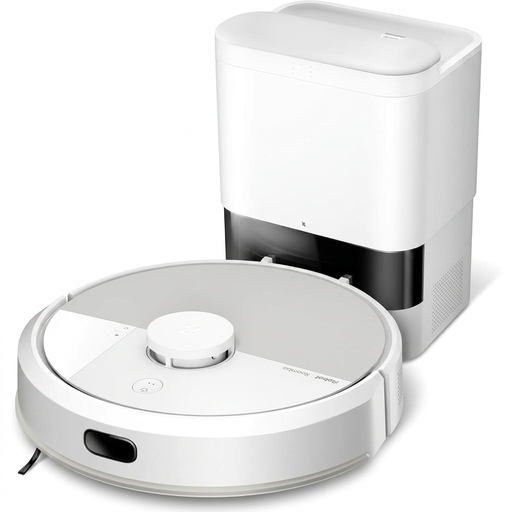 Image unavailable
iRobot Roomba Combo 115 AE, white
A model to consider if you’d like to combine vacuuming with mopping for everyday upkeep as part of your regular cleaning routine. Measure your thresholds, check how it handles carpets and confirm which app works with this model. You’ll also need to maintain the brushes.
View on Joybuy
 Image unavailable
ECOVACS DEEBOT T30C OMNI Gen2, black
Its listed features combine vacuuming and mopping with an OMNI station. The product name also states 25 000 Pa suction and mop pad washing at 75 °C. These figures don’t tell you how it will perform on your floors: check tests for this model, whether it can get over your thresholds and how to maintain the tanks.
View on Joybuy
 Image unavailable
ECOVACS DEEBOT X9 PRO OMNI
The model name describes OZMO roller mopping, an OMNI station with hot-water washing and hot-air drying, and stated suction power of 16 600 Pa. If your rooms have carpets or thresholds, check how the robot handles them in the instructions. You’ll also need to maintain the tanks, brushes and filters.
View on Joybuy
 Image unavailable
Eureka E20 Plus, black
This robot is listed with an auto-empty station and stated suction power of 8 000 Pa. Before relying on it to clean several rooms, check the clearance needed around the station, whether it can get over your thresholds and the instructions for cables and tasselled rugs.
View on Joybuy
 Image unavailable
roborock Qrevo S5V, white
The product name lists a docking station, FlexiArm mop pads, hot-air drying and stated suction power of 12 000 Pa. Before choosing this set-up, check that it offers the scheduling features you need, how it handles your carpets and what the station’s maintenance instructions say.
View on Joybuy
Frequently asked questions
Can a robot vacuum replace manual cleaning altogether?
No. It’s mainly designed for regular cleaning. Que Choisir finds that vacuuming results vary by floor type and, in tests published in December 2024, reports limitations in the mopping performance of many robot mops. Keep a way to clean stubborn stains and areas the robot can’t reach.
What should you measure at home before choosing?
Measure your thresholds, the clearance under furniture and the space available for the station, then note any carpets in the robot’s path. Compare these measurements and the layout of your rooms with the instructions for the exact model: climbing limits aren’t the same for all robots.
Should you tidy your rooms before a scheduled cleaning cycle?
Yes. Remove anything that could get in the way. iRobot recommends clearing obstacles and excessive clutter before using a Roomba Combo, and avoiding areas with standing water. Also follow the instructions for your model when it comes to tasselled rugs.
Is the mopping function suitable for all floors?
No. Que Choisir advises against using it on wood, particularly solid wood. Check the care instructions for your flooring and the robot’s manual. If you have carpets, also check whether your model has no-mop zones or can lift its mop pads.
How can you check which app a connected robot uses?
Check that the model works with your phone and offers the features you’ll use, particularly scheduling and maps. For example, iRobot says its Series 100 and 200, Plus 400 and Plus 500, and Max 705 models sold after March 2025 use Roomba Home, while other models use the classic iRobot Home app.


