What should you look for before choosing?
Start with your floor coverings and room layout. Then consider how scheduling, the station and mopping would actually fit into your routine.
| Feature |
What to check |
What I need |
| Floor cleaning |
Look for tests on the types of rugs and hard floors in your home. Check results near walls and in corners separately, as Que Choisir does, rather than relying on the advertised suction power alone. |
I have several types of flooring, so I want to know how the model performs on each one, including around the edges. |
| Navigation and scheduling |
Note any thresholds, obstacles and low-clearance spaces under furniture, then check the model’s dimensions and capabilities. If you want to schedule cleaning by room or set no-go zones, check its mapping features and app requirements. |
If some rooms or areas need different cleaning routines, I’d rather be able to set them than run one general clean every time. |
| Emptying and maintenance |
Check whether the station empties the robot’s dustbin, then find out which bags, filters and brushes are compatible. Read the maintenance instructions and check that parts are available for the exact model. |
I want to empty the small dustbin less often, but I don’t expect a station to do away with replacing consumables or cleaning the robot. |
| Mopping hard floors |
Check that your flooring is compatible and look for mopping tests on the model. Que Choisir reports variable results and advises against using these features on solid wood; check how to maintain the pads and station, too. |
I’m interested in an extra clean on my tiles or another compatible hard floor, but I still want to be able to mop by hand. |
Which brands should you consider?
These ranges offer a useful starting point for comparing navigation, apps and maintenance. Check the features and accessories for each model, though, as they can vary across a range.
Roborock
The French range includes connected robot vacuum cleaners, including mapping models and models with self-emptying stations.
- Roborock France explains how to schedule cleaning, select rooms and set no-go zones in its app.
- Check these features and compatible accessories for the specific model you’re considering: their presence in the range doesn’t mean they’re included with every robot.
Ecovacs
The DEEBOT range includes several series of robot vacuum and mop cleaners, with different levels of automation.
- Ecovacs France highlights mapping and mopping features on selected series.
- The brand’s support information explains that connecting and installing updates involves the app. Check the requirements and features of the model you choose.
Rowenta
The X-Plorer range includes models with random navigation, as well as others with different features.
- Rowenta France product pages let you check the features of each model, including its navigation system and repairability index where shown.
- A threshold-crossing capability or repairability rating published for one model won’t necessarily apply to the whole range.
iRobot
The Roomba and Roomba Combo ranges have accessories and maintenance instructions organised by series.
- iRobot France lists bags, filters and brushes for a number of different series.
- Check that accessories are compatible with the exact model and available when you buy.
Dreame
The French range includes robot vacuum and mop cleaners, as well as a selection of accessories.
- Dreame France lists filters, batteries and brushes by model, making it easier to find compatible parts.
- An accessory appearing in the catalogue tells you neither how well the robot cleans nor whether it will remain available.
Robot vacuum cleaners available on Joybuy
These options are designed for regular cleaning. They include robots with self-emptying stations and models that highlight navigation or mapping, sometimes alongside a mopping feature. For each one, compare the advertised specifications with your floors and the maintenance your home requires.
 Image unavailable
Eureka E20 Plus, black
Its self-emptying station is a handy option if you want to handle the robot’s dustbin less often during regular cleaning.
The product title lists 8,000 Pa suction, 3D obstacle avoidance and a 180-minute run time. Before choosing, check how it performs on your floors, what features the app offers and which accessories are compatible.
View on Joybuy
 Image unavailable
ECOVACS DEEBOT T30C OMNI Gen2, black
This model combines vacuuming, mopping and an OMNI station for homes looking to include both tasks in the same routine.
The product title lists 25,000 Pa suction and mop washing at 75 °C. These specifications alone don’t show how it will perform on your rugs or hard floors, so check which consumables you’ll need and how to maintain the station, too.
View on Joybuy
 Image unavailable
roborock Q7 L5+, black
LiDAR navigation and app control are worth considering if you want to organise cleaning across several rooms.
This model is listed with an automatic emptying station, a mopping function and 8,000 Pa suction. Check the settings available in the app, which consumables are compatible and how it performs on your floors.
View on Joybuy
 Image unavailable
ECOVACS DEEBOT X9 PRO Omni
Its mopping function and station may appeal if you’re looking to add an extra clean for compatible floors.
The product title lists 16,600 Pa suction, an OZMO Roller system, hot-water mop washing and hot-air drying. Check cleaning results, how it handles water and the app requirements for this model.
View on Joybuy
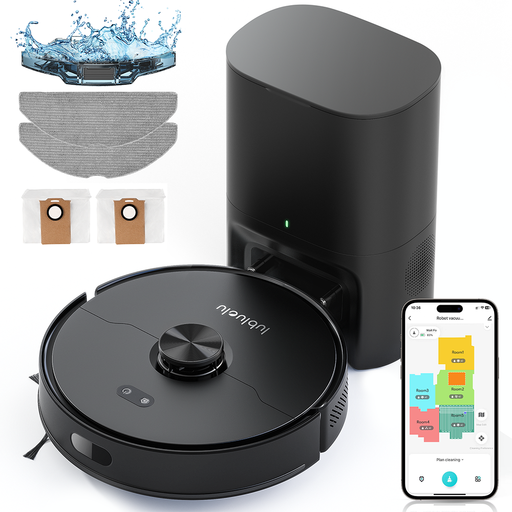 Image unavailable
Lubluelu L15 Max 3-in-1
Laser navigation and the advertised storage of five maps are worth a look if you want to organise cleaning across several rooms.
The product title lists a mopping function, 4,000 Pa suction and app control. Check whether the app is compatible, whether the robot will fit under your furniture and how it performs on your floors. You’ll also need to maintain the dustbin, filter and brushes.
View on Joybuy
Frequently asked questions
Can a robot vacuum cleaner replace a vacuum cleaner and a mop?
No. Think of it as an extra for regular cleaning. Les Numériques points out that a robot can’t clean stairs, furniture or skirting boards. Que Choisir also finds that vacuuming performance varies between floor types, and mopping results differ between models.
How can I tell if a robot is suitable for my rugs?
Measure the pile height of your rugs and the height of any thresholds, and note other obstacles before checking the specifications for the exact model. To assess cleaning performance, look for tests on similar rugs: Que Choisir tests different floor coverings and areas near walls separately.
What should I check before buying a connected robot?
Check that your phone and Wi-Fi are compatible, which features are available on the model and what’s required to install updates. ECOVACS support explains that its procedures use the app, and that some updates require the robot to be online, charging and docked at its station.
Does a self-emptying station mean there’s no maintenance?
No. It can transfer dust from the robot’s bin to a larger container, but you’ll still need to keep an eye on any bags, filters and brushes. Before buying, identify the accessories compatible with the exact model and read its maintenance instructions.


