Who is a robot vacuum suitable for?
A robot vacuum’s usefulness depends less on its scheduling features than on where it can actually go and which jobs you want it to do.
Homes with cluttered rooms
If furniture, belongings or narrow passages make it difficult for a robot to get around, check its navigation, clearance under furniture and edge cleaning. UFC-Que Choisir assesses how robots move around furniture and obstacles, among other things.
Homes looking to reduce hands-on tasks
Depending on the model, a docking station can take care of some tasks. You’ll still need to maintain the brushes, wheels, sensors and tanks, though. iRobot support notes, for example, that debris or dirty sensors can affect performance.
Homes with a mix of floor types
If you have carpets, hard floors or wood flooring, check how well the robot vacuums each surface and treat its mopping function as a separate consideration. UFC-Que Choisir’s testing protocol assesses different floor types, edges and corners separately.
What should you check before choosing one?
First decide whether you need regular, hands-free cleaning or mostly targeted cleaning. If a robot suits your needs, then consider your floors, the layout and how much maintenance you’re willing to do.
Robot vacuum
Worth considering: if you want to schedule vacuuming in accessible areas and don’t need a mopping function.
Bear in mind: you’ll need to empty the dustbin and clean the robot’s components regularly, even if it returns to its dock by itself.
Robot vacuum and mop with a docking station
Worth considering: if your floors are suitable for mopping and you’d like to automate some of the tasks involved in handling the mop pads or tanks.
Bear in mind: you’ll need space for the docking station and will still have to maintain its components. Mopping may not replace manual cleaning altogether.
Manual vacuum cleaner
Best for: tackling a specific area straight away or cleaning spaces a robot can’t navigate properly.
The trade-off: it won’t clean by itself while you get on with other things.
| What matters to you |
What to check |
Who is this for? |
| Navigation and obstacles |
Measure the clearance under your furniture and check for thresholds; compare navigation and edge cleaning. |
If my rooms have closely spaced furniture or items on the floor, I want the robot to cover the areas that matter without getting stuck. Around 33% of consumers prioritise coverage. |
| Maintenance still required |
Check what the station takes care of, such as charging, emptying or cleaning the mop pads, and find out which tasks you’ll still need to do by hand. |
If I often run a cycle while doing other things, repeated emptying and cleaning are important factors in my decision. Reducing these tasks is the top priority for around 27% of consumers. |
| Floors, carpets and edges |
Look for test results on surfaces similar to yours and check how the robot handles carpets and corners. |
With carpets, hard floors and areas near walls, I want to choose based on the surfaces in my home rather than a single suction figure. This is the top consideration for around 27% of consumers. |
| Limitations of mopping |
Check your floor material, the manufacturer’s instructions and how the robot avoids wetting carpets. |
If I have a delicate floor covering, I’d rather know whether I can use or disable the mopping function before choosing a model with one. Around 13% of consumers put this precaution first. |
Brands to know
The features below apply to the ranges or models mentioned, not to every product from each brand. They’re no substitute for test results on your own floors.
Roborock
The range includes robot vacuums and vacuum-and-mop models, with docking stations and navigation features varying by model.
- Roborock describes the Q7 L5+ as featuring LiDAR navigation and an automatic-emptying station.
- For the QV 35A, the brand lists support for 2.4 GHz Wi-Fi only, so check your network before choosing this model.
Ecovacs
The DEEBOT range includes robot vacuum-and-mop models with docking stations and various features for handling edges and carpets.
- Ecovacs lists a height of 81 mm and a 9 mm mop lift for the DEEBOT T50 OMNI.
- Measure the clearance under your furniture and check your carpets. These dimensions don’t guarantee access through every gap or ensure the robot won’t touch every carpet.
iRobot
The Roomba range includes compact models and devices paired with an AutoEmpty base.
- iRobot describes the Roomba Mini F155240 as featuring LiDAR navigation and carpet detection designed to avoid wetting carpets while mopping.
- iRobot support recommends checking the wheels, brushes, sensors and contacts. The base doesn’t remove the need for these tasks.
Robot vacuum and mop cleaners on Joybuy
These models are designed for hands-free floor care, with both vacuuming and mopping functions. If vacuuming alone is your priority, or you mainly want to clean specific areas by hand, consider those options separately.
 Image unavailable
EUREKA E20 Plus
Worth considering if you’re looking for a robot vacuum and mop for rooms where obstacles are a concern. Its product description lists DuoDetect AI 3D and suction power of 8000 Pa, but this figure alone won’t tell you how well it will clean your floors. Check how it handles your carpets before using the mopping function.
View on Joybuy
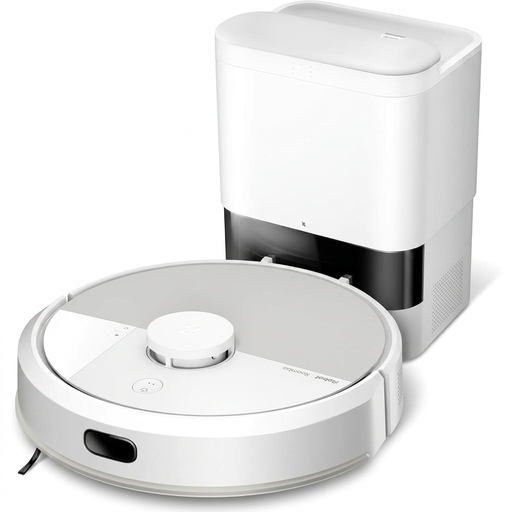 Image unavailable
iRobot Roomba Combo 115 AE — white
This robot vacuum and mop is worth considering if you want to reduce how often you empty the dustbin and have room for its AutoEmpty base. Measure the clearance under your furniture and check how it handles your carpets. Having a base doesn’t remove the need to maintain the brushes and sensors.
View on Joybuy
 Image unavailable
ECOVACS DEEBOT T30C OMNI Gen2 — black
Worth considering if you have space for a docking station and want to explore automated mop-pad care. Its product description lists an OMNI station, mop-pad washing at 75 °C and suction power of 25 000 Pa. Check how it cleans your edges and handles your carpets separately.
View on Joybuy
 Image unavailable
JONR T5 Pro with all-in-one station
If navigation around your rooms and the tasks involved after a cleaning cycle are important to you, take a closer look at this robot vacuum and mop and its docking station. Its product description mentions laser navigation, obstacle recognition and suction power of 8150 Pa. Check that it’s compatible with your Wi-Fi network and that you have enough room for the station.
View on Joybuy
 Image unavailable
Eureka J15 Pro Ultra
This robot vacuum and mop with a docking station is worth considering if you’d like to cut down on cleaning the mop pads by hand. Its product description lists suction power of 16200 Pa and hot-water cleaning at 75 °C. The robot is listed as 117 mm high, so measure the clearance under your furniture and check that mopping is suitable for your floors.
View on Joybuy
Frequently asked questions
Does a docking station mean you don’t have to maintain the robot?
No. Depending on the model, it may empty the dustbin or clean the mop pads, but you’ll still need to check the brushes, wheels, sensors and contacts. iRobot support says that debris or dirty sensors can affect performance, so check the maintenance tasks for the model you choose.
Can I use the mopping function on every type of floor?
No. UFC-Que Choisir advises against using robot mops on wood floors, particularly solid wood; the mopping tests cited were carried out on tiled hard floors. If you have a delicate floor covering, check the flooring manufacturer’s instructions and the robot’s manual before use.
What do I need to consider when setting up a docking station?
Check the location, access to a power socket and the clearance specified by the manufacturer so the robot can return to its base. Also find out what tasks and consumables are needed for the station you choose, including bags or, for a model with a mop, tank maintenance.
What should I do if a robot bought from a trader in France is faulty or not as described?
Contact the seller to make a claim under the legal guarantee of conformity, which is separate from a retailer’s returns policy. The French Ministry of the Economy explains that this mandatory guarantee applies to new, second-hand and refurbished goods sold by a professional trader. Describe the fault or how the product differs from its description when you make your claim.


