What should you check before buying?
Start with your floors and the routes between rooms, then choose between vacuuming only, mopping compatible floors, and a dock, based on the maintenance you’re happy to do. Keep a manual vacuum for areas and messes the robot can’t clean properly.
| Criteria |
What to check |
Who is it for? |
| Floors and obstacles |
Compare results by floor type; measure your thresholds and check how the robot handles rugs and objects on the floor. |
With rugs, hard floors and doorways between rooms, I want the robot to move around without leaving areas it can’t reach. Around 31% of consumers would make this their top priority. |
| Robot maintenance |
Check exactly what the dock takes care of, how much space it needs, and which bins or consumables require maintenance. |
If having to empty the dustbin after each run puts me off, I mainly want to cut down on those tasks without forgetting to maintain the dock. This would be the top need for around 31% of consumers. |
| Mopping |
Check whether your floors are suitable and, if you have rugs, how the mop pads behave around them. |
For my hard floors, I’d like to add regular damp cleaning while still cleaning tough stains by hand. Around 23% of consumers would put this need first. |
| Connectivity and data |
Confirm the required Wi-Fi band, which features work without the app, how updates work and what privacy settings are available. |
Before using scheduling and maps, I want to know whether my network is compatible and what data the app processes. Around 15% of consumers would make these checks a priority. |
Robot vacuums with a dock to explore on Joybuy
These models are designed for everyday cleaning and include dock features. First, check they’re suitable for your floors and thresholds: a dock can make some tasks easier, but it doesn’t guarantee the robot will reach every area or deliver a thorough clean.
 Image unavailable
ECOVACS Deebot X11 Pro Omni
Worth considering if you’re looking for a robot vacuum-mop with a dock for regular cleaning across different floor types; compare performance on each surface before choosing.
The product details state a suction power of 19 500 Pa and the OZMO Roller 2.0 mopping system. Measure your thresholds and check which crossing conditions apply in your home.
View on Joybuy
 Image unavailable
ECOVACS Deebot T30C OMNI Gen2, black
Consider this model if you want to combine vacuuming, damp cleaning and a dock; check how the mop pads behave if you also have rugs.
The product details state 25 000 Pa, OZMO Turbo 2.0 mopping and mop-pad washing at 75 °C in the dock. These specifications alone don’t tell you how it will perform on your floors.
View on Joybuy
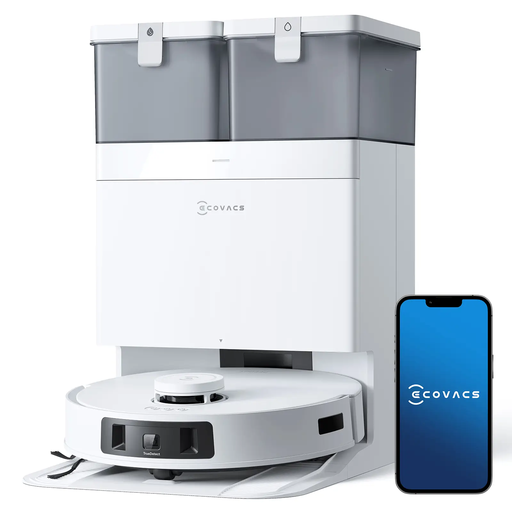 Image unavailable
ECOVACS DEEBOT T30C Pro Omni GEN 2
Worth comparing if you want to empty the robot less often while adding damp cleaning; check the space available for the dock and what maintenance it needs.
The model name mentions an auto-empty dock, hot-air drying, a stated suction power of 15 400 Pa and a stated run time of 200 min. Check separately how the mop pads behave on your rugs.
View on Joybuy
 Image unavailable
Dreame X40 Ultra Complete, white
Worth considering if you want to automate some floor-care tasks and cut down on the work after each run. Check what its base takes care of and how much space it needs.
If your home has rugs or thresholds, check the model’s product details for mop-pad management and the heights it can cross before buying.
View on Joybuy
 Image unavailable
roborock Qrevo S5V, white, with dock
Worth comparing if you’re looking for a robot with a dock and mop pads for everyday cleaning; check how well it crosses thresholds and handles the rugs in your home.
The product name states 12 000 Pa, FlexiArm mop pads, hot-air drying and smart navigation. These details are no substitute for results by floor type.
View on Joybuy
Frequently asked questions
Can a robot vacuum replace a manual vacuum for all your cleaning?
A robot vacuum can take care of some everyday cleaning, but it can’t replace manual cleaning on every surface. UFC-Que Choisir assesses performance on rugs, tiles, wooden floors, in corners and along edges separately. Keep a manual option for stairs, upholstery and messes the robot can’t clean properly.
How do you choose a robot mop if you have rugs?
For the specific model, check whether it detects rugs and whether it can lift the mop pad, including how high it lifts. This feature can help limit dampening, but you’ll still need to move cables out of the way and keep an eye on the first few runs, especially around thick rugs.
Do you need Wi-Fi to use a robot vacuum?
Whether you need Wi-Fi depends on the model and the features you want to use: maps, scheduling and remote control may all require the app. Ecovacs documentation states that some initial connections require a 2.4 GHz or combined 2.4/5 GHz network; check the manual for the compatible band and which features remain available offline.
What should you check before connecting a robot vacuum to an app?
Before creating an account, check the permissions requested, how updates work and the privacy policy. The CNIL recommends considering whether connected features are worth sharing your personal data for. In particular, check what data is processed, why, how long it is kept and what privacy settings are available.


