Who is a robot vacuum suitable for?
A robot can take care of regular cleaning while you’re out, provided its route suits your home and you’re happy to keep up with the maintenance it still needs.
Homes with mixed flooring and cluttered rooms
If your robot needs to move around furniture, rugs and hard floors, look at how it navigates rather than focusing solely on its advertised suction power. UFC-Que Choisir’s tests highlight differences in results across floor types, along walls and in corners. Also check the thresholds in your home and the clearance under your furniture for the model you’re considering.
Homes where cleaning is scheduled while everyone’s out
A docking station can mean you need to empty the robot’s dustbin less often. However, you’ll still need to find space for it and maintain the bags or tanks, filters and brushes. Mopping systems can also mean dealing with water and pads.
Homes where app features and spare parts matter
If you plan to use a map or adjust settings on your phone, check that the app is compatible, what permissions it requests and which features are available without it. To keep your robot running for longer, look for consumables and parts that match its exact model number.
What should you check before buying?
Start by considering what could interrupt a cleaning cycle while you’re out, then decide which tasks you genuinely want to spend less time on.
| Criterion |
What to check |
Who is it for? |
| Navigation and floor types |
Measure thresholds and check the clearance under furniture. Read the instructions and look for tests covering your rugs, edges and corners. |
In a home with several rooms or different types of flooring, I want the robot to cover the areas I’ve planned without getting stuck. Around 36 % of consumers make this their top priority. |
| Robot and docking station maintenance |
Compare how the dustbin is emptied, what’s involved in maintaining the station and whether consumables are available for the exact model. |
If I schedule frequent cleaning, my main aim is to empty the dustbin less often and avoid repeated tasks. Reduced maintenance is a priority for around 29 % of consumers. |
| App and data |
Check compatibility with your phone, the permissions requested and which settings are available without the app. |
To manage schedules and zones on my phone, I need to be able to use the app in a way that suits me. Around 21 % of consumers prioritise app compatibility and data. |
| Mopping hard floors |
Check that your flooring is compatible and see how the pads behave on rugs. Find out what maintenance they need. |
For hard floors, I’m mainly looking for an occasional damp clean, not a replacement for manual mopping. Mopping is the top priority for around 14 % of consumers. |
Mapping, a self-emptying station and mopping aren’t mutually exclusive options. A robot with random navigation may suit an open-plan space if you don’t need to set rooms or zones. In a home with separate rooms, look instead for mapping and scheduling features. A docking station solves a different problem by reducing how often you need to empty the dustbin, but it doesn’t eliminate maintenance.
Brands to know
Features vary between product ranges. A brand featured here doesn’t guarantee that every robot has a particular feature, or that all its models are available on Joybuy.
Roborock
Roborock offers connected robots with mapping and, depending on the model, a docking station. The Saros 10 is an example of the navigation and obstacle management features advertised by the brand.
- According to the manufacturer, the Roborock app lets you control compatible models.
- For the model you choose, check which features are available, whether the app is compatible and what information is provided about privacy. The manufacturer’s claims don’t guarantee how the robot will perform in your home.
iRobot
The Roomba range includes different designs and features, with AutoEmpty or AutoWash docking stations available for some models.
- iRobot provides mapping guides and an accessories catalogue for certain models.
- You may need the app to customise a map. Check the features and consumables against the exact model of robot and docking station.
Ecovacs
Depending on the model, the DEEBOT range includes mapping, a docking station, obstacle avoidance and mopping with mop lifting.
- Ecovacs support guides explain how to prepare the cleaning area and set up the docking station for relevant models.
- Check how much space is needed around the docking station and which sensors require maintenance. If the model has a camera or microphone, review its privacy settings.
Rowenta
Rowenta offers several navigation options and lists parts and accessories for various Smart Force and X-Plorer ranges.
- You can search the parts catalogue for accessories by model number.
- The brand’s navigation descriptions don’t replace testing a robot on your own floor types. Also check the model number and availability of the parts you need.
Robot vacuums with a docking station on Joybuy
These five robot vacuums pair a self-emptying station with scheduling and mopping features listed for their respective models. If you’re choosing a robot to run while you’re out, compare the layout of your rooms, the station’s maintenance requirements and the terms for using the app. Having these features doesn’t guarantee the same results on every type of flooring.
 Image unavailable
Q8-Max with mopping and self-emptying station
Worth considering if you want to schedule cleaning by room and empty the dustbin less often. The product listing includes LiDAR mapping, a self-emptying station, advertised suction power of 8 000 Pa and an advertised battery life of 200 minutes. App connectivity is listed as requiring 2.4 GHz Wi-Fi. Check your network, phone compatibility and how to maintain the brushes and filters.
View on Joybuy
 Image unavailable
Black ECOVACS Deebot T30C OMNI Gen2
Consider this model if you want to schedule cleaning cycles and let the station take care of some of the mop maintenance. The product listing describes TrueMapping, a station that empties the dustbin and washes and dries the mops, advertised suction power of 25 000 Pa and mop washing at an advertised 75 °C. Check how much space the station needs, which consumables are required and whether your floors are suitable for mopping. These specifications don’t indicate how it will perform in your home.
View on Joybuy
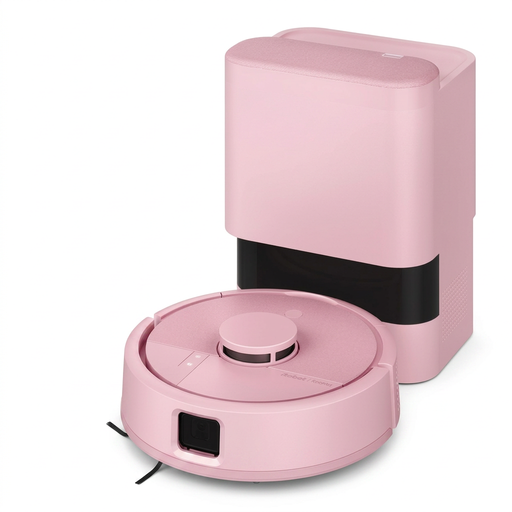 Image unavailable
iRobot Roomba Mini Pink F155640
Its compact design may appeal if you want to schedule cleaning without choosing a full-size robot. The product listing mentions LiDAR mapping, scheduling in the app, a mopping pad and an AutoEmpty station. Check how much space the full set-up needs, whether the app is compatible and how it performs on your floor types. Its size alone doesn’t tell you how much of your home it can cover.
View on Joybuy
 Image unavailable
Black Roborock Q7 L5+
Worth considering if you want to set schedules and no-go zones before leaving the robot to clean. The description mentions LiDAR navigation, a self-emptying station, a mopping function and advertised suction power of 8 000 Pa. Check which consumables the station needs, whether the app is compatible and how the model performs on your rugs and thresholds.
View on Joybuy
 Image unavailable
Black Eureka E20 Plus
Its bagless station is worth considering if you want to empty the dustbin less often without having to manage a station bag. The product listing specifies app scheduling, suction power of 8 000 Pa, a battery life of 180 minutes and mop lifting by 10 mm. It lists a 2.4 GHz Wi-Fi connection. Check your network and how the mop lift works on your rugs, without assuming it will protect every floor type.
View on Joybuy
Frequently asked questions
Can a robot vacuum replace manual cleaning?
Don’t rely on it to replace your vacuum cleaner or mop altogether. It’s mainly designed to keep floors clean between manual cleans. UFC-Que Choisir found that results vary depending on the flooring and areas cleaned, and that mopping performance is inconsistent. Check the care instructions for your floors before using a wet-cleaning function, particularly on wood.
Do you need to prepare rooms before going out?
Yes. Remove cables and small objects that could get in the way, and make sure the rooms you want cleaned are accessible. iRobot support recommends clearing obstacles when creating a map. Ecovacs notes that dirty navigation components can also affect the route of some DEEBOT models.
Does a self-emptying station mean no maintenance?
No. It can empty the robot’s dustbin, but you’ll still need to deal with its contents and maintain the filters and brushes. For a mopping model, also check what’s involved in managing the water and pads before scheduling repeated cleaning cycles.
What should you check about a connected robot’s app?
Check that it’s compatible with your phone, what permissions it requests and which features you can use without the app. Read the privacy settings and information for the exact model. The CNIL highlights the importance of controlling personal data in mobile apps, and it’s worth taking extra care if the robot has a camera or microphone.
How can you plan for maintenance over several years?
Make a note of the full model numbers for the robot and docking station, then look for compatible brushes, filters, bags and other parts. Also check the repairability information for the product you’re considering. The Rowenta and iRobot accessories catalogues show why it’s important to match parts to the exact series.


