Who is a robot vacuum for?
A robot can clean regularly while you get on with other things, provided its coverage and the tasks you still need to do suit your home.
Homes with carpets and hard floors
If your home has a mix of carpets, wooden floors and tiles, look at how the robot performs on each surface, as well as along walls and in corners. UFC-Que Choisir assesses these surfaces and areas separately in its testing process.
Households that want to empty the bin less often
A self-emptying dock can mean less frequent handling of the robot’s bin. However, it takes up space and needs maintenance of its own, particularly emptying its container and, depending on the model, replacing consumables.
Users who want to schedule cleaning by area
If you want to clean a particular room or keep the robot out of an area, check the features of the exact model and whether its app is compatible. Software updates and the data processed by the device are also worth considering.
What should you check before choosing?
Start with the surfaces to be cleaned and any tricky areas, then consider which tasks you’d like the dock or app to handle. UFC-Que Choisir assesses performance on carpets, hard floors, edges and in corners, among other things: no single advertised feature tells you how well a robot will perform in all these situations.
| Criteria |
What to check |
Who it’s for |
| Coverage of floors and tricky areas |
Compare test results for your flooring and the dirt you typically need to clean up. Also look at performance along walls and in corners. |
If my home has both carpets and hard floors, I want regular cleaning to cover areas where dust is still visible, too. Around 36% of consumers would make this coverage their priority. |
| Emptying and routine maintenance |
Check how the dock works, how much space it needs and what you’ll still need to do to maintain the bin, brushes and consumables. |
If I run cleaning cycles while I’m busy with other things, having to empty the small bin between runs would limit the robot’s usefulness. Around 29% of consumers would prioritise reducing this kind of manual handling. |
| Mopping hard floors |
Check that your flooring is compatible and look at mopping results for the marks or dirt you need to tackle. |
On a compatible hard floor, I’m mainly looking for regular maintenance alongside vacuuming, rather than expecting the robot to tackle every stain. Around 21% of consumers would put this need first. |
| Scheduling and app |
Check the room-by-room features of the exact model, mobile compatibility, software updates and privacy policy. |
If I want to schedule cleaning in certain rooms while I’m out, I also need to be comfortable using the app. For around 14% of consumers, this kind of control would be their main priority. |
Brands to know about when comparing
These examples of ranges and models can help you identify features to compare. Always check whether they’re available, and under what conditions, on the model you’re considering.
iRobot
Worth considering if room-by-room and area-based cleaning is your priority.
- According to iRobot, Imprint Smart Mapping lets you define rooms and areas on compatible models; the Roomba i7+ is an example of a model with automatic dirt disposal.
- Check the mapping features and whether a dock is included with the exact model, as these features aren’t available across the entire range.
ECOVACS
The DEEBOT range includes models to consider for mapping, mopping or dock-based cleaning.
- ECOVACS describes the DEEBOT X2 OMNI as featuring rotating mop pads and AI mapping; these features apply to this model.
- For the model you’re considering, check which features are available in the app, how updates work and how your data is handled.
Roborock
Worth comparing if you’re looking for a robot with a dock and navigation or mopping features, depending on the model.
- The Joybuy product listing for the Qrevo S5V features a dock, hot-air drying, navigation and obstacle-avoidance features.
- These advertised features don’t tell you how the robot will perform on your carpets, hard floors or in corners; compare tests on the surfaces in your home.
Robot vacuums with self-emptying docks on Joybuy
These models are for consumers who want to empty the bin less often while still enjoying autonomous cleaning cycles. Compare their maintenance requirements, the scheduling features you’ll find useful at home and whether the mopping function is compatible with your floors: a dock doesn’t remove the need to check these things.
 Image unavailable
ECOVACS DEEBOT X11 Pro OMNI with dock
Worth considering if you want to empty the robot less often and schedule cleaning by area. You’ll also need to refill the clean-water tank and empty the dirty-water tank.
Advertised suction power: 19 500 Pa. The model name indicates an OZMO Roller 2.0 mopping system and a maximum advertised threshold clearance of 4 cm; check whether this is suitable for your thresholds.
View on Joybuy
 Image unavailable
Black ECOVACS DEEBOT T30C OMNI Gen2 with dock
For scheduled cleaning with a self-emptying and mopping dock, remember to refill and empty the water tanks, and maintain the brushes and filters.
Advertised suction power: 25 000 Pa. The model features OZMO Turbo 2.0 mopping; its name mentions mop washing at 75 °C, but this figure doesn’t indicate how well it will clean your floors.
View on Joybuy
 Image unavailable
White Dreame X40 Ultra Complete
If reducing manual emptying is your priority, check how much room the dock needs. Allow for a clear space and a 220–240 V socket, as well as periodic bag replacement.
Before relying on targeted cleaning while you’re busy with other things, check the model’s scheduling features. For mopping, follow the instructions for your particular flooring.
View on Joybuy
 Image unavailable
Black Eureka E20 Plus with self-emptying dock
To schedule cleaning while reducing manual emptying, check that you have a 2.4 GHz Wi-Fi network for pairing. Make sure cables and lightweight rugs with tassels are clear of the robot’s path.
Advertised suction power: 8 000 Pa; advertised runtime: 180 minutes. These figures alone don’t tell you how well it will clean carpets or along walls.
View on Joybuy
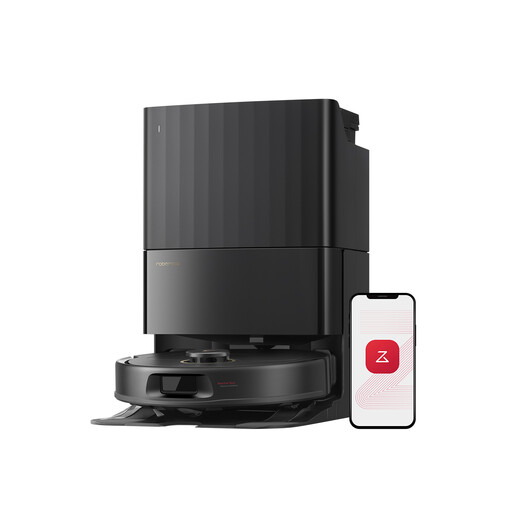 Image unavailable
Black Roborock Qrevo S5V with dock
Worth considering if you want to empty the bin less often and schedule cleaning cycles. For deep-pile carpets, check the mopping instructions and which areas you can exclude in the app.
Advertised suction power: 12 000 Pa. The model is listed with FlexiArm mop pads and hot-air drying. The product listing says to use Roborock cleaning solution in the water tank.
View on Joybuy
Frequently asked questions
Can you use a robot mop on all types of flooring?
No. Only use the mopping function on flooring that’s compatible with the robot’s instructions and the floor’s care guidance. UFC-Que Choisir tests this function on tiles and advises against using it on wooden floors, particularly solid wood, in its testing process.
What should you check before choosing an app-controlled robot?
Check that it’s compatible with your phone, the scheduling features of the exact model and how to install updates. Also read the permissions and privacy policy: the CNIL points out that connected devices can generate data stored online and need to be kept secure.
Does a commercial guarantee replace statutory rights in France?
No. According to the Ministry of the Economy, the statutory guarantee of conformity applies to new, second-hand and refurbished goods sold by a business to an individual; any commercial guarantee offered doesn’t replace it. If goods don’t conform to the contract, contact the seller and keep a copy of the offer description and your proof of purchase.
Is the repairability index useful when comparing robot vacuums?
Yes. Where it’s displayed for the models you’re comparing, it gives you an additional criterion that’s separate from cleaning performance. In France, the DGCCRF includes domestic robot vacuums among the product categories covered. Also check the information provided about spare parts for the model you choose.


