Which criteria should you prioritise?
First check access around your home and whether the robot suits your floors. Then choose dock or mopping features based on which tasks you’d like it to take off your hands.
| Criteria |
What to check |
Who is it for? |
| Getting around your home |
Measure thresholds and the clearance beneath furniture, then compare them with the limits of the model you’re considering. |
If the robot needs to move between rooms without getting stuck, checking that it can actually get around matters more than extra features. Around 31% of consumers rank this as their top priority. |
| Maintaining the robot and dock |
Check how much space the dock needs and what’s involved in looking after the bin, tanks and consumables. |
If I want to empty the bin less often, I’m happy to maintain a dock instead of dealing with the small bin after each cycle. Around 25% of consumers put reducing this kind of handling first. |
| Vacuuming performance on different floors |
Look for results for the exact model on your carpets and hard floors, including along the edges. |
In a home with different floor types, I mainly want to know where the robot will pick up debris and where I’ll still need to clean manually. Around 25% of consumers prioritise this suitability for their floors. |
| Mopping hard floors |
Check that your flooring is compatible with wet cleaning and look at the model’s mopping results. |
If regular wet cleaning is my main goal, I’m interested in a mopping function, but I know I’ll still need to tackle stubborn stains myself. Around 19% of consumers make this kind of additional mopping their top priority. |
For a connected model, also check whether the app is compatible with your phone, what permissions it requests and how updates work. The CNIL recommends looking at connected features and the data they can access.
Robot vacuums on Joybuy
These models cater to vacuuming routines that use navigation, a self-emptying dock or additional mopping. Compare their advertised features with the routes, floor types and maintenance requirements in your home.
 Image unavailable
Eureka E20 Plus with self-emptying dock
Worth a look if you want to schedule cleaning while emptying the robot’s bin less often. The product title states 8,000 Pa suction and 3D obstacle avoidance. Measure your thresholds and make sure you have a suitable spot for the dock.
View on Joybuy
 Image unavailable
ECOVACS Deebot T30C OMNI Gen2
Consider this model if you want to combine vacuuming with wet cleaning on compatible floors. The product title lists the OZMO Turbo 2.0 mopping system and mop-pad washing at 75 °C in the dock. This temperature doesn’t demonstrate how well it removes dried-on stains. You’ll still need to maintain the tanks and brushes.
View on Joybuy
 Image unavailable
Eureka J15 Pro Ultra robot vacuum and mop
This model combines vacuuming, mopping and a dock for regular cleaning. The product title states 16,200 Pa suction and water cleaning at 75 °C, but these figures aren’t a substitute for test results on your floors. Check how much space the dock needs and what consumables require maintenance.
View on Joybuy
 Image unavailable
White Dreame X40 Ultra Complete
Worth considering if you want a vacuuming and mopping routine with a dock. Allow space for the base and check the manual for threshold clearance, dock maintenance and whether mopping is compatible with your floors.
View on Joybuy
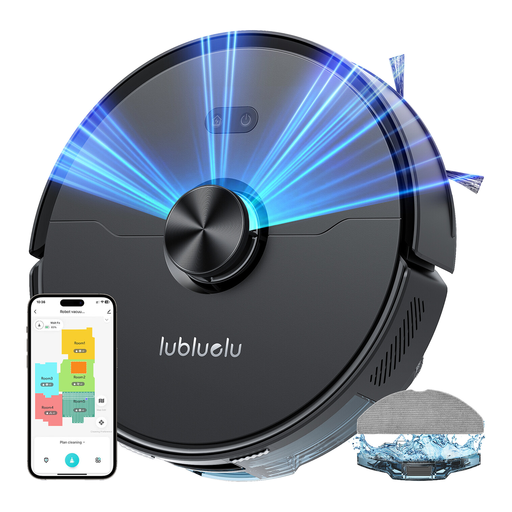 Image unavailable
Lubluelu L15 Ultra 3-in-1
Consider this model if laser navigation and combined vacuuming and mopping suit your routine. The product title states 4,000 Pa suction. Check your thresholds and the space available for the dock. Also confirm the noise level for this version, as the title and description give different information.
View on Joybuy
Frequently asked questions
Can a robot vacuum replace a vacuum cleaner and mop?
No. It’s best to think of it as a helping hand with everyday cleaning. UFC-Que Choisir reports that vacuuming results vary by floor type and that mopping has its limitations. Keep a manual option for corners, stubborn dirt and deeper cleans.
What should you measure at home before choosing a model?
Measure thresholds, the clearance beneath furniture and the space available for the dock, then compare these measurements with the manual for the exact model. For example, iRobot Support states that the Roomba models it covers can cross thresholds up to 1.6 cm. Don’t assume the same limit applies to another brand.
What should you check about the app for a connected robot?
Check that it’s compatible with your phone, which features require an account or Wi-Fi, what permissions it requests and how updates work. The CNIL recommends assessing whether connected features are useful and checking which ones can access personal data.
What protection applies if a robot or its dock breaks down in France?
For a new, second-hand or refurbished product bought by a private individual from a professional seller, the legal guarantee of conformity may apply if the conditions for a lack of conformity are met. The DGCCRF states that claims must be brought within two years of the product being delivered. This legal protection is separate from any optional commercial guarantee.


