Homes with several rooms
If you’d like to schedule cleaning while you get on with your day, look for a model and app that let you select rooms or zones. Also check that the scheduling options support the routines you need.


For regular cleaning across several rooms, choose a robot with mapping if room-by-room scheduling matters to you; add an auto-emptying station if emptying the dustbin is your main concern. Before choosing a model, check its features against your floors, rugs and thresholds, then look at the app and maintenance requirements. A manual vacuum is still useful for areas or jobs the robot can’t handle.
A robot can take care of regular cleaning, provided its route and maintenance requirements suit your home.
If you’d like to schedule cleaning while you get on with your day, look for a model and app that let you select rooms or zones. Also check that the scheduling options support the routines you need.
Measure access points and check your floor coverings before you buy. UFC-Que Choisir tests robots on rugs, tiles and wooden floors, as well as along walls and in corners. These conditions matter more for your home than any single advertised feature.
An auto-emptying station can reduce the need to empty the dustbin, if the model comes with one. You’ll still need to follow the care instructions for the dustbin, brushes and other components listed in the manual; iRobot, for example, recommends regular maintenance for the Roomba models concerned.
Start with the rooms and obstacles in your home, then decide which jobs you’d like to automate and which you’re happy to do yourself.
| Priority | What to check | What I need |
|---|---|---|
| Floors and tricky areas | Compare results for the rugs, tiles or wooden floors in your home. Also check how well it cleans along walls and in corners: UFC-Que Choisir tests these situations separately. | I want to clean the floor coverings I have at home, without assuming that results on a different type of floor will apply to mine. |
| Rooms and scheduling | Check whether the model lets you select rooms, set zones and schedule cleaning. Don’t assume a robot with random navigation will have these features; check the mapping model and its app. | In a home with several rooms, I’d rather target the areas that need cleaning than run a general clean every time. |
| Thresholds and objects | Measure the height and check the shape of each threshold, then compare them with the model’s stated limit. Look for cables and small objects to clear before a cleaning cycle; advertised obstacle avoidance doesn’t replace the recommended preparation. | The robot needs to reach the rooms I want it to clean, without me having to overlook tricky access points or items left on the floor. |
| Emptying and maintenance | Check exactly what the station automates: emptying the dustbin and, on some robot mops, looking after the mopping components. Consult the manual for details of the brushes, filters, tanks and consumables for the model you choose. | If I don’t like emptying the dustbin after each clean, a station appeals to me; I can still take care of the rest of the maintenance. |
| App and support | Check which app works with the exact model generation, the terms for software updates and the part numbers for accessories. iRobot, for example, distinguishes Roomba Home, for certain series sold after March 2025, from the classic iRobot Home app used by other models. | I want to keep access to the controls I need for my routines and be able to identify the right consumables for my robot. |
| Manual cleaning | Identify any areas the robot can’t reach and the occasional jobs you’d rather do yourself. Then consider how much space the robot takes up compared with a cordless or cylinder vacuum. | If I don’t want to clear the floor before every clean, or I mainly clean specific areas, a manual vacuum may still be the best choice for me. |
A single figure doesn’t tell you how well a robot cleans every type of floor or along the edges. UFC-Que Choisir tests rugs, tiles, wooden floors, room edges and corners.
Make a note of your floors and tricky areas, then look for results that apply to the model and conditions in your home.
The stated height applies to a specific model and doesn’t tell you on its own whether the robot can handle the shape of your thresholds. For example, Rowenta says the X-PLORER Serie 65+ can clear obstacles up to 18 mm high; this figure doesn’t apply to other robots.
Measure each threshold and compare it with the documentation for the model you’re considering. If you’re unsure whether the robot can get through, check before including that room in its route.
Apps can vary by series and generation. According to iRobot, Roomba Home is for the 100, 200, Plus 400, Plus 500 and Max 705 series sold after March 2025; other models use the classic iRobot Home app.
Check the model number and corresponding app on the manufacturer’s support site, then read the installation and update requirements.
A station takes care of specific tasks for that model, not every maintenance job. For the Roomba models concerned, iRobot recommends regularly cleaning the dustbin, brushes and charging contacts.
Check the manual to see what you’ll need to do, and confirm the consumable part numbers before you buy.
Wear parts still need replacing, depending on the model. For the Roomba models concerned, iRobot recommends replacing the brushes every 6 to 12 months.
Features and maintenance instructions vary within each brand, so always check the exact model number.
The X-PLORER range includes robots with mapping and stations. Rowenta provides manuals and frequently asked questions for each product.
Roomba models come in different generations and configurations, including some with a base that handles tasks automatically.
Some connected Roborock robots offer zone- or room-based cleaning controls, depending on the model.
Compatible DEEBOT models can create and save a map to organise their routes.
These robot vacuums include models with a station and a mapped model that doesn’t mention a station in its name. Choose according to the rooms you need to clean, the space available for a station and the maintenance tasks you’d like to reduce.
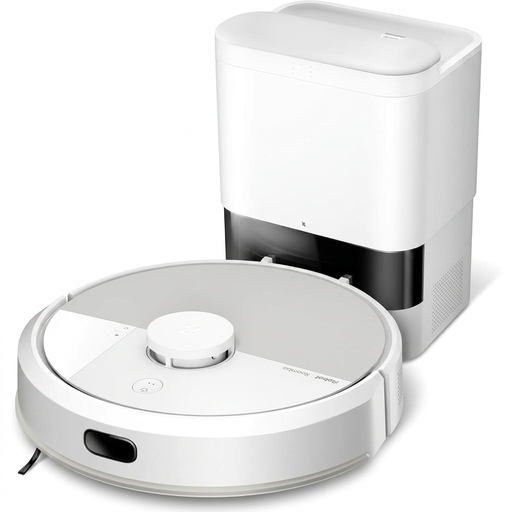 Image unavailable
This robot vacuum with a mopping function is worth considering if you want to automate regular cleaning and empty the dustbin less often. Before planning a route across several rooms, check its zone selection features, whether it can clear your thresholds and which app works with its exact generation. A base doesn’t eliminate the need to maintain the brushes and dustbin.
 Image unavailable
This model’s name includes LiDAR mapping and an auto-emptying station, making it worth considering for regular cleaning across several rooms. Its claimed battery life is 200 min; compare this with the floor area and settings you plan to use. Check that it connects to your 2,4 GHz Wi-Fi network, how high a threshold it can clear, and the maintenance required for the brushes and filters.
 Image unavailable
This robot with a station combines vacuuming with maintenance of its mopping components, which may suit anyone looking to cut down on some of the jobs involved after cleaning. Its name states a maximum obstacle clearance of 4 cm; check the documentation to see which obstacles and conditions this figure applies to before comparing it with your thresholds. Also check the app, consumables and any maintenance still required.
 Image unavailable
This robot vacuum and mop with a station may suit a home looking to automate some of the maintenance after cleaning. Its name states that the cleaning components are washed at 75 °C; this figure doesn’t indicate how well it will clean your floors. Check the scheduling options you need for your rooms, whether it can clear your thresholds and what jobs remain, particularly around the tanks and brushes.
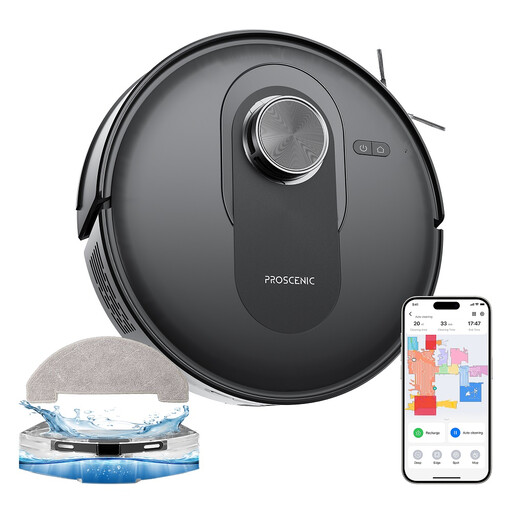 Image unavailable
This robot with mapping is worth considering if you want to schedule regular room-by-room cleaning without choosing an auto-emptying station based on its name alone. Its claimed running time is 200 min; check which settings and floor area this applies to, and whether it’s compatible with your 2,4 GHz Wi-Fi network. Confirm the dustbin capacity for the model being sold and measure your thresholds before planning its route.
Not necessarily. A robot is best suited to automated, regular cleaning; keep a manual vacuum for any areas or jobs it can’t reach. To work out how useful one will be in your home, compare results for your floors and tricky areas: UFC-Que Choisir tests rugs, tiles, wooden floors, edges and corners.
Measure your thresholds and check the clearance specifications for the exact model; separately, look at how it performs on the rugs in your home. Rowenta says the X-PLORER Serie 65+ can clear obstacles up to 18 mm high, but this model-specific figure won’t tell you what another robot can manage.
Follow the instructions for your model and clear any obstacles that could interrupt its route. ECOVACS support says a DEEBOT can save a map once it has completed its cycle and returned to the station automatically. Moving the robot or preventing it from returning could therefore disrupt this step.
It depends on the series and when it was sold. According to iRobot, Roomba Home is compatible with the 100, 200, Plus 400, Plus 500 and Max 705 series sold after March 2025; other models use the classic iRobot Home app. Check the exact model number before buying a robot for its remote controls.
No. It only automates the tasks specified for that model. For the Roomba models concerned, iRobot recommends cleaning the dustbin after every use and the brushes every week, or twice a week in a home with pets. Check the manual for your model to plan your maintenance routine.