What to check before buying
Start with your floors and the routes between rooms, then consider the level of automation you are prepared to maintain day to day.
| Priority |
What to check |
Your needs |
| Results on your floors |
Compare tests on rugs, tiles and parquet on a like-for-like basis; also check results along skirting boards and in corners. Examine the brush and anti-tangle system if hair or pet fur is a frequent issue. |
I want the robot to handle my main floor types, edges and rugs without relying on a general promise about battery life. |
| Navigation and thresholds |
Check the mapping, no-go zones, obstacle sensors and threshold-crossing limit of the exact model. Measure the thresholds in your home before comparing them with this limit. |
At home, the robot needs to reach the different rooms without getting stuck on a threshold, rug or items left on the floor. |
| Remaining maintenance |
Check exactly what the station automates: emptying, washing or drying. Allow for bags, filters, clean water, dirty water, pads and the recommended space around the base. |
I want to reduce repetitive tasks while accepting the maintenance jobs that do not disappear. |
| Mopping and rugs |
Confirm that your flooring is compatible, and check the mopping system and rug protection strategy. If rugs must stay dry, mop-pad lifting should be specified for the chosen model. |
I am interested in mopping for light cleaning of compatible hard floors, without risking wet rugs or sensitive flooring. |
| App and data |
Check app compatibility, update requirements, whether an account is needed and the permissions requested. The CNIL also recommends checking the options for disabling Wi-Fi or unused features. |
I want to know whether essential functions require a smartphone, an account or Wi-Fi, and choose the privacy settings that suit me. |
Joybuy products
Joybuy robot vacuum options with docking stations, designed to reduce routine floor-care tasks while requiring you to check compatibility with your rugs, thresholds and connected-use preferences.
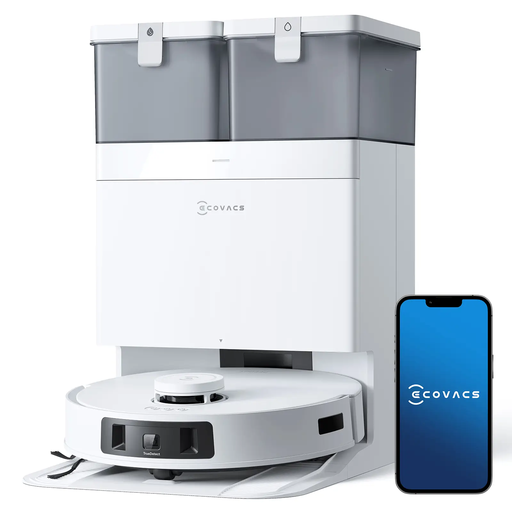 Image unavailable
ECOVACS DEEBOT T30C Pro Omni GEN 2
Worth considering for homes with rugs, pet fur or small objects on the floor, with a station designed to reduce repetitive tasks.
Listed features: mapping, 3D obstacle avoidance, 9 mm mop lifting, emptying, washing and drying station, 15 400 Pa and advertised battery life of up to 200 min.
Confirm app compatibility and privacy settings; on hard floors, mopping will not necessarily replace manual treatment of stubborn stains.
Joybuy
 Image unavailable
ECOVACS DEEBOT X9 PRO Omni
This model may suit a home with rugs or pets where a station is wanted for emptying and pad maintenance.
Listed features: multi-floor mapping, object and rug recognition, lifting system, OZMO roller, ZeroTangle 3.0, OMNI station, hot-water washing and hot-air drying.
Check the required clearance around the station, as well as app, account and connected-data conditions before buying.
Joybuy
 Image unavailable
ECOVACS DEEBOT T30C OMNI Gen2
Worth considering for frequent hard-floor cleaning and reducing tasks involving the bin and mop pads.
Listed features: multi-floor mapping, rug detection, OZMO Turbo 2.0 rotating pads, ZeroTangle 3.0, edge cleaning, OMNI station and pad washing at 75 °C.
Rug detection is listed, but check whether the pads lift if your rugs need to stay dry, as well as the app settings.
Joybuy
 Image unavailable
roborock Qrevo S5V white
An option to consider if pet fur, edge cleaning and regular mopping are among your priorities.
Listed features: 12 000 Pa, FlexiArm pads, dual anti-tangle system, pad lifting, obstacle avoidance, smart navigation, station and hot-air drying.
Measure your thresholds and check station clearances, mobile compatibility and data conditions relating to connected features.
Joybuy
 Image unavailable
Eureka J15 Pro Ultra
This robot may appeal to homes with pets or long hair where reducing bin and pad maintenance is a priority.
Listed features: 16 200 Pa, anti-tangle technology, LDS navigation, laser and RGB camera avoidance, brush and pad lifting, self-cleaning station and washing at 75 °C.
Check mapping features, no-go zones and threshold crossing, as well as account, Wi-Fi and privacy requirements.
Joybuy
Frequently asked questions
Can a robot vacuum cleaner completely replace manual cleaning?
No, not as a general rule. Results vary depending on the flooring and layout; for mopping, Que Choisir reports that performance was often limited on the models tested. Keep a manual solution for stubborn stains, inaccessible areas and occasional deep cleaning.
How can I tell whether the robot will cross my thresholds and rugs?
Measure each threshold and compare it with the limit advertised for the exact model. For example, iRobot states a limit of 1,6 cm only for certain Roomba i1, i3 and i4 models; do not apply it to other ranges. For a mopping robot, also check the intended approach to rugs.
How much space should I allow for a docking station?
Follow the instructions for your chosen model. For example, Ecovacs requires 0,5 m of clear space on each side and 1 m in front of the station for some DEEBOT models, with no obstacles or reflective objects. Also check the recommended floor type for installing the base.
Do I need an app and Wi-Fi?
It depends on the robot and the features you want to use. Que Choisir recommends checking app compatibility and update requirements; before creating an account, also review the permissions requested, the privacy policy and the available deactivation options.
Is the repairability index useful when comparing two robots?
Yes. In France, vacuum cleaners are among the product categories covered by the repairability index, a score out of 10 that takes into account factors including ease of dismantling, maintenance guidance, and the availability and price of spare parts, according to the ministry responsible for ecological transition. Compare the score for the exact model on the product listing or packaging.


