Homes with several rooms to clean by zone
Mapping can be useful if you want to schedule cleaning for specific rooms, create no-go zones or tailor cleaning runs to your routine. However, it requires floors to be cleared and an app to be used.


Start by considering the obstacles, rugs, thresholds and actual layout of your home: a robot can support your regular cleaning routine, but its results vary depending on the floor coverings and room configuration. Mapping makes room-by-room cleaning easier, while a dock means you can empty the bin less often without removing maintenance altogether. The mopping function is best suited to hard floors that are explicitly compatible.
Mapping can be useful if you want to schedule cleaning for specific rooms, create no-go zones or tailor cleaning runs to your routine. However, it requires floors to be cleared and an app to be used.
If you have rugs, tiles, parquet or other hard floors, compare how the robot performs on each surface, how it manages the mop on rugs and whether its mopping function is compatible with your floors.
A dock can reduce how often you need to empty the bin, but you will still need to maintain the brushes, sensors and filters, as well as the water tanks and mop pads, depending on the equipment.
| Priority | What to check | Your needs |
|---|---|---|
| Coverage and obstacles | Check the mapping system, no-go zones, the threshold height specified in the instructions and the space beneath your furniture. Cables, shoelaces, clothes and small objects must still be cleared before cleaning. | I want the robot to reach the rooms that matter without getting stuck on everyday objects. Mapping becomes more valuable when I need to target specific areas. |
| Floors, rugs and edges | Compare tests carried out on your types of flooring: rugs, tiles, parquet, corners and skirting boards. For a vacuum-and-mop model, check both the robot’s instructions and those for your floor. | At home, the vacuum needs to perform well on the surfaces I actually have. I will still clean dried-on stains, finishing touches and difficult areas manually. |
| Maintenance and consumables | Find out what maintenance is required for the bin, brushes, filters and sensors. With a washing dock, also check the bags, water tanks, mop pads and cleaning tray. | I would prefer to reduce how often I have to handle the appliance, while accepting the maintenance needed to keep it working properly. |
| App and data | Check app compatibility, update requirements, available features and Wi-Fi settings. Read the model’s privacy policy before enabling home mapping. | I want to schedule cleaning runs without overlooking the data linked to mapping. CNIL recommends assessing whether connected features justify their use and considering the implications for your data. |
| Durability and repairability | Check the repairability index where it is displayed and compare the stated availability of spare parts, batteries, brushes, filters and consumables. | I want to be able to maintain the appliance for several years rather than rely on components that are difficult to replace. ADEME states that vacuum cleaners, including robot models, are covered by France’s repairability index. |
A robot may miss certain areas or become stuck on cables, clothes, shoelaces or small objects. Que Choisir also highlights that vacuuming performance varies depending on the flooring, edges and corners.
Before comparing models, note the rugs, thresholds, spaces beneath furniture and usual obstacles in your home. Do not infer real-world coverage from a single advertised power rating.
The dock automates some tasks, but the brushes, filters, sensors and mopping components still need to be checked and cleaned.
Before buying, make a note of the included consumables, their references and the maintenance tasks specified in the dock’s instructions.
Depending on the configuration, a dock may require dust bags as well as maintenance of the filters, brushes, water tanks, mop pads or cleaning tray.
Que Choisir’s tests show that mopping performance varies between models and advise against using robot mops on wooden floors, particularly solid wood.
Use this function only on floors that are explicitly compatible, and keep a manual solution for ingrained stains and finishing touches.
Depending on the brand and settings, home maps may be sent to or stored in the cloud so that they can be displayed in the app.
Read the manufacturer’s privacy policy, check the sharing and deletion settings, then disable unnecessary connected features where the model allows it.
In France, iRobot sells Roomba models which, depending on the product, offer mapping, room and zone features in the iRobot Home app.
Roborock offers robot vacuum and mop models, with a French support portal covering maps, zones, troubleshooting and docks.
The DEEBOT range sold in France includes mapping, obstacle avoidance, mopping functions and docks, depending on the model.
In France, Dreame sells robot vacuum and mop models with navigation, docks and rug management on selected products.
These Joybuy options bring together robot vacuum-and-mop models with a dock, designed for households that want to schedule regular cleaning runs while accepting the maintenance of tanks, brushes and consumables.
 Image unavailable
For a household with hard floors and rugs that wants to organise zone-based cleaning and empty the bin less often by hand.
The product details state that it features multi-floor mapping, rug recognition, an OZMO roller mop, ZeroTangle 3.0, TruEdge 2.0 and an Omni dock.
Check that your floors are suitable for mopping, along with the maintenance requirements for the tanks, filters and brushes.
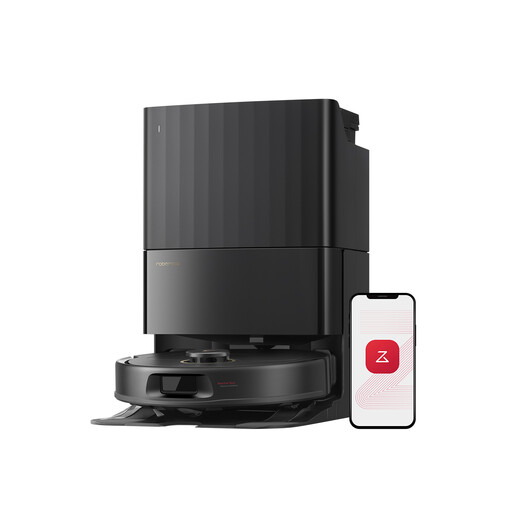 Image unavailable
This option is aimed at multi-room homes where no-go zones and app-based scheduling are important.
The product details mention 12,000 Pa suction, FlexiArm mop pads, a dual anti-tangle system, intelligent navigation and a washing and drying dock.
For long-pile rugs, check the model’s instructions and create no-go zones if necessary.
 Image unavailable
Consider this model if you want to reduce manual emptying while accepting the need to monitor the dock’s water tanks.
The product details list 25,000 Pa suction, OZMO Turbo 2.0, ZeroTangle 3.0, TruEdge 2.0, an Omni dock and mop washing at 75 °C.
Use the mopping function only on compatible floors, and be prepared to fill the clean-water tank, empty the dirty water and clean the brushes.
 Image unavailable
This model may appeal to households with long hair or pets that want a dock for regular cleaning runs.
The product details state that it features 16,200 Pa suction, anti-tangle technology, liquid detection, brush lifting and hot-water cleaning at 75 °C.
The quoted noise level is 73 dB(A) in Silent mode. Check that this suits your usage times and home.
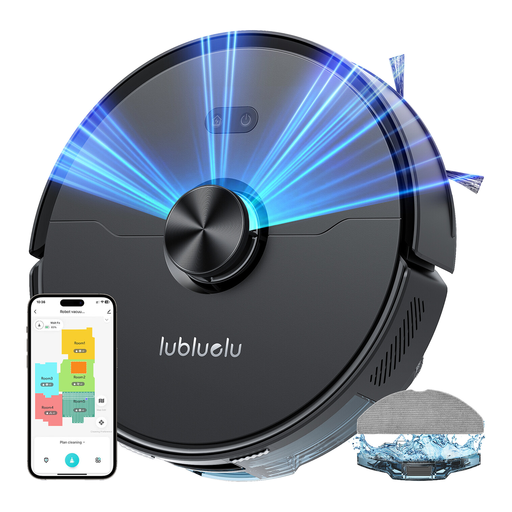 Image unavailable
For a multi-room home with moderate thresholds and enough space to install a dock.
The product details mention 4,000 Pa suction, laser navigation, 5-level mapping, a stated threshold-climbing ability of up to 2 cm, app control and a mopping function.
Check the dock’s dimensions, whether your rugs and floors are compatible, and the maintenance required for the bin and tanks.
No. Vacuuming performance varies depending on the type of floor, and Que Choisir states that mopping performance remains inconsistent between models. Think of the robot as an appliance for regular upkeep between manual cleans.
Remove or secure cables, shoelaces, clothes and small objects that could become tangled in the rollers or block the robot. For the first mapping run, leave doors open so that it can explore all accessible areas.
No. It reduces how often you need to empty the robot’s bin, but bags or tanks, brushes, filters and sensors still need to be monitored. Washing docks also require maintenance of the tanks, mop pads and cleaning tray.
No. Que Choisir advises against robot mopping on wooden floors, particularly solid wood. Check the instructions for your flooring and the robot before using water or detergent.
Check app compatibility, update requirements, Wi-Fi settings and the privacy policy. Some brands state that home maps may be sent to or stored in the cloud. CNIL recommends assessing whether connected features are useful and disabling those that are not necessary where this option is available.