What should you look for before buying?
Basic navigation
Worth considering: for general cleaning in an open-plan space, if you don’t need to target individual rooms.
What to bear in mind: without a usable map, you won’t have the same controls for selecting rooms and zones.
Mapping
Choose this if: you want to target specific rooms or set no-go zones in a home with separate rooms.
What to bear in mind: these settings may depend on the app and the model’s connection requirements.
An auto-empty station and a mopping function don’t replace your choice of navigation. They’re separate features to consider, depending on which cleaning tasks you want to hand over.
| Factor |
What to check |
Who is it for? |
| Room controls |
Check that the model supports room-by-room cleaning and no-go zones, and that its app is compatible with the exact model reference. |
I want to clean certain rooms without doing the whole house again; around 37% of consumers with this need would make room controls their priority. |
| Carpets and mixed flooring |
Compare test results on your floor coverings, and measure thresholds and the clearance under your furniture. |
With carpets and several types of flooring, I don’t want to judge a robot on just one surface; nearly 27% of consumers with this need would prioritise this. |
| Emptying and maintenance |
Allow space for the station and check which consumables are compatible with the exact model. |
If the robot runs often, I’d rather empty its bin less frequently, while still maintaining the station; around 18% of consumers with this need would put it first. |
| Mopping hard floors |
Check that your floor is suitable and find out what’s involved in managing the water and mop pads. |
On a compatible hard floor, I want regular damp cleaning without giving up manual cleaning for stubborn stains; this would be the priority for around 18% of consumers with this need. |
Robot vacuum cleaners on Joybuy
These models are suited to scheduled cleaning with mapping or easier maintenance with a station. Compare how well each one suits your floors, the app features and the maintenance tasks you’ll still need to handle.
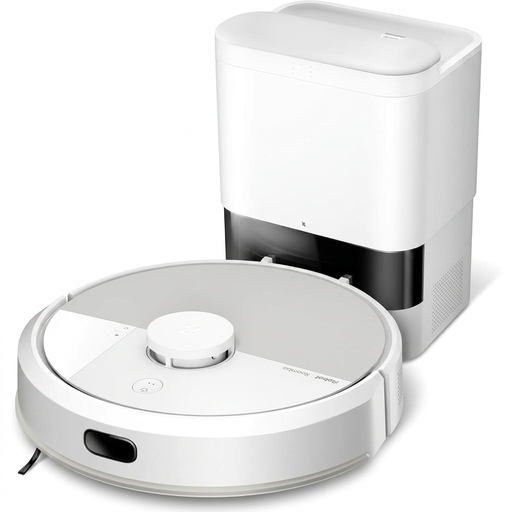 Image unavailable
iRobot Roomba Combo 115 AE with mopping function
Worth considering if you want to schedule floor cleaning and have a mopping function too. Make sure you have a suitable spot for the dock, and check performance on your floor coverings and which consumables are compatible with this model.
View on Joybuy
 Image unavailable
ECOVACS Deebot T30C OMNI Gen2 with station
Worth considering if you want to combine vacuuming and mopping with an OMNI station. The product name states a suction power of 25,000 Pa and mop pad washing at 75 °C, but these figures alone don’t tell you how it will perform on your floors. Check that your floors are suitable for mopping and allow for station maintenance.
View on Joybuy
 Image unavailable
Q8-Max with LiDAR navigation and auto-empty station
Worth considering for scheduled cleaning if LiDAR navigation and station-based bin emptying suit your needs. The product name states a suction power of 8,000 Pa, but this doesn’t replace testing on your own floor coverings. Also check the app’s connection requirements and which consumables are compatible.
View on Joybuy
 Image unavailable
Eureka E20 Plus with station
Worth considering if your priority is to empty the bin less often during scheduled cleaning cycles. The product name states a suction power of 8,000 Pa and DuoDetect AI navigation. Check performance on your floors, the space needed for the station and the app’s requirements separately.
View on Joybuy
 Image unavailable
ECOVACS Deebot X11 Pro Omni with station
Worth considering if you’re looking for a robot with a station and mopping function for regular cleaning. The product name mentions the OZMO Roller 2.0 system. If room-by-room cleaning or no-go zones are important to you, check that these controls are available on the exact model. You’ll also need space for the station and its maintenance tasks.
View on Joybuy
Frequently asked questions
Can a robot vacuum cleaner replace all manual cleaning?
Not necessarily. It’s mainly designed to maintain the surfaces it can reach on a regular basis. UFC-Que Choisir finds that results vary between floor types and also tests corners and edges. Keep a manual cleaning option for areas the robot can’t reach or where it doesn’t get the results you need.
Can you use the mopping function on all floors?
No. Check that your floor covering is suitable before using water. UFC-Que Choisir advises against robot mopping on wooden floors, particularly solid wood. Also follow the instructions from both the robot manufacturer and your flooring manufacturer.
Do you need Wi-Fi to update a connected robot?
Requirements vary by model, but the connected update procedures described by iRobot and Ecovacs require a connection. iRobot also specifies that Wi-Fi coverage must be good enough where the dock is located. Check the requirements for the robot you’re considering before deciding where to put it.
How can you check what maintenance a station needs before buying?
Look up bags, filters, brushes and, for mopping models, compatible mop pads using the full reference for the robot and its station. iRobot and Rowenta accessory catalogues distinguish between models and series, so a part listed for the brand won’t necessarily fit every robot.
What is the repairability index for?
It helps you assess how easy the appliance may be to repair, but it doesn’t tell you how well it vacuums or mops. ADEME includes robot vacuum cleaners among the appliances covered. Compare the index for the exact model and separately check the availability of any parts you might need.


