What should you look for when choosing one?
First, decide whether the robot will be able to move around your home regularly. Then choose between vacuuming alone and mopping, and consider which maintenance tasks you really want to hand over.
Robot vacuum cleaner
Consider it: for regular vacuuming in a home where routes can be kept clear.
Bear in mind: results vary across floor types and areas, as Que Choisir’s tests show. The bin or docking station will still need attention.
Robot vacuum and mop
Consider it: if you’d also like regular damp cleaning on floors approved in the model’s instructions.
Bear in mind: Que Choisir reports mixed mopping results, and water and mopping components mean extra maintenance.
Manual cleaning
Choose this: if carpets, stairs, thresholds or items on the floor make autonomous cleaning impractical, or if you mainly clean as and when needed.
Bear in mind: you stay in control of each clean, but won’t be handing over regular cleaning.
| Criteria |
What to check |
Who it matters to |
| Floor types and movement around the home |
Compare test results for your flooring and check how well the specific model crosses thresholds. Que Choisir tests carpets, tiles, parquet, edges and corners, among other areas. |
If my carpets and thresholds interrupt the robot’s routes, automation won’t help much. Around 33% of consumers would make suitability for their floors and routes their top priority. |
| Emptying and maintenance |
Check exactly what the dock can do, which tasks you’ll still need to handle and which consumables are compatible. |
I want to empty the bin less often without replacing that task with demanding dock maintenance. For around 27% of consumers, reducing the amount of hands-on work would be the main priority. |
| Mopping hard floors |
Check which floor types are approved in the instructions and look for tests covering the types of dirt you need to clean. Que Choisir advises against mopping wooden floors, especially solid wood. |
On my compatible hard floors, I mainly want to hand over regular damp cleaning, even if I still tackle stubborn stains by hand. Mopping would be the top priority for around 20% of consumers. |
| App and long-term use |
Check app compatibility, how updates work, the repairability rating shown and whether parts are available for your chosen model. |
Before adopting connected routines, I want to be able to use and maintain the robot over the long term. Around 20% of consumers would prioritise software and hardware support first. |
Robot vacuum cleaners to consider on Joybuy
These models are robot vacuum cleaners with a dock; several also offer a mopping function. To choose between them, start with the floors you need to clean, then check which tasks the dock actually handles and what’s required to install it.
 Image unavailable
ECOVACS DEEBOT X11 Pro Omni
Worth considering if you’d like to combine vacuuming with regular damp cleaning on compatible floors.
The model name mentions an OZMO Roller 2.0 roller and an Omni dock. Check the instructions for the floor types approved for mopping and the maintenance the dock requires.
View on Joybuy
 Image unavailable
ECOVACS DEEBOT T30C OMNI Gen2 black
Consider it if a robot vacuum cleaner with a mopping function and dock suits your floors and cleaning routine.
The name indicates OZMO Turbo 2.0, an Omni dock and mop-pad washing at 75 °C. Check what the dock requires you to do and whether your flooring is compatible.
View on Joybuy
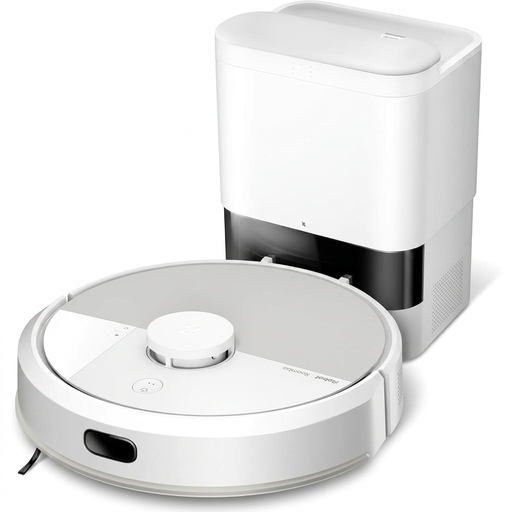 Image unavailable
iRobot Roomba Combo 115 AE white
Worth considering if you’re looking for a robot that combines vacuuming and mopping with an auto-empty base for everyday cleaning.
Allow space for the base and check compatible consumables, the app for this model and the floor types approved for mopping.
View on Joybuy
 Image unavailable
roborock Qrevo S5V white
Consider it if you’d like to combine vacuuming, mop pads and a dock as part of your regular cleaning routine.
The name mentions FlexiArm mop pads, an anti-tangle system and hot-air drying. Check which floors are compatible, how much space the dock needs and what maintenance you’ll still need to do.
View on Joybuy
 Image unavailable
Eureka E20 Plus black
Worth considering if regular vacuuming with an auto-empty dock is your priority.
The name advertises 8,000 Pa suction, a 180-minute runtime and 3D obstacle avoidance. These advertised figures don’t replace an assessment of how well it cleans your floors; also check what maintenance the dock needs.
View on Joybuy
Frequently asked questions
Can a robot vacuum cleaner replace a manual vacuum cleaner completely?
Not necessarily. It’s mainly designed to take care of regular cleaning in accessible areas. Que Choisir tests carpets, hard floors, edges and corners separately, so keep a manual option if you need to clean stairs, cluttered areas or occasional spills.
Can I use a robot mop on parquet?
Don’t assume that mopping is suitable for your parquet. Que Choisir advises against using it on wooden floors, particularly solid wood. Check the floor types approved in the model’s instructions before buying and using it.
Does a docking station mean I don’t need to maintain the robot?
No. It may mean you need to empty the bin less often or take care of some of the mopping, but the dock needs attention too. Depending on its features, you may still need to replace consumables, keep an eye on the tanks and clean the parts listed in the instructions.
What should I check if I want to schedule the robot from my phone?
Check that the app designed for the model is compatible with your phone and gives you access to the functions you want to use. iRobot uses different apps for different product lines, while Ecovacs support explains how to update eligible DEEBOT models in the app. Also check the instructions for your specific model.


