What to compare when choosing a robot cleaner
Start with the floors and rooms you want to cover, then compare the station features and controls you’ll actually need.
| What matters |
What to check |
Who it matters most to |
| Cleaning routes while you’re away |
Check whether you can schedule cleaning by room, set no-go zones and see obstacle-detection tests for the model. UFC-Que Choisir recommends assessing performance on different floors and in different areas of the home. |
If I want to schedule cleaning in specific areas without assuming the robot will avoid every object, I check its settings and how it handles obstacles. Around 27% of consumers prioritise reliable navigation. |
| Emptying and everyday maintenance |
Check the difference between a charging station, dust auto-emptying and mop maintenance. Also check the accessories and consumables included with the configuration on sale. |
If I don’t want to empty the bin after every cycle, I compare what the station automates with what I’ll still need to clean myself. Around 27% of consumers prioritise reducing hands-on tasks. |
| Different floor types |
Compare the model’s test results on the floors in your home, including rugs, carpets, tiles or wooden floors, as well as along edges and in corners. UFC-Que Choisir assesses vacuuming on several types of flooring. |
If my home has several types of flooring, I want to know where the robot is likely to leave areas that need cleaning by hand. Around 20% of consumers prioritise performance on mixed flooring. |
| Mopping hard floors |
Check that your flooring is compatible and read the model’s mopping test results for the stains you need to tackle. UFC-Que Choisir reports that results vary between robots and advises against robot mopping on wooden floors, particularly solid wood. |
If I want to maintain a compatible hard floor regularly, I check the test results rather than relying on the fact that the robot has a mop. Around 13% of consumers prioritise mopping. |
| App and software support |
For the exact model, check compatible systems, the terms and duration of software updates, the data collected and which controls are available without a connection. UFC-Que Choisir recommends checking app compatibility and updates; CNIL advises considering whether connected features are useful. |
If I want to schedule the robot while limiting my reliance on the app, I check its software dependencies and the data involved. Around 13% of consumers prioritise software support and privacy. |
Robots with auto-emptying stations on Joybuy
These Joybuy models are robot vacuum cleaners paired with an auto-emptying station. Check the exact features of each station, particularly for mopping and mop maintenance.
 Image unavailable
roborock Q7 L5+ with mopping function
To schedule cleaning in specific areas and reduce how often you empty the bin while you’re away, the description mentions scheduling, no-go zones and automatic emptying.
LiDAR navigation, a mopping function, a dual anti-tangle system and a quoted suction power of 8 000 Pa. The station uses a dust bag, which needs replacing when full.
View on Joybuy
 Image unavailable
Eureka E20 Plus
To schedule cleaning in specific areas, the description mentions scheduling and no-go zones via the app, as well as an auto-emptying station.
The title lists a suction power of 8 000 Pa, a quoted run time of 180 minutes and DuoDetect AI navigation. The bagless station has a 2-litre bin, which needs to be emptied by hand when full.
View on Joybuy
 Image unavailable
Eureka J15 Pro Ultra
To cut down on maintenance after mopping, the description says the station empties the bin, washes the mops and dries them.
The title lists a mopping function, a suction power of 16 200 Pa and hot-water mop washing at 75 °C.
View on Joybuy
 Image unavailable
Dreame X40 Ultra Complete
To reduce the amount of hands-on maintenance between cycles, the description combines automatic emptying with mop washing and drying.
The installation instructions say to leave at least 1,5 m in front of the station and 0,5 m on each side, and to make sure the water tank is accessible.
View on Joybuy
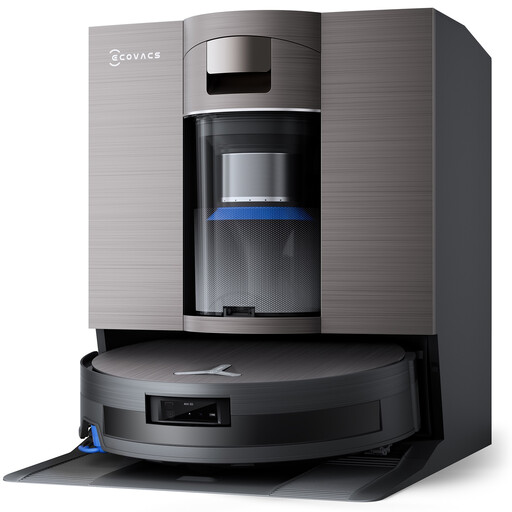 Image unavailable
ECOVACS X11 Omni Cyclone
To automate some floor-care tasks, the title describes a robot vacuum cleaner with an auto-emptying station.
The title lists a PureCyclone 2.0 station and a quoted suction power of 19 500 Pa.
View on Joybuy
Frequently asked questions about robot vacuum cleaners
Will a robot mop mean you never need to mop by hand?
No. UFC-Que Choisir’s tests on tiles show that results vary by model and stain. The organisation advises against robot mopping on wooden floors, particularly solid wood. Check your flooring and the test results for the exact model.
What should I do before starting a clean while I’m away?
Set the cleaning route and no-go zones if the model allows, then check how it handles the obstacles it’s likely to encounter. A map alone doesn’t prove that the robot will avoid every object on the floor.
Does an auto-emptying station mean the robot needs no maintenance?
No. It transfers dust out of the robot’s bin, but the station still needs maintenance. For a robot mop, parts that come into contact with water and the mops may also need care.
What rights and information should I ask the seller about in France?
For a purchase made by an individual from a business, the statutory guarantee of conformity is mandatory and separate from any commercial extended warranty. DGCCRF also states that sellers must tell you how long spare parts will be available if the manufacturer has provided them with this information. You shouldn’t assume this period is the same for every robot.
What precautions should I take with an app or camera?
CNIL recommends considering whether connected features are useful and, where possible, disabling any you don’t need. If a device records video and people outside your private circle visit your home, CNIL’s guidance on informing people may apply.


