Criteria to compare
Robot vacuum cleaner
Worth considering: if your priority is scheduling vacuuming on accessible floors.
Keep in mind: floor types and routes between rooms affect the results, and you’ll still need to empty the dustbin.
Robot vacuum cleaner with mopping
Worth considering: if you’d like to add a damp cleaning run on hard floors.
Keep in mind: mopping components and water tanks also need maintenance, and mopping doesn’t guarantee that stains will be removed.
Robot vacuum cleaner with emptying dock
Worth considering: if you’d like to empty the robot’s onboard bin less often.
Keep in mind: the dock takes up space, and its dust container, bags or ducts may need maintenance.
First compare the areas the robot can actually reach, then look at the features that reduce how often you need to carry out the tasks you’d like to do less often.
| Criteria |
What to check before buying |
Who should pay most attention? |
| Routes and scheduling |
Measure thresholds and clearance beneath furniture; check the stated capabilities of the specific model and whether it can schedule cleaning by area. |
If I want to run cleaning cycles in several rooms, I’ll check routes and obstacles first. Around 33% of consumers put ease of movement and scheduling first. |
| Vacuuming and mopping |
Identify your floor coverings and look for relevant test results. If your home has rugs, check how the model handles its wet components. |
If I have both hard floors and rugs, I’ll check that damp cleaning suits my needs and floor coverings. Around 27% of consumers prioritise mopping hard floors. |
| Dock and maintenance |
Distinguish between emptying dust and washing or drying; check how much space the dock needs and which parts must be cleaned or replaced. |
If I find it a nuisance to empty the small bin after each cycle, I’ll compare what the dock takes care of and what I’ll still need to do. Around 20% of consumers prioritise emptying the bin less often. |
| Parts and software |
Check the stated availability period for parts, compatible consumables, phone compatibility and update conditions. |
If I plan to keep the robot and use its connected features, I’ll check which parts are compatible and what ongoing app support is offered. Around 20% of consumers prioritise repairability and software support. |
Robot vacuum cleaners on Joybuy
The models below cover scheduled vacuuming. Depending on the model, they also offer mopping and an emptying or maintenance dock.
 Image unavailable
Roborock Q7 L5+ — robot vacuum and mop
Worth considering if you want to schedule cleaning and empty the robot’s bin less often.
The product listing specifies LiDAR navigation, a mopping function, 8,000 Pa suction power and an emptying dock with a dust bag.
The dock’s bag still needs replacing.
View on Joybuy
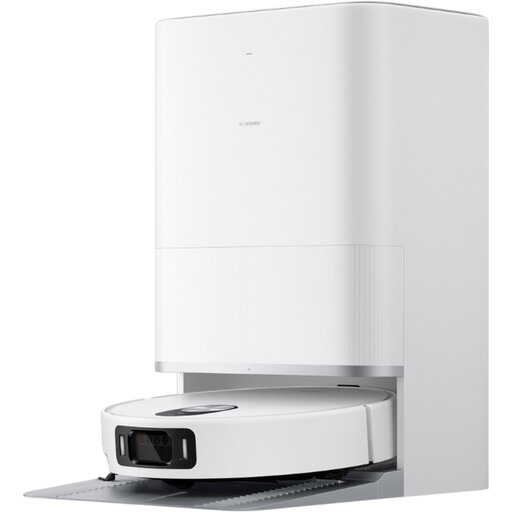 Image unavailable
Xiaomi Robot Vacuum 5 EU — BHR0834EU
Worth considering if you want to schedule vacuuming and mopping by area in the app.
The product listing mentions LiDAR navigation, rug recognition, mop lifting and a dock that empties the dustbin, washes and dries the mop pads.
View on Joybuy
 Image unavailable
Eureka E20 Plus
Worth considering if you want to schedule cleaning and set no-go areas, with a bagless emptying dock.
The product listing mentions 8000 Pa, a stated battery life of 180 minutes, 3D obstacle detection and a mop that lifts by 10 mm.
The instructions specify that the dock needs clear space: 0,5 m on each side and 1,5 m in front. The app is listed as compatible with 2,4 GHz Wi-Fi only.
View on Joybuy
 Image unavailable
Eureka J15 Pro Ultra
Worth considering if you want to combine vacuuming and mopping with a dock that empties the bin and maintains the mop pads.
The product listing mentions 16200 Pa suction power, liquid detection, a liftable brush and hot-water cleaning at 75°C.
View on Joybuy
 Image unavailable
Roborock Qrevo S5V White
Worth considering if you want to schedule vacuuming and mopping and leave several maintenance tasks to the dock.
The product listing mentions 12000 Pa, FlexiArm mops, hot-air drying and obstacle detection.
The product listing advises against mopping long-pile rugs and recommends setting no-go areas for thick rugs. It says to use only Roborock cleaning solution in the clean water tank.
View on Joybuy
Frequently asked questions
Is a robot mop suitable if I also have rugs?
Check how the exact model handles rugs. Ecovacs says the DEEBOT T90 PRO OMNI lifts its roller when it goes over a rug. This feature isn’t available on every robot mop, and results vary between models.
What still needs doing with an emptying dock?
You’ll still need to manage the dust container or bags and clean the parts specified in the instructions. For Clean Base, iRobot recommends replacing the bag when prompted by the dock or app, as well as maintaining the contacts and duct. A washing dock requires other maintenance tasks.
What should I check about the app and updates?
Before buying, check that the app is compatible with your phone and find out how updates work. For DEEBOT firmware, Ecovacs support says the robot must be on its dock, charged and connected to ECOVACS HOME. This process doesn’t specify how long future support will last.
What information and guarantees should I check when buying in France?
Check the model’s repairability index where it applies. The French Ministry of the Economy says the statutory guarantee of conformity applies to new, second-hand and refurbished goods sold by a business to an individual. Separately, ask how long the parts are expected to remain available, as this depends on the model and the applicable terms.


