Homes with hard floors and carpets
If you have a mix of wood flooring, tiles and carpets, check how the model performs on each surface. If you’re considering a robot mop, look separately at what happens when it encounters a carpet.


For a home with mixed flooring, choose a robot vacuum based on the carpets, thresholds and routes it will actually need to cover, then check how it performs on each surface. A docking station can mean less frequent emptying, while mopping hard floors calls for extra care around carpets. Keep a manual cleaning option for stairs and areas the robot struggles to reach or clean.
A robot can take care of regular cleaning, but the right choice depends on your flooring and the obstacles in your home. UFC-Que Choisir’s testing protocol assesses performance on different surfaces, as well as along edges and in corners.
If you have a mix of wood flooring, tiles and carpets, check how the model performs on each surface. If you’re considering a robot mop, look separately at what happens when it encounters a carpet.
Depending on its features, a docking station can reduce how often you empty the dustbin or handle the mop pads. It still needs space and model-specific maintenance.
If thresholds, carpets in doorways or objects on the floor get in the way, measure the routes and check the model’s zone settings. Also plan how you’ll clean areas the robot can’t reach.
Start with the routes and flooring that make cleaning tricky, then decide which maintenance tasks you’d like a docking station to handle. UFC-Que Choisir reports performance by floor type and around the edges of rooms, so a feature on the spec sheet alone won’t tell you how well a robot will clean every area.
| What matters | What to check | Who is it for? |
|---|---|---|
| Routes and obstacles | Measure thresholds and carpets in doorways; check the model’s zone settings. | If a threshold or objects on the floor could leave a room out of reach, being able to cover tricky routes becomes a priority. Around 31% of consumers put this need first. |
| Carpets, hard floors and edges | Look for separate results by floor type and, if you’re considering mopping, check how the robot behaves at carpet edges. | If wood flooring, tiles and carpets sit side by side, I want to avoid a setting that works for one surface but leaves the others poorly cleaned or wet. This is the main concern for around 31% of consumers. |
| Dustbin, docking station and maintenance | Compare emptying and cleaning tasks, consumables and the space needed for the docking station. | With frequent cleaning, emptying the dustbin or handling mop pads between runs can become a chore. Reducing these tasks comes ahead of other criteria for around 23% of consumers. |
| Cleaning you’ll still need to do by hand | Identify stairs, corners and areas the robot can’t reach, then decide how you’ll use your manual vacuum. | If I still need to clean stairs or tackle corners from time to time, I’d rather plan for that than rely on the robot alone. Around 15% of consumers prioritise combining robot cleaning with manual vacuuming. |
A map of your rooms won’t help the robot cross a threshold that’s too difficult or get past objects on the floor.
Measure the routes before you buy. Once the robot is set up, watch its first few runs before setting any no-go zones.
ECOVACS says that an obstacle in front of a carpet can cause a mop pad to wet its edge. Check whether this could happen in your home.
If there’s an obstacle close to a carpet, monitor the first mopping run and use a no-mop zone if your model allows it.
A docking station automates some tasks, depending on the model, but you’ll still need to clean its components and keep an eye on accessories.
Before choosing, check exactly what it does, how much space it takes up and what maintenance it needs.
Depending on the docking station, you may still need to replace or clean bags, filters, brushes and mop pads.
Scheduling and zone settings depend on the features available on your chosen model. It’s also useful to know how long spare parts will be available for, to help you maintain the robot over time.
Before ordering, check that it’s compatible with your phone, find out about software updates and confirm the accessory part numbers. For spare parts in France, the DGCCRF states that the seller must tell consumers how long the manufacturer has said they will be available.
These brands are useful starting points for your research, but features and performance can vary between models.
The range includes robot vacuums with mapping, mopping and a docking station, depending on the model. ECOVACS highlights the DEEBOT N30 PRO OMNI, which features a mop-lifting function.
Dreame offers robot mops with docking stations, with mop-lifting on some models.
UFC-Que Choisir lists Roborock among the robot vacuum brands worth considering.
These robot vacuum models are worth considering for frequent cleaning in a home with mixed flooring. If a docking station or mopping is important to you, check the features of the specific variant you choose and how it handles your carpets and routes.
 Image unavailable
Worth considering if you want to combine vacuuming and mopping for regular cleaning. The product title lists 16 600 Pa, an OZMO Roller, an Omni station, hot-water mop washing and hot-air drying. Compare its performance on carpets separately, and check what maintenance the station needs.
 Image unavailable
Worth considering for regular vacuuming and mopping, provided you check how it handles your carpets. The product title lists 25 000 Pa, an OZMO Turbo 2.0 system, an Omni station and mop washing at 75 °C. These features alone don’t tell you how it will perform on every surface.
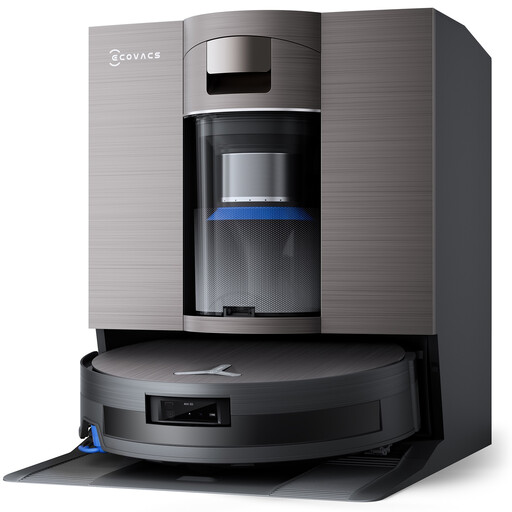 Image unavailable
If thresholds are a factor in your decision, compare yours with the maximum 4 cm obstacle clearance listed in the title, without assuming it will get over every carpet. The title also lists 19 500 Pa, OZMO Roller 2.0 and PureCyclone 2.0 automatic emptying. Check cleaning performance on the different floors in your home.
 Image unavailable
If your home has both hard floors and carpets, ask for separate performance results on each. Before choosing the white variant, confirm that it has the mopping and docking station features you need, and check how it behaves around carpets and at thresholds.
 Image unavailable
Worth considering if navigating around objects and managing dustbin emptying matter for your regular cleaning. The title lists 8 000 Pa, 3D obstacle avoidance, an emptying station and up to 180 minutes of stated battery life. Check how the station collects dust before choosing consumables, and make sure it can cross your thresholds.
Don’t assume it will. UFC-Que Choisir says performance varies by floor type, and assesses carpets, hard floors, edges and corners separately. Keep a way to clean stairs and areas your robot struggles to reach.
Check the model’s mopping and no-go zone settings, then keep an eye on its first run near carpets. ECOVACS warns that an obstacle in front of a carpet can cause a mop pad to wet its edge. You may need to move the obstacle or set a no-mop zone.
Measure the thresholds and carpets in doorways, then compare them with the stated capability of the specific model. A listed obstacle clearance doesn’t guarantee it will get through every layout, so consider any obstacles and the shape of the entrances too.
Find out which accessories your model needs and how long spare parts will be available for. According to the DGCCRF, if a manufacturer tells the seller how long parts will be available, the seller must pass this information on to consumers. The French Ministry of the Economy also notes that the legal guarantee of conformity applies to new, second-hand and refurbished goods sold by a business to an individual. This is separate from routine maintenance requirements.