What should you check before buying?
First, check whether the robot can reach the rooms and clean the floor types you have. Then compare the scheduling controls and consider how much maintenance you’re prepared to do.
| What matters |
What to check |
Who is this for? |
| Routes and obstacles |
Measure thresholds and the clearance beneath furniture; check the exact model’s ability to cross obstacles and its obstacle-avoidance test results. |
If you want the robot to move between rooms without getting stuck, prioritise a clear, accessible route. Around 28% of consumers put this need first. |
| Scheduling |
Check the scheduling options and room-by-room cleaning, along with the app, phone and network requirements. |
If you want to choose which rooms to clean or schedule runs without having to restart the robot, room-based controls matter more. Around 22% of consumers prioritise this kind of scheduling. |
| Maintenance and docking station |
Check whether the robot’s dustbin is emptied automatically, and what other tasks the station requires. Consult the manual for maintenance and consumables. |
If you want to handle the dustbin less often after cleaning runs, compare what the station automates and what maintenance it needs itself. Around 22% of consumers prioritise reducing manual emptying. |
| Cleaning different floor types |
Note the rugs and carpets in your home; look for test results covering those floor types and edges. |
If your home has rugs, carpets or several types of flooring, check how well the robot vacuums these surfaces. Around 17% of consumers make this a priority. |
| Mopping function |
Check test results for your type of flooring, whether the floor is compatible and what maintenance the water tank and mop pads require. |
If you want to add a damp-cleaning run on a hard floor, consider the results you can expect and the maintenance involved. Around 11% of consumers prioritise this use. |
Robot vacuum cleaners available at Joybuy
These models cover a range of needs, including scheduling and room management, a self-emptying station or a mopping function, depending on the model.
 Image unavailable
Roborock Q7 L5+
Worth considering if you want to schedule cleaning runs and set no-go zones in the app, while reducing the need to empty the dustbin yourself.
The title lists LiDAR navigation, a mopping function, an anti-tangle system and 8 000 Pa suction power.
Joybuy
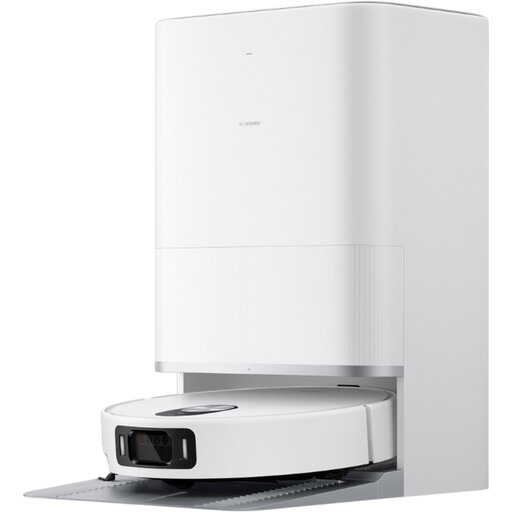 Image unavailable
Xiaomi Robot Vacuum 5 EU, BHR0834EU
Worth considering if you’re looking for scheduled cleaning and a station that automates some tasks after each cycle.
The product information lists LiDAR navigation, scheduling and app-based room management. It also mentions a height of 8,8 cm, mop pads that lift over rugs and automatic dust emptying.
Joybuy
 Image unavailable
Eureka E20 Plus
Worth considering if you want to schedule cleaning runs and choose zones, with a station designed to reduce manual emptying of the robot.
The title lists a self-emptying station, 8 000 Pa suction power, an anti-tangle function and a stated run time of 180 minutes. The product information also mentions 3D obstacle avoidance and app controls.
Joybuy
 Image unavailable
Eureka J15 Pro Ultra
Worth considering if you’re looking for a robot that combines vacuuming and mopping with several automated tasks handled by a station. Mopping performance will still depend on your floor type.
The title lists 16 200 Pa suction power and mop washing with water at 75 °C. The product information describes LDS navigation and a station that empties the dustbin, washes and dries the mop pads.
Joybuy
 Image unavailable
Roborock Qrevo S5V White
Worth considering if you want to schedule cleaning runs and reduce how often you empty the robot yourself, while adding a mopping function.
The title lists 12 000 Pa suction power, FlexiArm mop pads and an anti-tangle system. It also mentions hot-air drying and obstacle avoidance; the product information describes how to set schedules and zones in the app.
Joybuy
Frequently asked questions
Can a robot completely replace a manual vacuum cleaner?
No, not in areas it can’t reach, such as stairs or some spaces beneath furniture. If these areas are part of your cleaning routine, think of a robot as an extra rather than a replacement.
What should I prepare before the first scheduled clean?
Check thresholds and rugs, clear away movable obstacles and position the charging dock as instructed in the model’s manual. For a connected robot, check which app you need before relying on room-by-room schedules.
Does a docking station mean I don’t have to empty or clean anything?
No. A station may empty the robot’s dustbin, but it needs maintenance too. Some mopping stations also require you to deal with dirty water and clean the wash tray. Check the manual for your station.
Which app do I need for a recent Roomba?
iRobot support lists the Roomba Home app for some newer series and the classic iRobot HOME app for older products. For Roomba Home, the English-language support page states that the 100/1000 series requires iOS 17 or later and Android 11 or later. Check the information for your model and the app on offer, as well as the requirements shown during installation.
What legal guarantee applies to a robot vacuum cleaner bought in France?
According to information from the DGCCRF, if you’re a private individual buying a new, second-hand or refurbished product from a professional seller, the legal guarantee of conformity applies against the seller for two years from delivery. Any optional commercial warranty is in addition to the legal guarantees and does not replace them.


