To keep your floors clean between more thorough cleans, start by choosing a robot that performs well on your floor types and can move around without too much preparation. Mopping can help maintain hard floors, but it won’t always replace a mop and bucket. A docking station means less hands-on work, but takes up space and needs looking after too. If obstacles or spot cleaning make automated runs impractical, keep a manual cleaning option to hand.
Which households are robot vacuums suited to?
A robot is most useful for regular cleaning when your home’s layout lets it repeat the job without too much preparation.
Households looking to cut back on manual cleaning
If you want to keep your floors clean between more thorough cleans, compare how well the robot vacuums your floor types and moves between furniture. UFC-Que Choisir tests these two aspects separately.
Households with hard floors and rugs
Mopping may appeal if you have hard floors, but check how the model avoids or protects your rugs. UFC-Que Choisir notes that robot mops still don’t clean perfectly, so assess this feature separately from vacuuming.
People who want to empty their robot less often
An auto-empty station can mean less intervention after each clean. However, you’ll need space for the base and should check what still needs doing, particularly when it comes to maintaining the bins and accessories.
What should you check before choosing one?
Start with your floors and any obstacles around your home, then think about how much hands-on work you’re happy to keep doing. If these factors make regular automated cleaning difficult, a manual vacuum is still an option for the areas in question.
| Feature | What to check | What you need |
|---|
| Vacuuming on different floors |
Look for test results on rugs, tiles and wood flooring like those in your home. Also check performance along walls and in corners; UFC-Que Choisir tests vacuuming on different floor types. |
I want to keep my usual floors clean, not just the surface where a device performs well. |
| Navigation |
Check how it moves around furniture and obstacles, which UFC-Que Choisir also assesses. Note what you’d need to move before each clean and whether any areas may need to be blocked off. |
If I have to clear every room completely each time, automated cleaning may not be worthwhile for me. |
| Mopping and rugs |
Assess mopping separately from vacuuming: UFC-Que Choisir still considers the cleaning performance of robot mops imperfect. Check the settings on the exact model to see how it avoids getting rugs wet. |
My hard floors could benefit from regular damp cleaning, but I want to keep rugs out of the way and tackle stubborn stains by hand. |
| Maintenance and docking station |
Check the manual for instructions on maintaining the bins, brushes and filters, as well as mop pads and water tanks, if applicable. Measure the space needed for the docking station. |
I’d like to empty the robot less often, without adding a base that’s difficult to position or maintenance tasks I don’t want. |
| Noise, charging and app |
Compare noise and energy consumption measurements taken in conditions relevant to how you’ll use the robot. If a feature relies on an app, check that it’s compatible with your phone and that accessories are available for the exact model. |
The robot might run while I’m at home, and I also want to know whether I’ll be able to access the settings I need on my phone. |
What mistakes should you avoid when buying?
-
Relying only on the advertised power or an overall score
Performance on one floor type doesn’t tell you how well a robot will vacuum your rugs, wood flooring or areas along the walls. UFC-Que Choisir tests vacuuming on different floors and also assesses how robots navigate around obstacles.
Look for comparable results on the surfaces in your home and see how the robot moves around furnished rooms.
-
Assuming mopping will replace a mop and bucket
UFC-Que Choisir still considers the cleaning performance of robot mops imperfect. A damp clean can help maintain hard floors, but won’t deal with every kind of dirt.
Keep a manual method for stubborn stains and check how the model you choose protects rugs. For example, Dreame recommends setting its L10s Pro Gen 2 to avoid medium- or long-pile rugs so they don’t get wet.
-
Thinking a docking station means no maintenance
A docking station can handle emptying or some mopping-related tasks, but you’ll still need to keep an eye on the bins and accessories.
Check the model’s manual and consumables, and make sure you have enough room for the base.
Also allow time to clean or replace the parts involved, including brushes, filters and mop pads, depending on the equipment.
-
Overlooking the app requirements
Mapping and no-go zones depend on the model’s features and may require an app that’s compatible with your phone.
Check the manual and support page for the exact model, its mobile compatibility and any accessories needed for maintenance.
Which brands should you know about?
UFC-Que Choisir names these brands in the robot vacuum category. Their inclusion here doesn’t indicate the performance or features of any individual model.
iRobot
UFC-Que Choisir names iRobot as one of the established brands in the category, particularly for its Roomba range.
- According to iRobot, the iRobot Home app offers mapping features for compatible robots.
- Check the features of the exact model and whether it’s compatible with your phone; these won’t tell you how well it vacuums or navigates.
Rowenta
Rowenta is among the robot vacuum brands named by UFC-Que Choisir.
- Compare the model you’re considering on your floor types, and check its accessories and maintenance requirements.
Samsung
UFC-Que Choisir names Samsung as one of the established brands in the category.
- Look at the performance and features of the exact model rather than assuming that the specifications of one apply to the whole range.
Ecovacs
Ecovacs is among the robot vacuum brands mentioned by UFC-Que Choisir.
- Check the navigation, any mopping features and consumables separately for the model you’re interested in.
Roborock
UFC-Que Choisir names Roborock in this category. According to the brand, its app lets you manage no-go zones and cleaning routines on compatible models.
- Roborock offers a French-language support and app access page.
- Check the features and accessories of the model you choose; what the app can do doesn’t prove that the robot can avoid obstacles.
Dreame
Dreame is also named by UFC-Que Choisir among the brands in this category.
- For the L10s Pro Gen 2, Dreame says the Dreamehome app includes a setting to avoid getting medium- or long-pile rugs wet.
- This setting applies to this specific model. Check rug handling and the included parts for any other model.
Which robots should you consider on Joybuy?
These options include robot vacuum and mops, several with docking stations, for regular floor care. For each one, compare the advertised features with your floor types, available space and the maintenance tasks you’re happy to take on.
 Image unavailable
ECOVACS DEEBOT X9 PRO Omni with docking station
Worth considering if you want to combine vacuuming and damp cleaning with a docking station. The product description lists 16 600 Pa suction, an OZMO roller, hot-water washing and hot-air drying for the mopping components. These specifications alone don’t tell you how well it will perform on your floors. Make room for the station and check the maintenance requirements for its tanks, brushes and filters.
View on Joybuy
 Image unavailable
EUREKA E20 Plus with auto-empty station
This option combines vacuuming, mopping and a docking station to cut down on some of the work after each clean. Its product description lists 8 000 Pa, a DuoDetect AI 3D system and app control; these claims don’t guarantee how it will move around your home. Check how much space the station needs and whether your Wi-Fi network is compatible with the 2,4 GHz frequency specified for the app.
View on Joybuy
 Image unavailable
White roborock Qrevo S5V with docking station
For a routine that combines vacuuming and damp cleaning, this model comes with a docking station and FlexiArm mop pads. Its product description lists 12 000 Pa and hot-air drying. Check the station’s dimensions and consumables, as well as how this model performs on your floors and around obstacles.
View on Joybuy
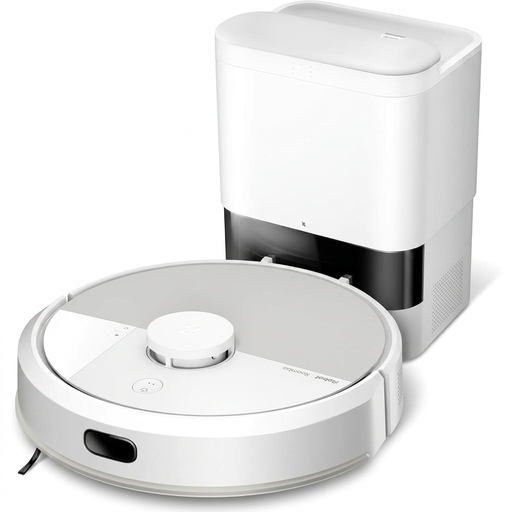 Image unavailable
White iRobot Roomba Combo 115 AE
This robot vacuum and mop comes with an AutoEmpty base to reduce manual emptying. You’ll still need to replace the base bag and regularly clean the bin, filters, brushes, sensors and contacts. Also check that the app is compatible with your phone and see how the model performs on your floors.
View on Joybuy
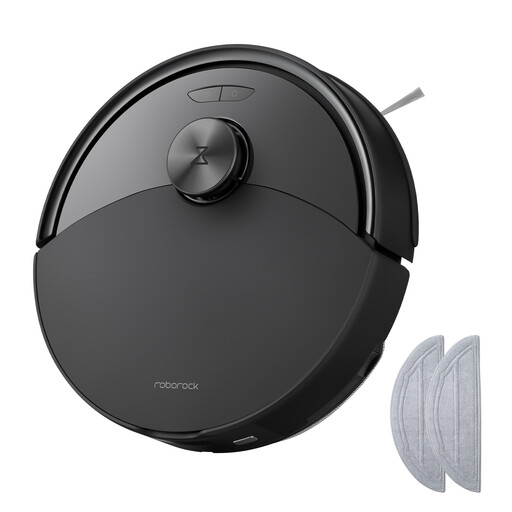 Image unavailable
Black Roborock Q10 S5 vacuum and mop
Worth a look if you want to combine vacuuming and damp cleaning without making a docking station your deciding factor. The product description lists 10 000 Pa, an anti-tangle system and automatic mop lifting. Check how this feature handles your rugs, as well as how you empty the bin and how well the model navigates.
View on Joybuy
Frequently asked questions
Can a robot replace manual cleaning completely?
Not in every home or for every kind of dirt. UFC-Que Choisir assesses vacuuming on different floor types and navigation, and still considers the cleaning performance of robot mops imperfect. Keep a way to deal with corners or stains that the robot can’t handle well enough.
Is a robot mop suitable for a home with rugs?
It can be, if the exact model can handle your rugs and its settings suit their type. For its L10s Pro Gen 2, Dreame recommends using the app to avoid medium- or long-pile rugs and carpets so they don’t get wet. Check the instructions for the robot you’re considering.
Do you need an app to use a robot vacuum?
That depends on the features you want to use and the model you choose. Mapping and no-go zones may rely on an app, so check compatibility before buying. For the relevant Wi-Fi setup, iRobot specifies iOS 15 or later and Android 9.0 or later; these requirements don’t apply to every robot.
What should you do with an old robot vacuum in France?
Take it to a suitable collection point for electrical and electronic equipment rather than putting it in your household rubbish. The Ministry for Ecological Transition notes that these devices may contain batteries or accumulators. ecosystem outlines options for donating a working device or recycling it.


