What should you look for before buying ?
Que Choisir Ensemble compares navigation and cleaning results across different floors; the CNIL also recommends checking what data apps collect and what permissions they request. Start with the need that will have the biggest impact on how you use the robot at home.
| Factor |
What to check before buying |
Who is it for ? |
| Routes and obstacles |
Check room-by-room settings, cables and thresholds; compare the height of your thresholds with the guidance for the exact model. |
If my home has several rooms, cables or thresholds, I want to know where the robot can go before scheduling its cleaning runs. Around 28 % of consumers prioritise navigation and obstacle handling. |
| Vacuuming performance |
Look at tests covering floors, rugs and types of dirt like yours; check the brushes and how to maintain them if you have pets that shed. |
If I have rugs or pet hair to vacuum, I look for results tested on surfaces and dirt similar to those in my home. Around 22 % of consumers prioritise vacuuming their floors and picking up hair. |
| Emptying and maintenance |
Check the maintenance required for the robot and dock, compatible consumables, parts availability and the repairability rating shown. |
If I want to empty the bin less often, I also check which bags, filters and brushes need to be cleaned or replaced. Around 22 % of consumers prioritise emptying and maintenance. |
| Mopping hard floors |
Look for tests on the type of flooring you have; check the cleaning modes, how rugs are handled and how to maintain the pads. |
If I have mostly tiled floors and want to mop regularly, I want to know how it performs on this flooring and what maintenance it needs. Around 17 % of consumers prioritise mopping hard floors. |
| App and data |
Check the app’s compatibility and update terms, the permissions it requests and whether you can disable certain connected features. |
If I’d rather limit the data I share or stay in control of connected features, I check the app before choosing. Around 11 % of consumers prioritise privacy and control over the app. |
Robot vacuums on Joybuy
This selection features robot vacuums with auto-empty docks, so you can compare scheduling, maintenance and mopping features for your floors.
 Image unavailable
Roborock Q7 L5+ with mopping function
Worth considering if you want to schedule cleaning and reduce the need to empty the bin by hand with an auto-empty dock.
The product listing states that it has LiDAR navigation, app control, scheduling and no-go zones.
Its stated suction power is 8 000 Pa; the title also mentions an anti-tangle system.
View on Joybuy
 Image unavailable
Eureka E20 Plus
Worth considering if you’re looking for an auto-empty dock and want to check the rug-handling features of the variant you choose.
The product listing states that it has 8 000 Pa suction, a 2 litre bagless dust container and app control.
The description states that the mop lifts by 10 mm; check that this is high enough for the rugs in your home.
View on Joybuy
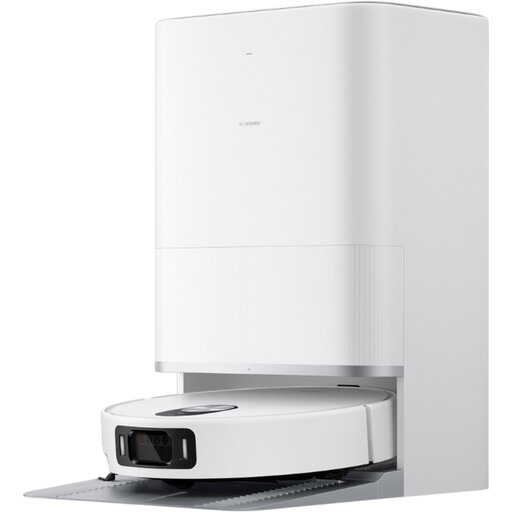 Image unavailable
Xiaomi Robot Vacuum 5 EU, BHR0834EU
Worth considering if you want to combine scheduling and automatic emptying with mop maintenance handled by the dock.
The description mentions app control and rug detection.
The mops are stated to lift by up to 15 mm; the stated cleaning time is up to 2.5 hours.
View on Joybuy
 Image unavailable
Dreame X40 Ultra Complete, white
Worth considering if you want a dock to handle several maintenance tasks and to add mopping to robot cleaning.
The description mentions automatic emptying, mop washing and hot-air drying, as well as app connectivity.
The dock should be placed on a flat, dry floor, with the clearances specified in the instructions.
View on Joybuy
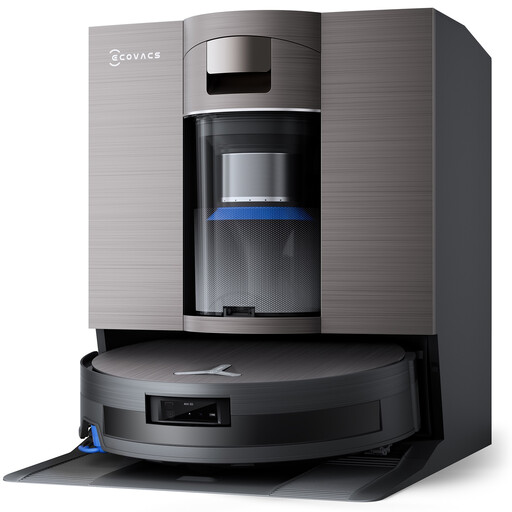 Image unavailable
Ecovacs X11 Omni Cyclone
Worth considering if you’re comparing an auto-empty dock with a mopping function.
The title for this variant states that it has 19 500 Pa suction, the OZMO Roller 2.0 system and a maximum threshold height of 4 cm.
Check these details against the exact model number and compare the stated height with the thresholds in your home.
View on Joybuy
Frequently asked questions
Can a robot clean every floor of your home and cross any threshold ?
No. A robot vacuum can’t go up or down stairs. Measure each threshold and compare it with the guidance for the exact model: Rowenta states that the RR8585WH can cross thresholds up to 18 mm high, but this doesn’t apply to all robots.
What should you do before scheduling a clean ?
Look out for cables and small objects, then check the app settings and make sure the app is compatible with your phone. Les Numériques’ test of the Eureka J15 Pro Ultra reports that this model swallows cables despite navigating methodically.
Does an auto-empty dock mean you don’t need to do any maintenance ?
No. The dock empties dust from the robot’s bin, but the brushes and consumables still need maintaining. Roborock France lists bags, filters and brushes for the Q7 L5+; check which parts are compatible with the model you’re considering.
What legal protections should you check when buying from a trader in France ?
The legal guarantee of conformity applies to new, second-hand and refurbished goods sold by a trader to a private individual. According to the DGCCRF, claims must be made within two years of delivery. Robot vacuums are also among the products covered by the French repairability rating. An optional commercial warranty doesn’t replace these rights.
How can you check the app’s privacy settings ?
Read the information about the data collected and the permissions requested, then check whether you can disable any connected features you don’t want. The CNIL provides general advice on apps and connected robots; this doesn’t certify the privacy of any particular model.


