What to compare before you buy
Navigation or mapping
Worth considering: if you want to schedule cleaning in several rooms or set specific zones, compare the navigation controls and features actually offered by the model.
Bear in mind: a map doesn’t prove that the robot will clean your floors well or avoid every obstacle. Check that the app is compatible, too.
Mopping hard floors
Worth considering: if keeping your tiled floors clean is a priority, look for test results for the specific product reference and check how to care for the mop pads.
Bear in mind: UFC-Que Choisir reports that results vary depending on the stains and advises against the tested mopping function on wooden floors, particularly solid wood floors. Results on tiles won’t necessarily apply to other flooring.
Self-emptying dock
Worth considering: if frequently emptying the robot’s bin is your main concern, check that the version you’re considering includes automatic emptying and find out which consumables are compatible.
Bear in mind: transferring dust doesn’t eliminate maintenance. A dock that also washes the mop pads may need extra attention, including topping up water and cleaning the pads.
A handheld vacuum as a backup
Worth considering: if you have stairs, furniture to vacuum or areas the robot can’t reach, keep a suitable handheld vacuum for those jobs.
Bear in mind: these jobs still need to be done by hand, but they’re separate from the everyday cleaning the robot can take care of.
To choose the right model, first compare test results with the floors and obstacles in your home. Then think about how much time you’re willing to spend maintaining the bin, dock and mop pads. UFC-Que Choisir and Les Numériques cover factors including suction, navigation, noise and maintenance.
| What matters to you |
What to check |
Who it matters most to |
| Suction and navigation |
Test results for the model on your floors, in corners and around obstacles; documented navigation features. |
I want scheduled cleaning to pick up dirt from my carpets and along the walls, without getting stuck on obstacles. Around 33% of consumers put suitable suction and navigation for their floors first. |
| Emptying and the dock |
Automatic emptying on the specific version; collection system, bags and other compatible consumables. |
I want to empty the robot’s bin less often, while knowing which jobs and consumables are still my responsibility. Around 27% of consumers put reducing how often they empty the bin at the heart of their choice. |
| Mopping tiles |
Test results on tiled-floor stains, mop pad maintenance and restrictions for other floor types. |
I want to keep my tiled floors clean regularly, without assuming the robot will remove stubborn stains or be suitable for my wooden floors. Around 20% of consumers prioritise everyday mopping on tiled floors. |
| Long-term use and maintenance |
App compatibility and update information; noise measurements and parts compatible with the product reference. |
I want to schedule cleaning easily and check the noise levels, as well as the availability of parts and software support for the model I choose. Around 20% of consumers prioritise ease of use and maintenance over time. |
Robot vacuums with self-emptying docks
The models featured here pair a robot vacuum with a self-emptying dock; several also have a mopping function. Compare the advertised features and model-specific restrictions with your floors and the maintenance you’re prepared to do.
 Image unavailable
Eureka E20 Plus robot vacuum with dock
Worth considering if you want to combine vacuuming and mopping with a self-emptying dock. Check the mopping instructions for your type of flooring.
The product details list 8 000 Pa suction, 180 minutes’ runtime, a 2 L bagless dock and 10 mm mop lifting when a carpet is detected.
View on Joybuy
 Image unavailable
Eureka J15 Pro Ultra robot vacuum and mop
Worth considering if you’re looking for a robot with a dock that maintains the mop pads. Check that the mopping function is suitable for the floors in your home.
The product details list 16 200 Pa suction and hot-water cleaning at 75 °C. UFC-Que Choisir advises against using the tested mopping function on wooden floors, particularly solid wood floors.
View on Joybuy
 Image unavailable
ECOVACS DEEBOT X9 PRO Omni robot vacuum and mop
Worth considering if you’re looking for a model that combines vacuuming and mopping with a dock. Check the maintenance instructions and any restrictions for your flooring.
The product details list 16 600 Pa suction, hot-water washing of the mop pads and hot-air drying. UFC-Que Choisir advises against using the tested mopping function on wooden floors, particularly solid wood floors.
View on Joybuy
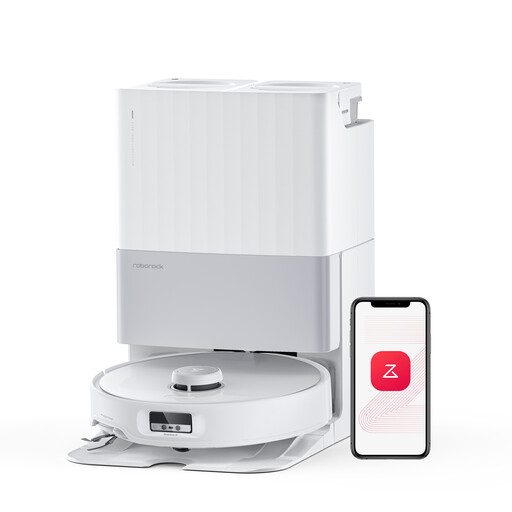 Image unavailable
Roborock Qrevo Edge robot vacuum and mop
Worth considering if you’re looking for a dock that collects dust and maintains the mop pads. Bear in mind the mopping restrictions listed in the product details.
The product details list 18 500 Pa suction and hot-water washing of the mop pads at 75 °C. They advise against mopping long-pile carpets and state that only Roborock cleaning solution should be used. UFC-Que Choisir also advises against using the tested mopping function on wooden floors, particularly solid wood floors.
View on Joybuy
 Image unavailable
Q8-Max robot vacuum with dock and mopping function
Worth considering if you want to schedule cleaning by room and empty the bin less often. Check that the connection is compatible with your network.
The product details list 8 000 Pa suction, LiDAR navigation and 200 minutes’ runtime. Wi-Fi pairing requires a 2.4 GHz network. UFC-Que Choisir advises against using the tested mopping function on wooden floors, particularly solid wood floors.
View on Joybuy
Frequently asked questions
Can a robot vacuum replace a handheld vacuum?
Not for every job. A robot can take care of some everyday cleaning, but it can’t climb stairs or clean furniture. For carpets, corners and hard floors, compare test results for the specific model rather than assuming all robot vacuums perform the same way.
What still needs doing with a self-emptying or mopping dock?
A self-emptying dock transfers dirt out of the robot’s bin, but you’ll still need to empty its container or replace its bag. If it also cleans the mop pads, check the model’s instructions for water and pad maintenance. The intervals given by a manufacturer may not apply to every home.
How can I check that connected scheduling will suit my needs?
Before you buy, check that the app is compatible and find out which features you can access directly on the robot. iRobot says its Wi-Fi-connected robots receive updates when connected and placed on their dock. Check the conditions and software support for other models separately. Cybermalveillance.gouv.fr recommends installing available security updates for connected devices and their apps.
What consumer rights should you check when buying a robot vacuum in France?
For a purchase from a business by an individual, the French Ministry of the Economy says the statutory guarantee of conformity covers new, second-hand and refurbished goods. For a distance purchase from a business, you have at least 14 days to change your mind, subject to the applicable exceptions. Check the terms provided before placing your order. These rights don’t tell you how well the robot performs or whether its parts will be available.


