To keep relatively clear floors maintained while you’re away, choose a robot vacuum if regular dust pick-up is your priority. Consider a robot mop if you’d also like to maintain lightly soiled hard floors. A docking station can reduce some of the hands-on tasks, but you’ll still need to maintain the brushes and tanks. Measure your thresholds, clear cluttered routes and keep a manual cleaning option for areas the robot can’t reach.
Which households might suit a robot vacuum?
Households where people are often out and floors are clear
If you’d like to use your manual vacuum less often, check how the robot schedules its cleaning cycles and accesses different rooms. You’ll also need to empty the dustbin and clean the brushes and filter.
Homes with a mix of hard floors, rugs and thresholds
Measure your doorways and check how the specific model handles rugs, especially if it mops. UFC-Que Choisir’s tests show that results vary by floor type, so one feature alone won’t tell you how well it will clean your home.
Households with pets or frequent messes
Regular cleaning cycles and a docking station could work well with your routine, as long as you allow time to maintain the brushes and filter and, for a robot mop, the tanks. Check which tasks your chosen model actually automates.
What should you check before choosing?
First, decide whether you mainly want regular vacuuming or would also like your hard floors mopped. Then check how easily the robot can access each room and what you’ll still need to do between cleaning cycles.
| Priority |
What to check |
Your needs |
| Access to rooms |
Compare the stated climbing height with the thresholds and rugs you’ve measured. Check the width of your doorways, how the model handles obstacles and its zone settings. |
I want the robot to reach the rooms that need cleaning, even when no one is there to free it. |
| Vacuuming |
Look for test results on the surfaces you have most of, including edges and corners, rather than relying on the stated suction power alone. UFC-Que Choisir tests suction on different floor types. |
Dust or pet hair builds up at home on hard floors and rugs, as well as along the skirting boards. |
| Mopping and rugs |
Check mopping results separately from vacuuming results. Find out how the specific model avoids rugs or handles its mop pads, and what you’ll need to do once the cycle is finished. |
I’d like to maintain my hard floors regularly without assuming the robot will tackle stubborn stains or replace all manual cleaning. |
| Maintenance still required |
Check exactly what the docking station empties, washes or dries. Look at access to the brushes and filter, the tanks, consumables and the space needed to install it. |
If I run frequent cycles, I want to know what tasks I’ll still need to do and where I can put the docking station. |
| Use while you’re away |
Check the scheduling options, room-by-room settings and any preparation needed to clear the routes. If noise and energy consumption matter to you, compare data gathered under similar conditions. |
I want to schedule cleaning while I’m away without leaving cables or small objects in the robot’s path. |
What buying mistakes should you avoid?
-
Choosing based on the stated suction power alone
This figure alone doesn’t show how well the robot picks up dirt from rugs, wooden floors or tiles, or how it performs in corners. UFC-Que Choisir’s test protocol assesses vacuuming on different floors under defined conditions.
Compare results for the surfaces in your home, then use the product specifications to check the dimensions and settings.
-
Assuming it will get over every threshold and obstacle
A threshold, thick rug or object in the way can prevent the robot from reaching a room. Ecovacs support says that, for the models covered by its response, thresholds or rugs over 2 cm high prevent the robot from getting across. This isn’t a limit that applies to every robot.
Measure your obstacles, compare them with the specifications for the exact model and clear the routes before scheduling cleaning cycles.
-
Assuming a docking station means no maintenance
A docking station can handle some tasks, but the brushes and filters still need attention. Depending on the system, you may also need to deal with the clean and dirty water.
Check the station’s functions, the tasks you’ll need to do by hand and the installation space required in the specifications and manual for your chosen model.
-
Expecting a robot mop to deep-clean your floors
UFC-Que Choisir’s tests show that mopping systems don’t all deliver the same results. Stubborn stains and areas the robot can’t reach may still need to be cleaned by hand.
Choose this feature for regular hard-floor maintenance, then check its mopping results and how it handles rugs before you buy.
Which brands are worth comparing?
These ranges give you a starting point for comparing advertised features, but being included here doesn’t mean every model has the same equipment or delivers the same results.
Ecovacs
The DEEBOT range includes robot vacuums and mops, with docking stations available on some models.
- Depending on the model, Ecovacs offers features for cleaning edges, dealing with hair or automating tasks at the docking station.
- Its support pages point out that thresholds, clutter and maintaining the bins or tanks may still require your attention.
Rowenta
The X-Plorer range includes robot vacuums and mops, with features varying by model.
- Rowenta’s product pages describe features such as laser navigation and a collection and cleaning station on some models.
- Check the features of the model you’re considering. Their presence in the range doesn’t show how well it will perform on your floors.
iRobot
The Roomba and Combo ranges include robot vacuums and mops, with different types of base depending on the model.
- For some bases, iRobot describes features such as emptying debris and washing or drying mop pads.
- Check which tasks the base for the specific model handles and which you’ll still need to do by hand.
Roborock
Roborock is among the brands featured in UFC-Que Choisir’s French comparison of robot vacuums.
- The comparison lets you assess specific models rather than judging a whole range by its brand name alone.
- Check how the model you’re considering handles thresholds and mopping, and what maintenance it requires. You can’t assume these features based on the brand alone.
Robot vacuums with a docking station to explore on Joybuy
The models below suit the scenario of regular cleaning with a mopping function or docking station. Compare their advertised features with your floors, thresholds and household maintenance tasks. This selection doesn’t replace deciding between a robot vacuum, a robot mop and additional manual cleaning.
 Image unavailable
ECOVACS Deebot X11 Pro Omni
Worth considering if you’d like to combine vacuuming, mopping and an Omni station for regular cleaning cycles. The product name lists 19,500 Pa and OZMO Roller 2.0; suction power alone can’t predict how it will perform on your floors. Check the maximum threshold height for your home, then allow time to maintain the brushes, filter and tanks.
View on Joybuy
 Image unavailable
Black ECOVACS Deebot T30C OMNI Gen2
This robot vacuum and mop with an OMNI station is worth considering if frequent hard-floor mopping is one of your priorities. Its product name lists 25,000 Pa and mop washing at 75 °C. These are advertised features, not a guarantee of how well it will clean your floors. Check how it handles thresholds and rugs, and what you’ll need to do to maintain the station.
View on Joybuy
 Image unavailable
ECOVACS DEEBOT X9 PRO Omni
For a combination of vacuuming and mopping, its product name lists an OZMO roller, an Omni station, hot-water washing and hot-air drying. The advertised 16,600 Pa doesn’t replace test results on your own floors. Measure the clearance under your furniture and check the maximum threshold height for your home.
View on Joybuy
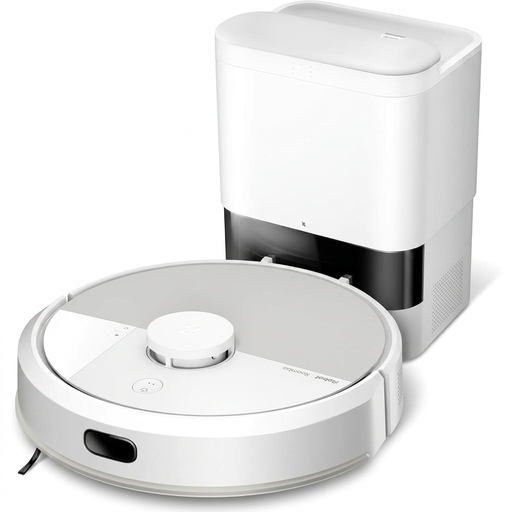 Image unavailable
White iRobot Roomba Combo 115 AE
This Roomba Combo is described as a robot vacuum with a mopping function. If you’d like to cut down on tasks between cycles, check exactly what its base does: emptying dust doesn’t mean the pad is washed or dried automatically. Also compare its dimensions and threshold clearance with the furniture and thresholds in your home.
View on Joybuy
 Image unavailable
Eureka J15 Pro Ultra
Worth considering if pet hair, small obstacles and regular mopping are important to you. Its product name lists 16,200 Pa, anti-tangle technology, liquid detection with brush lifting and hot-water cleaning at 75 °C. These advertised features don’t guarantee how it will perform in your home. Check how it handles your rugs and thresholds, and allow time to clean the robot’s components.
View on Joybuy
Frequently asked questions
Can a robot completely replace a manual vacuum?
Keep a manual cleaning option for stairs, localised messes and areas the robot can’t reach. Robot vacuums are mainly designed for regular maintenance; UFC-Que Choisir’s tests show that results vary depending on the floor and how the vacuum is used.
How can I tell if a robot will get over my thresholds and rugs?
Measure them and compare each height with the stated limit for the exact model. Ecovacs support says that, for the models covered by its response, a threshold or rug over 2 cm may prevent the robot from getting across. This figure doesn’t apply to every model. Also clear the routes and check the rug settings after installation.
Does an emptying or washing station mean no maintenance?
No. Depending on the model, it may empty the dust or wash or dry cleaning components, but the brushes and filters still need maintenance. If you have a washing station, you’ll also need to keep an eye on the clean and dirty water.
What should I do with an old robot vacuum in France?
Consider repairing or donating it if it’s still usable. If you need to dispose of it, ADEME says you can return a vacuum cleaner to the retailer or take it to an in-store collection point.


