Regularly away from home
You want to schedule cleaning while you're at work or out, and check that the robot can follow a clear route and return to its dock.


To keep your floors clean while you're away, choose a robot with scheduling and navigation that suit the layout of your home. Mapping can help you target specific areas, while an auto-empty dock can mean fewer interruptions. However, you’ll still need to prepare its route and maintain the appliance. For mopping, Que Choisir reports mixed results across different floors and advises against using this function on wood, particularly solid wood.
You want to schedule cleaning while you're at work or out, and check that the robot can follow a clear route and return to its dock.
You want to distinguish between rooms or keep the robot away from certain areas. Check that the model offers the mapping and settings you need.
You want to empty the bin less often or add mopping for hard floors, while bearing in mind that the bin, brushes, mop pads and dock will still need maintenance.
To choose a robot that suits your time away, start with the task you want to cut down on, then check what it needs to work properly in your home.
| What matters | What to check before buying | Who considers it most important |
|---|---|---|
| Scheduling | Available days and times; run a test cycle before leaving the robot to work on its own. | If I leave at regular times, I want the robot to start as planned and return to its dock without help. Around 29% of consumers prioritise reliable scheduling. |
| Room coverage | Compare random navigation with mapping; check thresholds, narrow passages, obstacles and areas to exclude. | When several rooms or obstacles make the route more complicated, I want to know which areas the robot can actually reach. Coverage of the home is a priority for around 23% of consumers. |
| Emptying and maintenance | Check whether the dock empties dust or also takes care of the mop pads, and which accessories are included. | If I want to reduce the work needed between cleaning sessions, I check what the dock can do and what still needs cleaning. Around 18% of consumers put reducing manual emptying at the top of their list. |
| Floor compatibility | Identify your floor coverings and check reviews or tests for the model and flooring in question before choosing a mopping function. | With tiles, rugs or wood, I want to know whether the vacuuming and mopping functions are suitable for my floors. Floor compatibility is a priority for around 18% of consumers. |
| App and connectivity | Check the app, network requirements, available features and the manufacturer's guidance on updates. | If I want to schedule the robot remotely, I check the connection requirements and how access is managed. Around 12% of consumers prioritise connectivity and data protection. |
Scheduling doesn't clear obstacles or replace maintenance of the bin, filters or brushes. A cluttered route can also disrupt cleaning or stop the robot from returning to its dock.
Supervise the first cycle and check the recommended maintenance frequency for the model you choose.
A charging dock, an auto-empty dock and a dock that cleans mop pads don't all do the same things. A mopping function doesn't necessarily mean that dust is emptied automatically.
Check which tasks the dock handles and which accessories are included with the exact model.
Que Choisir reports mixed mopping results across different models and floor coverings. Its analysis advises against robot mopping on wood, particularly solid wood.
Check whether your floors are compatible and look for tests of the specific model before choosing this function.
Remote controls may depend on the model's app and network. The CNIL recommends securing connected devices and their access.
Check which features are available on your chosen model, Wi-Fi reception near the dock and the security settings on offer.
The information below relates to documented models or features; it may not apply to every model from a brand.
The documented models illustrate different approaches: the X-Plorer Série 45 RR8275WH is listed with random navigation, while the X-Plorer Série 135+ RR91D5WH is described as having laser navigation and an auto-empty dock.
iRobot France support explains how to schedule certain Wi-Fi-connected Roomba robots and outlines the update requirements for the relevant models.
A question posted on Dreame's French forum asks how to schedule a L10s Ultra Gen 3 Kit to clean every day.
Ecovacs France's guide explains how to prepare the route and dock when using a programmable robot.
eufy's French guide explains how to set schedules and areas on robots with the relevant features.
These models combine vacuuming, mopping and a dock, making them suitable for scheduled, regular cleaning. The tasks they handle and the maintenance still required vary by model.
 Image unavailable
Worth considering if you want to schedule cleaning and empty the bin less often: the product listing specifies app scheduling and an auto-empty dock.
Advertised suction power: 8000 Pa; advertised runtime: 180 minutes. Wi-Fi is limited to 2.4 GHz, and the dock needs a clear space.
 Image unavailable
Worth considering if you want a dock that handles several tasks after cleaning: the description lists bin emptying, water refilling and mop pad cleaning.
Suction power stated in the name: 12000 Pa. The instructions say not to use the appliance on a wet surface and to place the collection bin on a hard floor, not on a rug.
 Image unavailable
Worth considering if you want to organise cleaning using scheduling and mapping: the product listing describes multi-floor mapping and a dock that empties dust, washes and dries the mop.
Advertised suction power: 16 600 Pa. The stated set-up requires an app account and a 2.4 GHz Wi-Fi network. The water tanks and brushes need regular maintenance.
 Image unavailable
Worth considering if you want to schedule cleaning times in an app and have the robot return to its dock afterwards; these features are listed in the description.
Advertised suction power: 8150 Pa; laser navigation and obstacle recognition are stated in the name. The dock needs clear space, and its tanks and dust bag should be checked regularly.
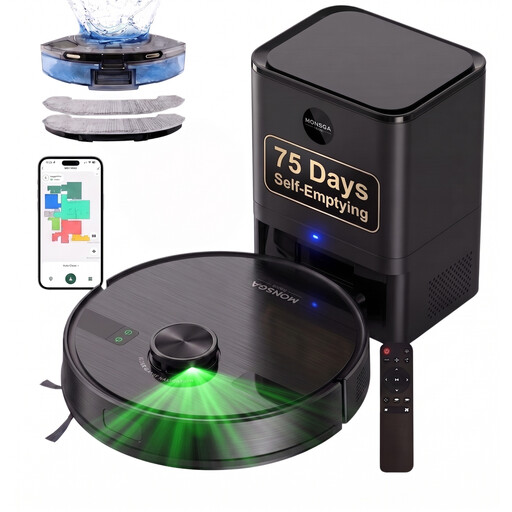 Image unavailable
Worth considering if you want to schedule cleaning using LiDAR navigation and app controls, while emptying the bin less often with an auto-empty dock.
The name states 9000 Pa suction power, a 4,0 L dock and an advertised runtime of 180 minutes. The instructions say to clear the route and place the dock on a hard floor with space around it.
Yes, if the model you choose has this feature: iRobot France support explains how to set the days and times on a compatible connected Roomba. Test its route and return to the dock first, before scheduling a clean while you're away.
Make sure the dock is accessible and the route is clear. Even when scheduled, the robot's bin, filters and brushes need checking. For mopping, follow the model's instructions for maintaining the mop pads and water tank.
It depends on the model. For the iRobot Wi-Fi robots covered by its support article, software updates are carried out while the robot is connected, on its dock and not cleaning. Rowenta France says the X-Plorer Série 45 RR8275WH has an iOS and Android app; check the connection requirements and software support separately for any other model.
For a new item sold by a professional to an individual in France, the legal guarantee of conformity applies. The Ministry of the Economy states that you have two years to claim under it; an additional commercial warranty or insurance policy does not replace it.