Who is a robot mop suitable for?
How useful a robot mop will be depends as much on your flooring and home layout as on how much time you’re still willing to spend maintaining it.
Homes with compatible hard floors
If you’d like to schedule regular cleaning on tiles or another floor type that can be mopped, a robot can take care of some routine maintenance. However, Que Choisir’s tests highlight limitations in mopping performance, so keep a suitable option to hand for targeted cleaning when needed.
Homes with rugs, thresholds or cluttered rooms
Your choice depends on how easily the robot can move between rooms and how well it protects rugs while mopping. Measure thresholds and clearances, then check whether the model you’re considering detects rugs and lets you set no-mop zones.
Homes looking to cut down on some maintenance tasks
A dock can save you from emptying the robot’s small dust bin after some cleaning cycles and, depending on its features, may wash the mop pads or refill the water tank. It still needs a permanent spot, and you’ll need to keep an eye on the brushes, consumables and water system.
What should you check before choosing?
Start by checking that the robot is suitable for your flooring and can move between rooms, then decide how much automation you’re prepared to maintain.
| Priority | What to check | Your needs |
|---|
| Flooring and mopping |
Check that your flooring can be damp-cleaned and that you can switch mopping off. Look at tests covering the types of dirt you’re concerned about: Que Choisir found limitations in its robot mop cleaning tests and advises against mopping wooden floors, particularly solid wood. |
I want to maintain a compatible hard floor regularly, without expecting the robot to remove every dried-on stain. If my flooring must not get wet, vacuum-only mode is a better fit. |
| Rugs and movement around your home |
Compare the stated threshold-climbing height with your measurements. Check rug detection, whether the mop lifts or avoids rugs, and which no-mop zones are available on the exact model. |
With rugs, thresholds and furniture to consider, I need to know where the robot can go without wetting a surface that needs protecting. |
| Dock and maintenance |
Check which tasks the dock handles: emptying dust, washing or drying the mop pads, and refilling the water tank. These features vary by dock. Check how much space it needs and whether you can easily access the tanks, brushes and consumables. |
I’d like to empty the dust bin less often, but I can still clean the brushes and look after the tanks. If I’d rather tackle stains directly, a non-robotic cleaner is still an option. |
| App and ongoing support |
Check that the app is compatible with your home Wi‑Fi, find out about update requirements and check the stated availability of parts for the model you’re considering. Que Choisir recommends checking these points before you buy. |
To schedule cleaning and set no-mop zones, I need an app that works with my network and a device I can maintain over time. |
A guide to the brands
These features apply to the models mentioned, not every device from each brand.
Roborock
The QV 35A is an example of a model with a multifunction dock and LiDAR navigation.
- According to Roborock’s French product page, its dock empties dust, washes and dries the mop pads, and refills the water tank.
- This model is listed as supporting 2.4 GHz Wi‑Fi only, and the dock and its consumables still need maintenance.
iRobot
The Roomba Mini F115040 and Roomba Plus 515 Combo offer two different set-ups: one with a SlimCharge stand and the other with an AutoWash dock.
- According to iRobot France, the Roomba Mini F115040 has LiDAR mapping and avoids rugs while mopping. The Roomba Plus 515 Combo’s dock empties debris and cleans and dries the mop pads.
- Don’t assume these features are available on other Roomba models: iRobot support says some models require you to set no-mop zones manually.
Ecovacs
DEEBOT models can be compared by looking at how each one handles rugs, mop pads and its own dock.
- Ecovacs lists rug detection and, on some models, automatic mop-pad lifting as features to compare for each model.
- You’ll still need to check that the threshold height suits your home. Ecovacs also notes that blocked water outlets or dirty mop pads can affect cleaning performance.
Robot vacuums with docks available on Joybuy
These options combine vacuuming and mopping with a dock. Compare the tasks each dock actually handles, then check your thresholds, rugs and flooring before choosing.
 Image unavailable
Black ECOVACS Deebot T30C OMNI Gen2
For compatible hard floors, this robot and dock let you schedule regular cleaning. The product title lists 25,000 Pa suction, OZMO Turbo 2.0 and dock-based mop-pad washing at 75 °C. These specifications don’t indicate how well it removes stains. Check threshold heights and how rugs in your home can be protected.
View on Joybuy
 Image unavailable
ECOVACS DEEBOT X9 PRO Omni
This set-up combines vacuuming and mopping with a dock for regular cleaning of compatible floors. The product title lists 16,600 Pa, an OZMO Roller, hot-water mop-pad washing and hot-air drying. If your home has different types of flooring, check the exact model’s threshold-climbing ability and how it protects rugs.
View on Joybuy
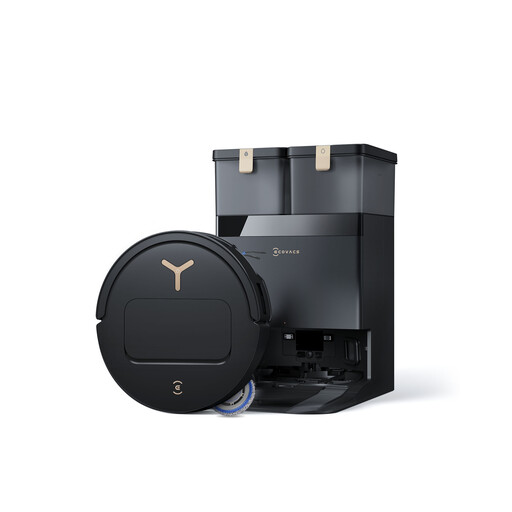 Image unavailable
Black ECOVACS T50 Pro with OMNI dock
If your hard floors are alongside rugs, pay particular attention to how the mop pads are handled during a mopping cycle. The product title lists 9 mm mop-pad lifting, suction power of up to 25,000 Pa and hot-water washing by the dock. Check whether the lift is high enough to protect your rugs and whether the robot can clear your thresholds.
View on Joybuy
 Image unavailable
EUREKA E20 Plus
This model is worth considering if you’d like to empty the dust bin less often while still having a mopping function. The product title mentions a dust collector and app control. Check which mop-related tasks you’ll need to do yourself, as well as how it handles thresholds and rugs in your home.
View on Joybuy
 Image unavailable
White roborock Qrevo S5V
For routine cleaning of compatible hard floors, this model pairs FlexiArm mop pads with a dock. The product title lists 12,000 Pa suction, hot-air drying and obstacle avoidance. Check how it handles rugs and whether it can clear your thresholds before scheduling mopping cycles.
View on Joybuy
Frequently asked questions
Can you use the mopping function on solid wood flooring?
It’s best to avoid it: in its tests, Que Choisir advises against using robot mops on wooden floors, particularly solid wood. For vacuuming only, follow the flooring manufacturer’s instructions and check the robot manual for guidance on your type of floor.
How should you prepare a home with rugs and thresholds?
Measure your thresholds and rug thickness, then compare them with the specifications of the model you’re considering. In mopping mode, check whether the robot detects rugs or lifts its mop, and set no-mop zones if needed. iRobot support notes that some robots don’t detect rugs automatically.
Does a dock mean you don’t have to maintain the robot?
No. Depending on the model, it may empty dust, wash or dry the mop pads, or even refill the robot’s water tank. You’ll still need to check the tanks, brushes, mop pads and consumables. Ecovacs notes in particular that blocked water outlets can affect mopping.
Which cleaning product should you put in the tank?
Only use a solution approved in the manual for the exact model. Ecovacs lists residue from unsuitable cleaning solutions as one possible cause of blockages, so a detergent’s compatibility with another robot doesn’t mean it will work with yours.
How can you check for a safety recall in France?
Search RappelConso using the exact model, GTIN and sales period, then follow the notice’s instructions if your device is affected. A recall for a different model doesn’t tell you whether the robot you’re considering is affected.


