Choosing a new RGB gaming keyboard can often be a daunting task. Between the responsiveness of a mechanical gaming keyboard, the silence of a membrane model, and the space-saving design of a TKL gaming keyboard, it's easy to feel lost. This guide is here to help you make sense of it all and find the keyboard that perfectly matches your gaming habits, your desk, and your budget.
How to Choose an RGB Gaming Keyboard??
Before diving into our top picks, here are the key points to keep in mind to guide your choice.
Mechanical or Membrane?: The Heart of the Typing Experience
The switch type is arguably the most important criterion.
- Mechanical gaming keyboard?: Praised for its precision, responsiveness, and distinct tactile feedback. Each key has its own mechanical switch. Particularly popular, red switches are linear and fast?: they activate with minimal force, making them a formidable advantage for in-game execution speed.
- Membrane keyboard?: Quieter and often more affordable, it relies on a rubber dome under each key. The typing feel is softer and more discreet, which is ideal for late-night gaming sessions or in a shared space.
The Form Factor?: TKL, Compact, or Full-Size??
The size of your keyboard directly impacts your gaming space and freedom of movement.
- Full-size?: The standard keyboard, complete with a number pad.
- TKL (Tenkeyless) format?: A TKL gaming keyboard omits the number pad. This frees up valuable desk space for wider mouse movements, a decisive advantage in many games.
- Compact format (65% / 60%)?: Even smaller, this type of compact gaming keyboard goes a step further by also removing the function and navigation keys, which remain accessible through key combinations. It's the perfect solution for minimalist setups or gamers on the go.
Essential Features?: Anti-Ghosting, AZERTY, and Compatibility
Certain technical features are simply essential for a great gaming experience.
- Anti-ghosting?: This technology allows you to press multiple keys at once without any of them being dropped. Full anti-ghosting (N-Key Rollover or NKRO) guarantees that every keystroke is registered, no matter how many keys are pressed simultaneously.
- The AZERTY Layout?: For us French gamers, an AZERTY gaming keyboard is non-negotiable to feel comfortable, whether in-game or for writing an email.
- Connectivity and Compatibility?: The majority of models are wired gaming keyboards for near-zero latency. Also, remember to check compatibility with your platform, whether you're gaming on PC, PS5, or Xbox.
Gaming Keyboard Recommendations
Let's get to the main event with a few models that caught our eye and cater to very specific needs.
THE G-LAB Keyz Titanium: The Compact and Versatile Mechanical Keyboard
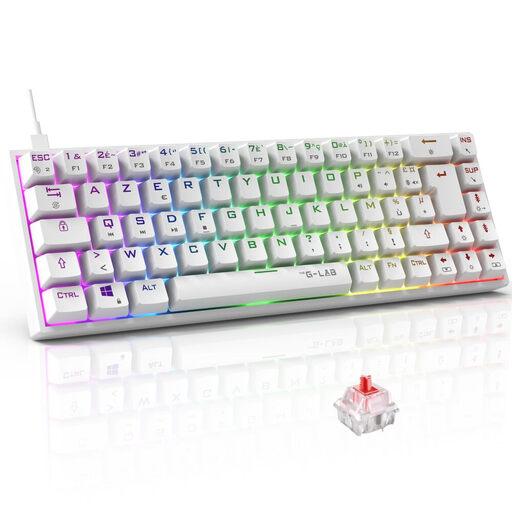
Why it stands out?: The Keyz Titanium from THE G-LAB successfully combines a 65% compact gaming keyboard format with a full AZERTY layout. It offers the best of both worlds?: significant space savings for your mouse without sacrificing French typing ergonomics.
- Pros?:
- Red mechanical switches (Outemu) for optimal responsiveness and precision.
- 100% NKRO anti-ghosting technology, ensuring every action is registered, even in the heat of battle.
- Fully customisable per-key RGB backlighting.
- Wide compatibility?: PC, PS4, PS5, and Xbox.
- Who is it for?
- Gamers seeking the performance of a mechanical gaming keyboard in a compact form factor to optimise their space. It will appeal to both competitive players and fans of clean setups.
THE G-LAB Keyz Caesium TKL: Quiet and Affordable Comfort
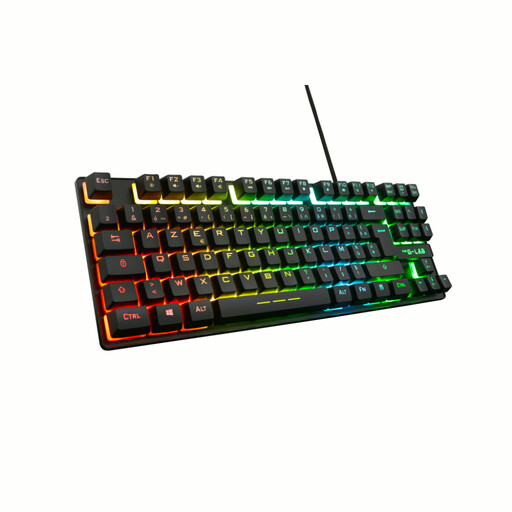
Why it stands out?: This membrane TKL gaming keyboard is the perfect alternative for those seeking both silence and responsiveness. Its tenkeyless format is a real bonus, and its quiet keystrokes make it a great ally for not disturbing anyone.
- Pros?:
- Quiet and comfortable typing thanks to its membrane technology.
- TKL format for an uncluttered desk and greater freedom of movement for the mouse.
- 26-key anti-ghosting, covering the most common combinations used in gaming.
- 15 programmable macros and 12 multimedia shortcuts.
- Who is it for?
- Beginner or casual gamers, those who share their gaming space, or simply anyone looking for a high-performance keyboard without breaking the bank.
THE G-LAB KEYZ ELITE 400 HE: Competition-Grade Performance (QWERTY)
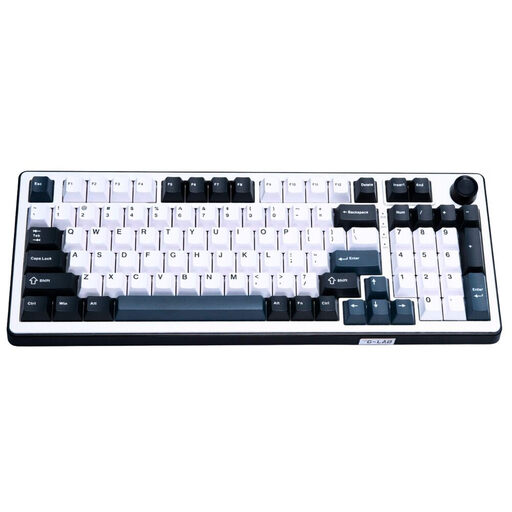
Why it stands out?: This model is aimed at experienced users. With its Hall Effect magnetic switches, it offers near-zero latency and adjustable actuation sensitivity. Its 8000?Hz polling rate immediately positions it as a device built for competition. Please note, this model has a QWERTY layout.
- Pros?:
- Magnetic (Hall Effect) switches for unparalleled responsiveness and durability.
- Polling rate up to 8000?Hz for a near-instantaneous response time.
- Compact 96% format that retains the number pad while being smaller than a full-size keyboard.
- Double-shot PBT keycaps for exceptional wear resistance.
- Who is it for?
- Competitive gamers and hardware enthusiasts looking for top-tier performance who are comfortable with a QWERTY key layout.
Looking for a Different Style??
If setup aesthetics are just as crucial to you as performance, and you're dreaming of a design that stands out from the crowd, don't worry. For models with pastel colours, rounded shapes, or a delightfully retro look, take a look at our selection of cute computer keyboards.
Frequently Asked Questions (FAQ)
1. What is the difference between a mechanical keyboard and a membrane keyboard?
A mechanical gaming keyboard has individual switches under each key, giving it better responsiveness, greater durability, and distinct tactile feedback. A membrane keyboard, on the other hand, uses a common rubber dome sheet?: it's quieter and less expensive, but its typing feel is considered less precise.
2. Is a gaming keyboard compatible with a PS5 or Xbox?
Yes, the vast majority of USB wired gaming keyboards are plug-and-play on consoles like the PS5 and Xbox Series X/S. Simply plug them in to navigate menus and play compatible titles. However, be aware that advanced features (RGB customisation, software-based macros) are generally reserved for PC use.
3. Why choose a TKL or compact keyboard?
A TKL or compact gaming keyboard frees up valuable space on your desk. This extra room allows for much wider and smoother mouse movements, a major advantage in first-person shooters (FPS) or MOBAs. It's also the ideal solution for small desks and minimalist setups.


