
Livraison le jour même ou le lendemain

Qualité garantie

Débloquez vos offres de bienvenue: Livraison GRATUITE | Jusqu'à -80 % | 30 jours d'essai gratuits à JoyPlus
Téléchargez l'application
A gaming headset cluttering your desk, tangled cables, a setup that lacks style… These minor annoyances can quickly ruin your gaming experience and the look of your space. An RGB gaming headset stand emerges as the perfect solution to combine organisation and aesthetics. But be warned: the market is flooded with models making tempting promises that often hide deal-breaking flaws.
To prevent a promising purchase from turning into a disappointment, let's review the most common pitfalls to avoid.
To ensure your gaming headset stand is a true upgrade for your setup, here are the technical features on which you should never compromise.
A stand's number one mission is to keep your headset safe. And for that, it all comes down to its headset base.
A USB hub can turn your stand into a mini docking station. But for it to be genuinely useful, check the following points:
The stand is also an object that enhances your desk: it must integrate perfectly with your setup.
Because every gamer is unique, here are options tailored to different needs and budgets, all selected with our quality criteria in mind.
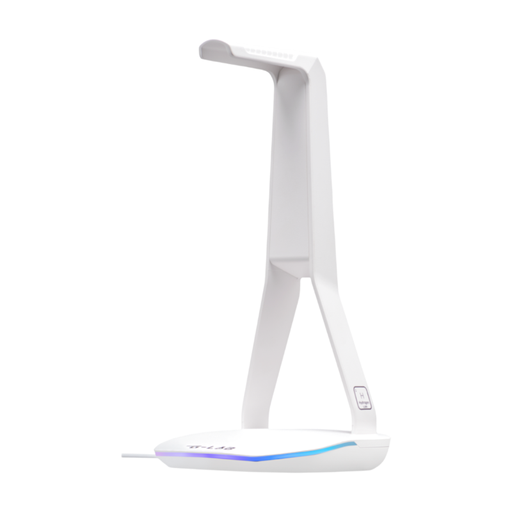
Why we chose it: Ideal for gamers who care about their desk's aesthetics. Its clean white design and controllable RGB backlighting integrate perfectly into a modern, organised setup.
Its non-slip base ensures rock-solid stability. The backlighting has a dedicated button to turn it off, preventing any unwanted visual clutter.
Its hub with 2 USB 2.0 ports and 1 USB-C port centralises your connectivity and lets you plug in or charge multiple peripherals with ease.
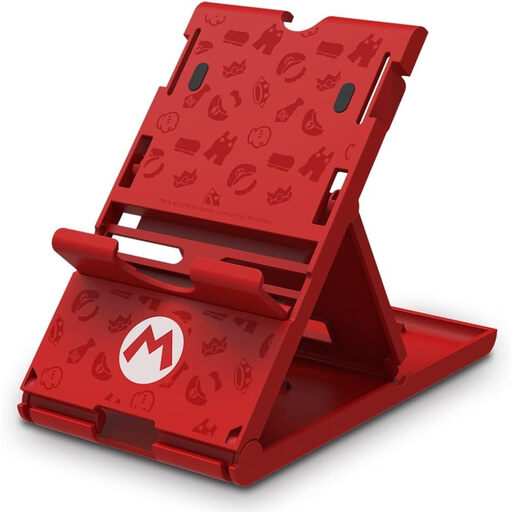
Why we chose it: For Nintendo Switch players, a dedicated console stand is just as crucial. This officially licensed model allows for stable and much more comfortable tabletop mode gaming.
As an official Nintendo product, it guarantees a robust design and a perfect fit, light-years ahead of often wobbly generic stands.
It offers three viewing angles and, most importantly, leaves the USB-C port accessible for charging the console mid-game.
Why we chose it: For those who prioritise efficiency above all: a tidy desk and ports within easy reach. The aesthetics are a bonus, but function comes first.
It counters the "gimmick" USB hub trap by offering three genuinely functional ports that free up your computer's ports for more practical daily use.
Its universal compatibility and long 2-metre braided cable ensure an easy installation, regardless of your headset or desk layout.
Organising your setup doesn't stop with your headset. Discover our complete selection of stands and storage solutions to optimise every corner of your gaming space.
Can a stand with a USB hub damage my PC or peripherals? There's no risk if you choose a quality product that complies with CE standards. A well-designed stand includes protection against power surges and short circuits. It plugs into a USB port on your computer or console and acts as a simple USB hub, posing no danger to your devices.
Are headset stands truly universal? Yes, in the vast majority of cases. Stands are designed with a standard height and width to accommodate almost all audio and gaming headsets. Only models with an exceptionally wide or unusually shaped headband might pose a problem, which is extremely rare.
Does RGB lighting consume a lot of electricity? Absolutely not. The power consumption of RGB LED lighting is negligible and represents a tiny fraction of your electricity usage (a few watts at most). The impact on your bill will be unnoticeable, even if you leave it on 24/7. Furthermore, the best models include a button to turn it off whenever you wish.