
Livraison le jour même ou le lendemain

Qualité garantie

Débloquez vos offres de bienvenue: Livraison GRATUITE | Jusqu'à -80 % | 30 jours d'essai gratuits à JoyPlus
Téléchargez l'application
Building your first battlestation is a thrilling experience. The dream is a space that's not only high-performance for gaming but also visually stunning. RGB lighting has become the centerpiece of this aesthetic, but coordinating all your peripherals can quickly turn into a headache, especially on a budget. How do you assemble a coherent gaming setup kit without getting lost in a sea of options?
This guide is here to shed some light. As the Head of Product Recommendations at Joybuy, my mission is to help you see things more clearly. We've decoded the trends and expectations of young gamers to bring you a selection of components that pair perfectly, combining style, performance, and an affordable price.
Before we unveil our selection, here are a few key points to check when building your own gamer peripheral bundle.
The key to a successful setup? Cohesion. RGB lighting isn't just a gimmick: it creates an atmosphere and enhances immersion. Look for products with customizable lighting effects. Even with products from different brands, choosing devices with similar color palettes or adjustable lighting modes will allow you to create a unified visual look for your complete desk setup.
For a first-time build, simplicity is key. Prioritize PC gaming accessories that are plug-and-play via a simple USB connection. Also, make sure they are compatible with your operating system (Windows, macOS). Multiple connectivity options, like Bluetooth or a 3.5mm jack, are a real bonus for easily connecting other devices like a console or smartphone.
Looks should never come at the expense of performance. For an RGB keyboard and speaker combo, there are several points to watch out for:
Rather than a rigid, pre-packaged bundle, we've selected three complementary products that, together, form a solid and stylish foundation for any gaming setup.
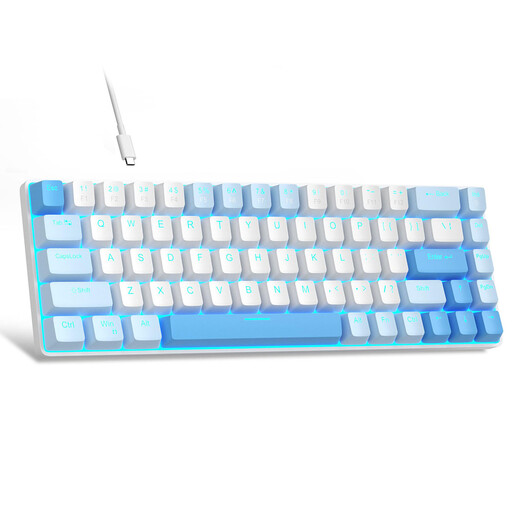
Why it stands out: This keyboard combines an ultra-compact form factor with the responsiveness of mechanical switches, all in a unique two-tone design. It frees up valuable desk space for wide mouse movements, which are essential in gaming.
Advantages:
Who is it for? Gamers and content creators who want to optimize their desk space and are looking for a responsive mechanical keyboard with a polished look.
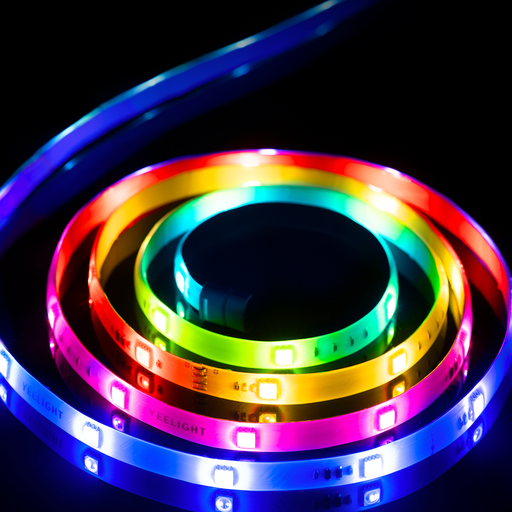
Why it stands out: This LED strip goes far beyond standard RGB thanks to its RGBIC technology. Each LED can be controlled independently, allowing multiple colors to be displayed on the strip at the same time for ultra-smooth gradients and spectacular dynamic effects.
Advantages:
Who is it for? Those who want to turn their desk into a true light show and sync their lighting with their games or music.
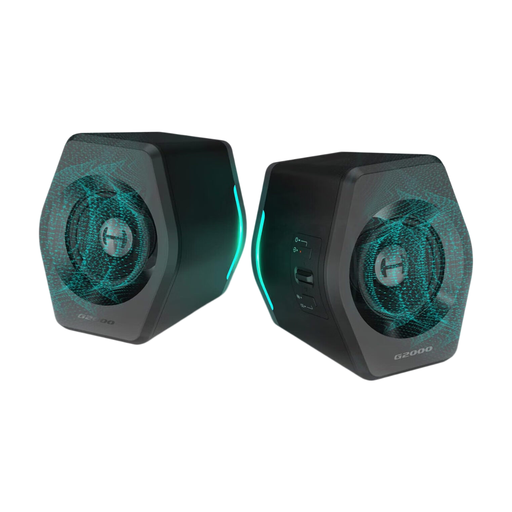
Why they stand out: These compact speakers deliver a surprising 32W of power and integrate a DSP sound card. According to Edifier, it can generate a virtual 7.1 surround effect via their software, which radically boosts sound immersion.
Advantages:
Who is it for? Gamers looking for an audio solution that is far more compelling than their monitor's built-in speakers, while adding a synchronizable RGB touch to their setup.
When it comes to lighting, the only limit is your creativity. If you want to explore other ways to illuminate your space, from light bars to wall panels, our dedicated category is full of gems.
? Discover our selection of LED Desk Lights for a custom atmosphere.
Yes, absolutely. Building a bundle from hand-picked products simplifies things greatly. It ensures aesthetic and functional consistency and saves you from spending hours comparing dozens of references. It's the easiest and fastest way to get a complete desk setup that's functional and hassle-free.
Syncing lighting between devices from different brands is often a real headache. The simplest method is to use products from the same brand, controlled by a single piece of software. Alternatively, you can always manually set a static color or similar effects on each peripheral to create visual harmony. Third-party software exists, but its compatibility is far from guaranteed.
Absolutely not! That's no longer the case. The market for PC gaming accessories has become ultra-competitive. Many brands now offer high-performance products with sleek designs at very accessible prices. By intelligently choosing a keyboard, an audio system, and ambient lighting, it's entirely possible to build an impressive RGB gaming bundle without breaking the bank.