
Livraison le jour même ou le lendemain

Qualité garantie

Débloquez vos offres de bienvenue: Livraison GRATUITE | Jusqu'à -80 % | 30 jours d'essai gratuits à JoyPlus
Téléchargez l'application
Does your bag look like a tangled mess of cables? Are you constantly juggling chargers for your laptop, smartphone, and tablet? For digital nomads and frequent travelers, managing charging accessories can be a real headache. The retractable cable charger emerges as the game-changing solution to bring order to your digital life.
This guide is here to help you make an informed decision. We'll break down the essential criteria to consider before you buy and present our selection of the best models, designed for users who refuse to compromise on efficiency and convenience.
Before you take the plunge, it's crucial to understand a few technical specifications that will make a real difference in your daily use.
Power, measured in watts (W), determines how fast your devices charge. A 65W or 67W fast charger is now a highly versatile standard, capable of efficiently powering a wide range of devices.
A good charger for MacBook and iPhone should therefore not only offer sufficient power but also the right ports (USB-C and, if needed, Lightning).
The acronym GaN stands for gallium nitride. A GaN charger uses this next-generation semiconductor to replace traditional silicon. The advantages are immediate:
The goal? To replace your entire collection of chargers. A good model should be a multi-port USB-C charger and, ideally, include other connectors. The key feature of a wall charger with an integrated cable is the presence of one or more retractable cables (USB-C, Lightning) built directly into the housing—no more loose cables at the bottom of your bag.
Here are a few models that stand out for their design and features, specially selected for the most demanding users.
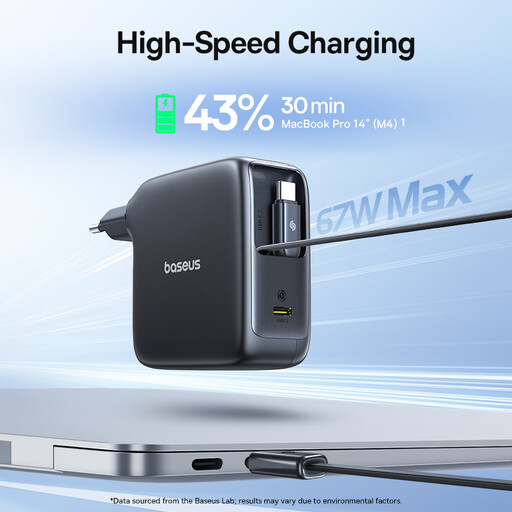
Why it stands out: The Baseus model is one of the few to feature two retractable cables (one USB-C and one Lightning), in addition to a free USB-C port. It's the ultimate solution for those who juggle between Apple and Android ecosystems.
Advantages:
Who is it for? Ideal for users with an iPhone, a USB-C laptop, and other accessories. It allows you to charge three devices simultaneously without needing any external cables.
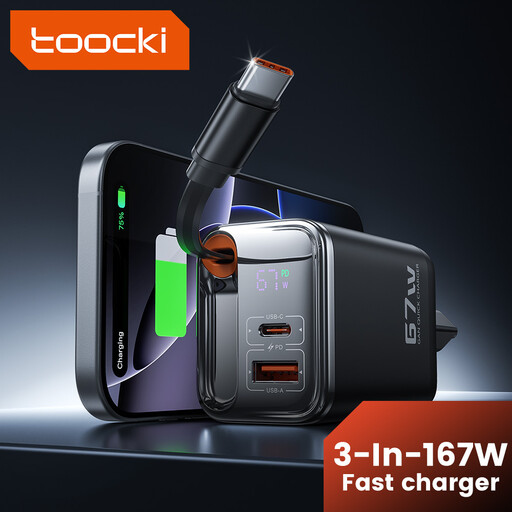
Why it stands out: This charger combines a retractable USB-C cable with a great selection of additional ports, including two USB-A ports. This ensures broad compatibility with older devices that haven't yet abandoned this standard.
Advantages:
Who is it for? For anyone who needs to charge a modern laptop and smartphone, as well as accessories (smartwatch, earbuds, power bank...) that still use USB-A.
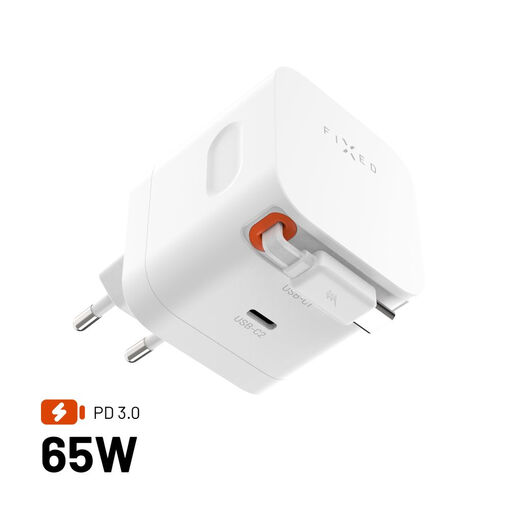
Why it stands out: This model goes all-in on GaN technology to deliver 65W in an ultra-compact form factor. Its 64 cm retractable USB-C cable stores neatly thanks to a magnetic clip, making it the quintessential travel charger.
Advantages:
Who is it for? For the traveler or minimalist looking for the most compact and technologically advanced solution to power their laptop and smartphone.
Our selection highlights very specific all-in-one solutions. If your needs are different, or if you simply want to explore a wider range of chargers, many other options are available.
Explore our full collection of chargers to find the perfect model that matches your devices and lifestyle.
1. Is a 65W GaN charger powerful enough for a laptop? Yes, for most ultraportables like the MacBook Air, Dell XPS 13, or HP Spectre. A power output of 65W or 67W is sufficient to power them and recharge their battery, even during use. For more power-hungry machines (mobile workstations, gaming PCs), it's still essential to check the manufacturer's recommended wattage.
2. Can I use a multi-port charger to charge several devices at once? Absolutely. That's the main benefit of a multi-port USB-C charger. Just be aware that the total power (e.g., 67W) is shared among the different ports. The charger intelligently distributes the power: if you plug in a laptop and a smartphone, it might allocate 45W to the former and 20W to the latter, for example.
3. Is the retractable cable mechanism reliable in the long run? These mechanisms are designed to withstand thousands of uses. To maximize their lifespan, it's best to guide the cable as it retracts rather than letting it snap back. Also, avoid pulling the cable beyond its limit to prevent damaging the internal spring. A little care will ensure its longevity.