
Livraison le jour même ou le lendemain

Qualité garantie

Débloquez vos offres de bienvenue: Livraison GRATUITE | Jusqu'à -80 % | 30 jours d'essai gratuits à JoyPlus
Téléchargez l'application
Resin 3D printing is fascinating: it promises an unparalleled level of detail for your miniatures, prototypes, or precision parts. But the market is a jungle of technical jargon and marketing promises that can quickly lead you astray. As a product expert for Joybuy, my mission is to help you see clearly and make an informed choice without breaking the bank.
Before you dive in, let's break down the most common pitfalls and the essential criteria to check.
Falling for spec sheets without understanding their practical implications is the surest way to be disappointed. Here are two major pitfalls to avoid.
Manufacturers love to highlight impressive resolutions: 9K, 12K, and even 14K 3D printers. However, while high resolution matters, it isn't everything. A 14K screen mounted on a machine with an uneven light source or an unstable Z-axis will produce disappointing results. The XY resolution, measured in micrometres (?m), is a much more telling indicator of the actual level of detail. The lower this number, the smaller the pixels and the more precise the details. Don't be dazzled by the "K" number; it's just one piece of the puzzle.
Buying a resin 3D printer is just the beginning of the journey. Once the object is printed, it's still tacky, fragile, and must go through two critical steps: washing and curing. Too many beginners discover too late that this process, if done by hand, is messy, tedious, and requires handling chemicals like isopropyl alcohol (IPA).
Skipping this equipment often leads to failed prints and a healthy dose of frustration. A washing and curing station (like the Anycubic Wash and Cure series) is an almost mandatory investment to achieve clean, safe, and consistent results.
To make a smart choice, focus on these three parameters that determine the quality and reliability of your prints.
Light Source and Uniformity: The technology behind the LCD screen is crucial. A COB (Chip-on-Board) light source paired with a Fresnel lens, for example, ensures a much more uniform distribution of UV light across the entire print surface. A uniformity of over 90% is an excellent indicator. This guarantees that the edges of your model are cured just as well as the centre, a critical point for rapid prototyping and complex miniature 3D printing.
Build Volume and Mechanical Stability: First, determine the maximum size of the objects you plan to print. A large build volume is tempting, but it demands flawless mechanical stability. Check the Z-axis structure. Dual linear rails are often preferable to a single rail for large-format machines, as they prevent vibrations and the "Z-wobble" effect that ruins layer quality.
Resin Compatibility and Choice: Not all resins are created equal. To start, a water-washable resin greatly simplifies cleanup. For functional parts, an ABS-like resin will offer better impact resistance. Make sure the printer you're considering is compatible with a wide range of 405 nm 3D resin, which will give you more flexibility for future projects.
Rather than an endless list, here are our targeted recommendations for different user profiles.
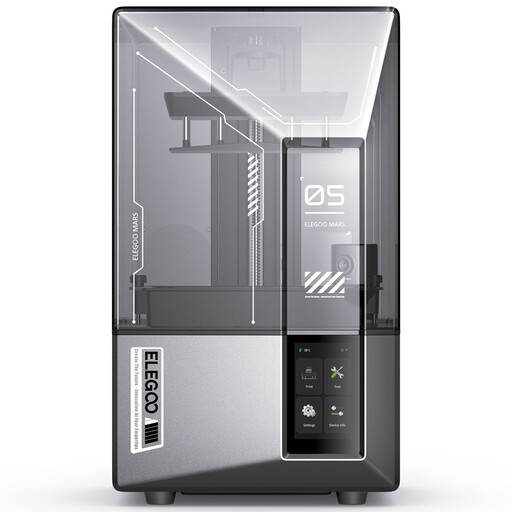
Why it's a great choice: The Elegoo Mars 5 Ultra is an excellent starting point. It combines a 9K resolution (18 ?m) with smart features like auto-levelling and an AI camera for error detection. It's a machine that is forgiving of beginner mistakes while ensuring high print quality for miniatures and small objects.
It doesn't just boast a high resolution; it pairs it with a uniform COB light source and smart assists that make resin 3D printing more accessible and reliable from the very first use.
Auto-levelling and AI error detection for a hassle-free experience. High print speed up to 150 mm/h.
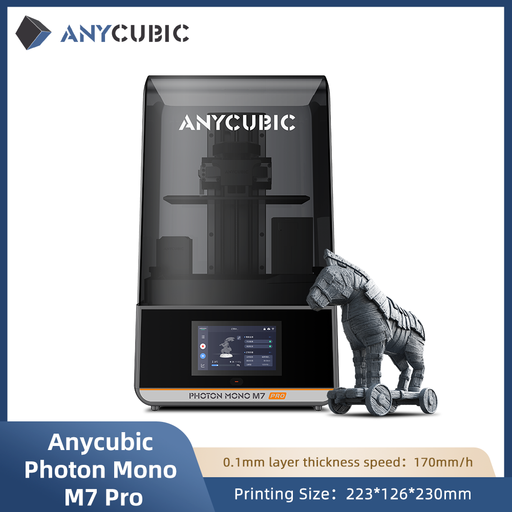
Why it's a great choice: For those who want to produce high-precision parts quickly. This **Anycubic 3D printer** offers 14K resolution (16.8 × 24.8 μm) and stunning speed. Its advanced features like resin temperature control and auto-filling make it a true production tool for small batches or functional prototypes.
It justifies its 14K resolution with a LighTurbo 3.0 optical system and features that stabilise the process (heating, auto-fill), turning the promise of high resolution into concrete, repeatable results.
Very high resolution (14K) for extreme detail. Automation features for a more efficient workflow and less waste.
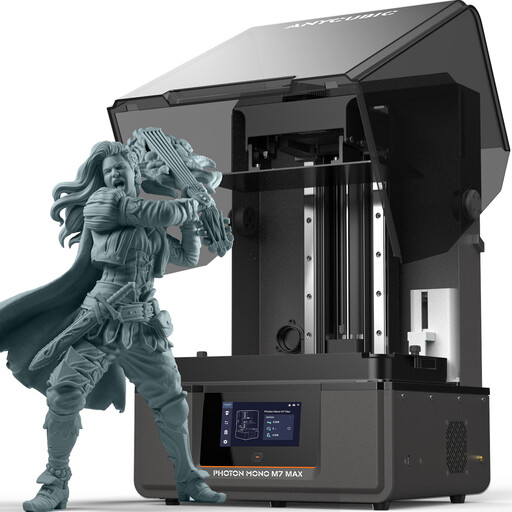
Why it's a great choice: When size truly matters, this model stands out. With a massive 14.7-litre build volume (298 x 164 x 300 mm), it's designed for large projects, batch production, or professionals (designers, engineers) who need to print large parts in a single piece. The dual linear rail Z-axis ensures the stability required for such dimensions.
It isn't just big. It provides solutions to the specific problems of large-format printing, like resin temperature control and an automatic recycling system, which are essential for successfully completing prints that take hours.
XXL build volume for the most ambitious projects. Reinforced mechanical stability to guarantee quality on tall prints.
Don't forget to pair your printer with a suitable post-processing station, like the ANYCUBIC Wash & Cure 3 Plus, whose large capacity is ideal for models from large-format printers.
We have curated a comprehensive and up-to-date selection of products that meet our strict selection criteria and current safety standards.
While it's possible to do these steps by hand, a dedicated wash and cure station is highly recommended. It automates the process, ensuring a thorough clean and uniform cure, which is essential for achieving the expected mechanical strength and surface finish. It's also a much cleaner and safer solution, limiting your exposure to resin and solvent fumes.
Water-washable resin simplifies cleanup by replacing isopropyl alcohol (IPA), which reduces odours and risks. However, be aware: it's crucial to understand that the rinse water, now contaminated with resin, is still hazardous waste. It must never be poured down the drain. You need to leave it in the sun for the resin particles to cure, then filter the water before disposing of the solid residue with your household waste.
Modern monochrome LCD screens have a much longer lifespan than older generations, typically around 2,000 printing hours. However, it is a consumable part that will eventually need to be replaced. To extend its life, proper maintenance is key: avoid resin spills on the screen and handle the vat carefully to prevent scratches.