
Livraison le jour même ou le lendemain

Qualité garantie

Débloquez vos offres de bienvenue: Livraison GRATUITE | Jusqu'à -80 % | 30 jours d'essai gratuits à JoyPlus
Téléchargez l'application
A rechargeable ergonomic wireless mouse can make working days, studying or long gaming sessions considerably more comfortable. However, product specifications can sometimes be overloaded with claimed battery life, maximum resolution and promises of comfort. To avoid unpleasant surprises, it is better to focus on the shape, connectivity and your actual usage conditions.
An ergonomic vertical mouse will not automatically suit every hand. Likewise, a high DPI count does not necessarily make the pointer more precise in everyday use. Here are the criteria to review before comparing models.
DPI refers to the sensor’s sensitivity—in other words, the distance travelled by the cursor for the same mouse movement. A mouse with a high resolution can be useful for graphic design or gaming, but a record-breaking figure offers little benefit for office work.
For checking emails, working on spreadsheets or browsing the web, an adjustable range of 800 to 2 400 DPI is generally sufficient. Graphic designers and gamers may want more adjustment options, while also checking the supplied software, polling rate and connection stability.
An ergonomic mouse for right-handed users does not have the same shape as a left-handed model. A vertical mouse designed for the right hand can therefore become genuinely uncomfortable when used in the left hand. Hand size, grip style—palm, fingertip or claw—and the amount of space available on your desk also need to be taken into account.
Before placing your order, check whether the product is described as « right-handed » or « left-handed », along with its weight and dimensions where these are provided. A vertical mouse may also take a few days to get used to.
The fact that a mouse is rechargeable does not tell you everything. Check the cable type, whether it has a USB-C port, the stated charging time and whether you can continue using it while it charges. An integrated battery means you do not need to buy disposable batteries, but it must be used in accordance with the manufacturer’s recommendations.
With a lithium-ion battery, use a certified USB charger and keep the mouse away from heat, moisture and impacts. At the end of its life, the mouse and its battery must be taken to a collection point for waste electrical and electronic equipment.
An ergonomic vertical mouse generally places your forearm in a different position from the one used with a conventional mouse. This may suit people who spend several hours in front of a computer, but it is not a medical guarantee. Alternating tasks, adjusting the height of your chair and taking regular breaks remain essential.
The surface should provide a stable grip without making you squeeze the mouse. A matt or slightly soft-touch finish can improve contact, while a glossy finish tends to show more fingerprints.
A Bluetooth wireless mouse connects directly to many compatible laptops, tablets and other devices. It does not take up a USB port, which is particularly useful with a MacBook or ultraportable laptop.
The 2.4 GHz receiver, often supplied in nano format, is easy to connect to PCs without Bluetooth or connected to a docking station. Dual-mode models let you choose the connection best suited to each device. For a mouse compatible with PC and Mac, still check that the customisation software works properly on macOS.
The number of buttons should match your usual activities. Six buttons can speed up navigation, access to office shortcuts or certain creative tasks. For gaming, programmable controls, integrated memory and support for multiple profiles become more important.
A silent mouse limits audible clicks in a shared office, library or during a video conference. This does not necessarily mean that the scroll wheel and every button are completely silent, so remember to check the detailed description.
The models below are presented based on their published specifications and potential uses. They do not constitute medical advice.
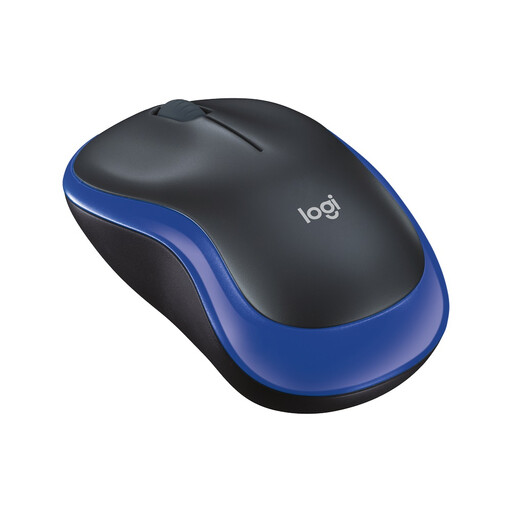
Why this model suits this profile : Its compact design is equally suitable for mobile use and everyday office work. The 2.4 GHz receiver plugs into a compatible PC or Mac, with no software configuration specified.
The listing states that it has a 1 000 DPI optical sensor and up to 12 months of battery life with one AA battery. This puts resolution figures into the right context.
Compact design, scroll wheel with line-by-line scrolling, shape advertised as suitable for both right- and left-handed users, on/off switch.
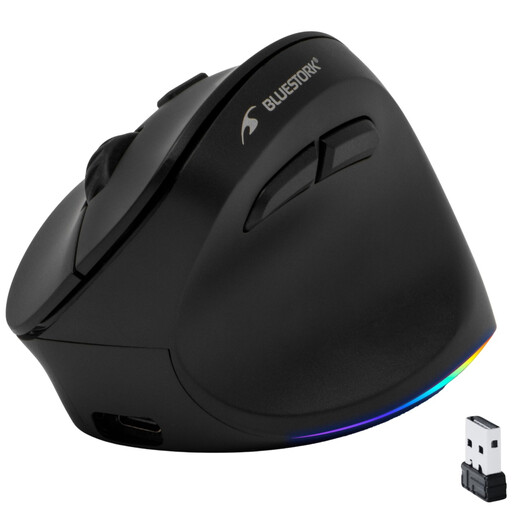
Why this model suits this profile : Its vertical right-handed design, six buttons and USB-C charging are well suited to days spent switching between documents, browsing and meetings.
The listing specifies an adjustable range of 800 to 2 400 DPI, despite the commercial name mentioning 4 800 DPI. This is a useful distinction when comparing verifiable data rather than a simple product title.
Dual Bluetooth and 2.4 GHz connectivity, integrated battery, USB-C port, silent clicks and customisable RGB lighting.
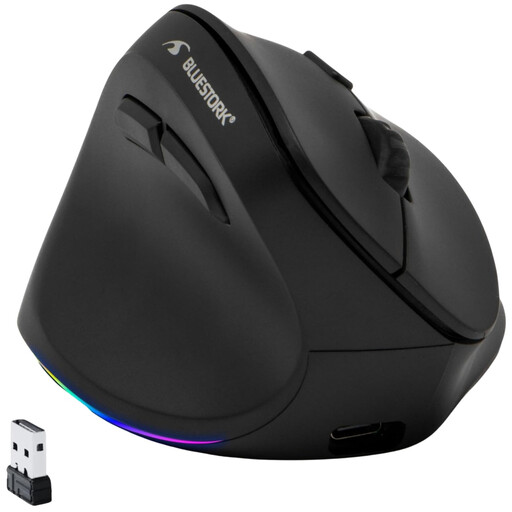
Why this model suits this profile : Its vertical grip is explicitly designed for the left hand, a feature that is still uncommon among ergonomic mice.
The product reference clearly states that it is designed for left-handed users and connects via a 2.4 GHz nano receiver. The risk of ordering a mouse with the wrong shape is therefore reduced.
Adjustable DPI up to 4 800 according to the listing, USB-C charging, RGB lighting and advertised compatibility with Windows PCs.
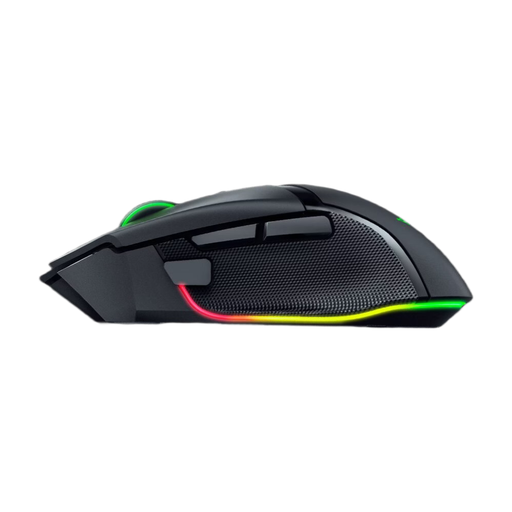
Why this model suits this profile : This mouse is aimed at gamers and creators who want to customise controls, lighting and sensitivity in a compatible Windows environment.
The listing details the three connection modes, 11 programmable controls and integrated profiles. However, you will need to install Razer Synapse software to access customisation options.
Sensor advertised at up to 30 000 DPI, 2.4 GHz, Bluetooth and USB-C connectivity, 13-zone RGB lighting and a four-way multidirectional scroll wheel.
We have put together a comprehensive, regularly updated selection of products that meet these strict criteria, while also taking European safety regulations into account.
Yes, provided that the listing mentions macOS compatibility and that the selected connection mode is supported. Bluetooth generally avoids taking up a USB port. With a 2.4 GHz receiver, however, an adapter may be required for some newer Macs.
It depends on the battery capacity and charging circuitry. Use the supplied cable or a certified USB charger, following the manufacturer’s recommendations. To avoid being left without a mouse, recharge it as soon as the battery level becomes low rather than waiting for it to switch off completely.
Depending on the model and settings, RGB lighting can reduce battery life compared with a mouse whose light effects are switched off. If you prioritise operating time, reduce the intensity or turn off the animations. Gamers will appreciate the customisation options, while a shared workstation will benefit more from a discreet, silent mouse.