
Livraison le jour même ou le lendemain

Qualité garantie

Débloquez vos offres de bienvenue: Livraison GRATUITE | Jusqu'à -80 % | 30 jours d'essai gratuits à JoyPlus
Téléchargez l'application
A conversation at a railway station, a meeting with an overseas business partner or ordering in a restaurant can quickly become a challenge when language gets in the way. Real-time AI translation earbuds promise to make these situations easier, but product listings do not always give you a clear idea of how they work.
Before buying Bluetooth translation earbuds, an instant translation headset or a portable voice translator, three points deserve careful attention: the languages genuinely supported, reliance on the app and battery life in real-world conditions. Here are the criteria to consider when comparing different models, without relying solely on marketing claims.
A claim such as “voice translation in 150 languages” generally refers to the compatibility advertised by the manufacturer or seller. It does not mean that all languages offer the same functions, or that translation can be used without an internet connection.
Voice recognition quality can also vary depending on:
When travelling, therefore, check whether the app allows you to download languages for offline use, or whether an internet connection remains essential.
Smart translation earbuds often rely on a mobile app. You will usually need to scan a QR code supplied in the manual, install the app, switch on Bluetooth and then select the target language.
Without a compatible smartphone, an available app or correctly configured permissions, translation may be limited or even impossible. Before placing your order, check compatibility with your Android or Apple phone, as well as the app’s terms of use.
A claimed battery life of 5 to 7 hours generally applies to use under specific conditions. Translation, calls and audio playback do not place the same demands on the battery. The case capacity also matters: the M76, M75, M112 and M113 models feature a 40 mAh battery per earbud and a 300 mAh battery in the charging case.
For a long journey, choose a model supplied with its case and charging cable. Remember to charge everything before setting off.
The models featured here use Bluetooth 5.4 and several VoxorAI earbuds claim a range of up to 15 metres. However, this theoretical distance can be reduced by walls, interference or when your phone is kept in a bag.
Bluetooth connects the earbuds to your smartphone. It does not guarantee that translation will work without the internet: this point must be confirmed in the manual or directly in the app.
An in-ear model such as the M76 will suit those looking for a discreet design. An ear-hook model such as the M75, M112 or M113 may be better suited to users who prefer a different type of fit while travelling or during everyday activities.
Comfort is closely linked to each individual’s ear shape. For several hours of professional or tourist use, check the weight, shape and whether tips in different sizes are included.
The listings for these products mention a noise isolation function. This should not be confused with active noise cancellation measured according to a standardised protocol. In a busy environment, moving the microphone closer to the person speaking and avoiding overlapping conversations can improve voice recognition.
For important conversations, it is best to keep a back-up option available: a translation app on your phone, an offline dictionary or a written phrase prepared in advance.
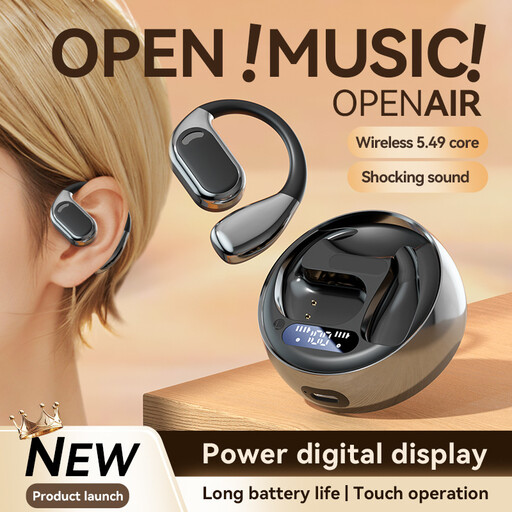
Why this choice suits this profile : its in-ear design and touch controls make it easy to use for a first purchase, whether you want to travel, study or have everyday conversations.
The listing mentions a dedicated app, Bluetooth 5.4 and a claimed battery life of around 5 to 7 hours : useful details to check before setting off.
In-ear earbuds, touch controls, a 300 mAh charging case and claimed support for around 150 languages.
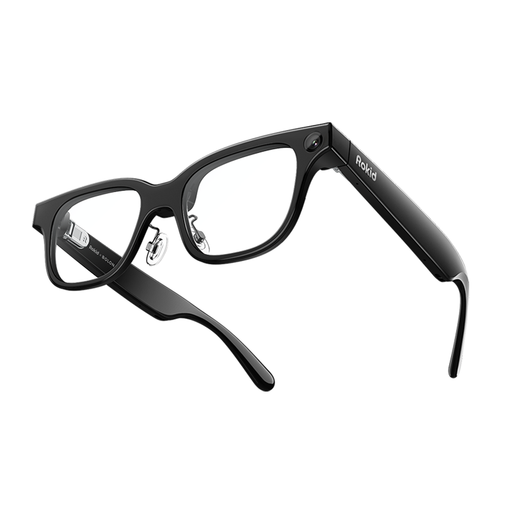
Why this choice suits this profile : this design is aimed at those who want to combine translation, display and connected features in a single portable device.
This product is more than just a pair of glasses : before buying, check the terms of use for the display, translation and various connected features.
Smart glasses with a display, AI assistance features, claimed real-time translation and a stated weight of 49 g.
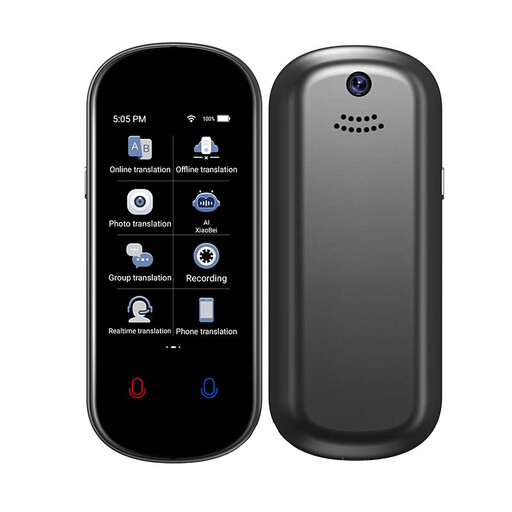
Why this choice suits this profile : its standalone design is aimed at professionals on the move, expats and travellers who prefer a dedicated voice translator to earbuds.
The listing distinguishes between online translation in 139 languages and offline translation in 17 languages. This is useful information for preparing for situations without network coverage.
Voice, photo and text translation, Wi-Fi or hotspot connection, plus a compact ABS and aluminium alloy casing.
We have put together a complete, regularly updated list of products that meet these demanding selection criteria and European safety standards.
To get started with multilingual translation earbuds or a portable voice translator:
Clean the earbuds with a dry cloth. Avoid water, prolonged exposure to moisture and extreme temperatures. Smart translation glasses must not be used while driving, cycling or operating machinery.
Not always. Translation depends on the model and the app. Some devices offer a limited number of offline languages, while others require a Wi-Fi connection or mobile data. For example, the Rexsun Z2 claims to support 17 offline languages and 139 online languages, according to its listing.
The VoxorAI earbuds featured here claim around 5 to 7 hours of playback. Actual battery life varies depending on translation use, calls, volume and connection quality. The charging case extends usage sessions, but it also needs to be recharged regularly.
Earbuds are suitable for those who want to keep their hands free and use a discreet device. A dedicated voice translator can be more convenient for sharing its screen, using photo translation or having a separate device during group conversations. The best choice therefore depends on the situation, your mobility and the features you genuinely need.