
Livraison le jour même ou le lendemain

Qualité garantie

Débloquez vos offres de bienvenue: Livraison GRATUITE | Jusqu'à -80 % | 30 jours d'essai gratuits à JoyPlus
Téléchargez l'application
The iPad is a fantastic tool, but to unlock its full potential, an external keyboard is often essential. To transform your tablet into a credible laptop alternative, choosing the right QWERTY iPad keyboard case is crucial. The problem? The market is flooded with options, some with misleading promises. As a product expert at Joybuy, my mission is to guide you through this jungle and help you identify the criteria that truly make a difference.
Before you start, watch out for these three common pitfalls that can turn a good investment into a costly disappointment:
To avoid these unpleasant surprises, focus on a few essential points. They are your guarantee of a lasting and successful purchase.
This is the absolute starting point. Before even looking at features, identify the exact model number of your iPad. It's engraved on the back of the device (an "A" followed by four digits, like A2757 for a 10th-generation iPad) or can be found in Settings > General > About.
The spec sheets for reputable keyboards, especially for iPad Pro or iPad Air, list the compatible model numbers precisely. Skipping this step is the number one cause of product returns.
A true QWERTY Bluetooth keyboard must, of course, follow the standard layout for fast, intuitive typing. But beyond the arrangement, the quality of the keys themselves is paramount.
Far from being gimmicks, these two options determine whether your iPad remains a simple input device or transforms into a true mobile workstation.
To help you make the right choice, we've matched specific models to real-world use cases. Find the one that fits your daily life.
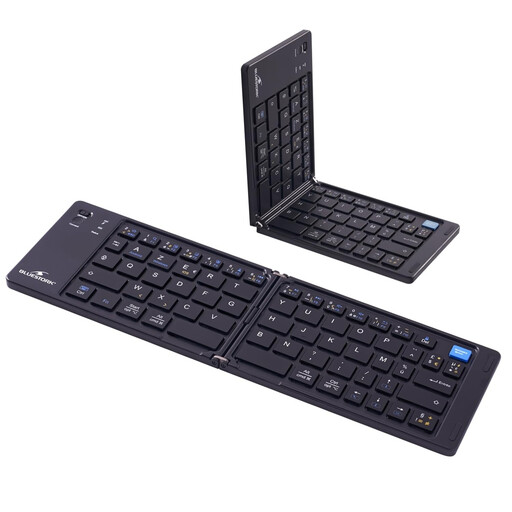
Why we chose it: Ideal for those who prioritise portability above all else. Its foldable design allows it to be slipped into a bag or jacket pocket, offering the comfort of a real keyboard anywhere, without the bulk of a full case.
As a standalone Bluetooth keyboard, it naturally bypasses the physical compatibility trap. It works with any iPad (and even other devices). Its layout is a true, standard QWERTY.
Ultra-portable thanks to its folding mechanism. Automatically sleeps when closed to save battery.
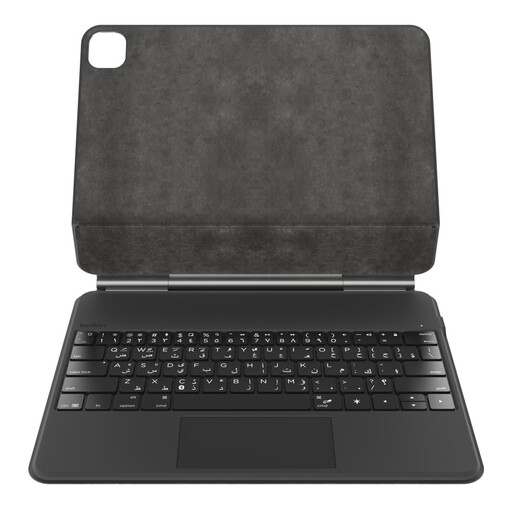
Why we chose it: For professionals who use their iPad Pro as their primary work tool. It offers a complete experience with a large trackpad, backlit keys, and robust protection, turning the iPad into a true mobile workstation.
Designed specifically for the iPad Pro 13" (M4), it guarantees a perfect fit. Belkin's renowned build quality ensures the robustness of the magnetic stand and hinge, eliminating the risk of fragility.
Large multi-touch trackpad for fluid navigation and an integrated magnetic slot to securely store and charge the Apple Pencil.
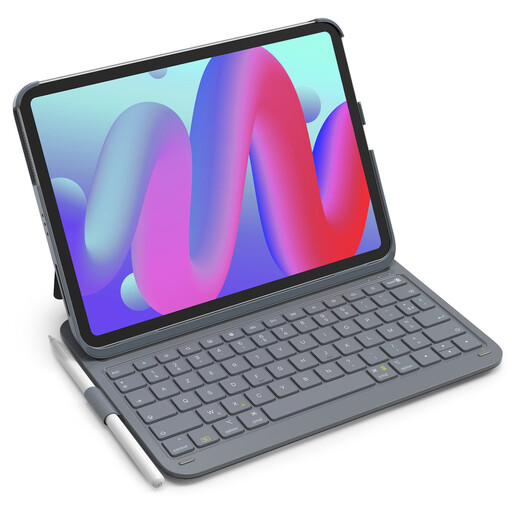
Why we chose it: An excellent all-rounder for students. It's lightweight, protects the iPad, includes a pencil holder, and offers remarkable battery life. Perfect for taking notes in class, writing essays, and relaxing, without ever worrying about a recharge.
Its clear spec sheet lists a wide range of compatible models (Air, Pro, 10th/11th Gen), encouraging you to double-check before buying. It features a dedicated row of shortcut keys, so you don't have to memorise complex key combinations.
Lightweight with record-breaking battery life: at only 427g and with up to 150 days of standby time, it's designed to follow you all day without ever being a burden.
Explore our full selection of keyboards that all meet our strict criteria for quality and performance.
The most reliable way is to find your iPad's model number, which starts with the letter "A" followed by four digits. It's engraved on the back of the device. You can also find it in Settings > General > About. Then, compare this number with the list of compatible models provided by the keyboard manufacturer.
For many everyday tasks (note-taking, emails, office work, web browsing), an iPad equipped with a good keyboard case with a trackpad is a perfectly credible and often more enjoyable alternative. The experience is similar to that of an ultrabook. However, for highly specific uses (heavy video editing, coding, 3D software), a dedicated computer remains essential.
A QWERTY Bluetooth keyboard connects wirelessly to the iPad. It has its own battery that needs to be recharged occasionally. Its advantage? Great flexibility, as it can often be used with other devices (a smartphone, another computer...). A Smart Connector keyboard attaches magnetically to the iPad, which powers it directly. Pairing is instant, and you never need to charge it. Its only drawback is that it's only compatible with iPad models equipped with this specific connector.