
Livraison le jour même ou le lendemain

Qualité garantie

Débloquez vos offres de bienvenue: Livraison GRATUITE | Jusqu'à -80 % | 30 jours d'essai gratuits à JoyPlus
Téléchargez l'application
The quest for the perfect gaming setup inevitably involves choosing the right monitor. For many gamers, QHD (or 1440p) resolution is the sweet spot, striking the ideal balance between sharp detail and the essential smoothness required for modern games. However, faced with an avalanche of technical specs—refresh rate, panel type, response time—it's easy to feel lost.
This guide is here to help you make sense of it all and choose a QHD gaming monitor that fits your needs and budget. We'll also present a selection of must-have models for 2026, designed for different types of gamers.
Navigating the jungle of gaming monitors is no easy task. Here are the key points to check to make an informed decision.
The refresh rate, measured in Hertz (Hz), is the number of frames your monitor displays per second. For gaming, a minimum of 144?Hz is now the standard, but models with 180?Hz or even a 200?Hz monitor and higher offer a significantly smoother experience, especially in fast-paced games (FPS, racing).
A fast response time, measured in milliseconds (ms), defines how quickly pixels change colour. A low response time (ideally 1?ms or less) is crucial for reducing motion blur (ghosting) and ensuring a perfectly sharp image under all conditions.
The panel technology directly influences image quality?:
The most popular size for a 1440p gaming monitor is 27 inches, which offers an ideal pixel density for a very sharp image. A 32-inch monitor provides greater immersion but may appear less sharp to users sitting too close to the screen.
Finally, adaptive sync technology (G-Sync compatible for NVIDIA cards or AMD FreeSync) has become an essential standard. It synchronises the monitor's refresh rate with the frame rate from your graphics card, eliminating screen tearing for a perfectly smooth gaming experience.
Here is our selection of models that stand out from the crowd.
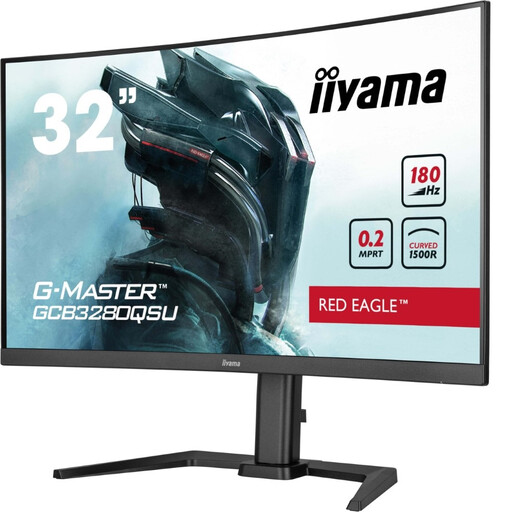
Why it stands out?: This iiyama monitor is all about immersion. Its large 31.5-inch curved VA panel (1500R curvature) wraps around the player's field of view, and its high contrast ensures dark scenes are rich with detail.
Highlights?:
Who is it for?? For gamers who prioritise immersion in adventure games, RPGs, and simulations. Its large size and curvature make it a prime companion for a near-cinematic experience.
View the iiyama G-MASTER GCB3280QSU-B2
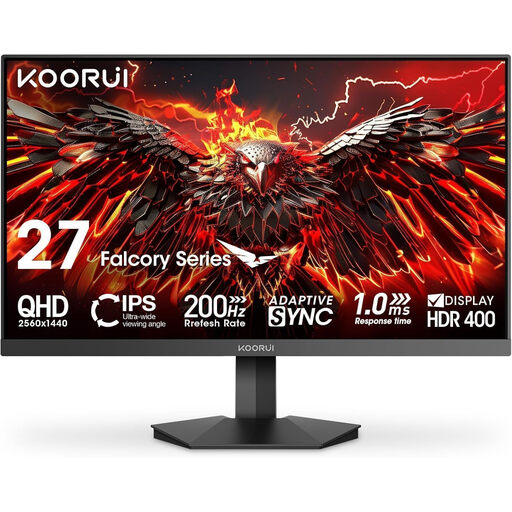
Why it stands out?: The KOORUI G2721P is a formidable option for gamers looking for a high-performance 27-inch gaming monitor without breaking the bank. It combines a responsive IPS panel with a high refresh rate.
Highlights?:
Who is it for?? For the all-round gamer seeking the best performance for the price. Its well-rounded spec sheet makes it a formidable do-it-all monitor, equally at home in competitive FPS games and open-world adventures.
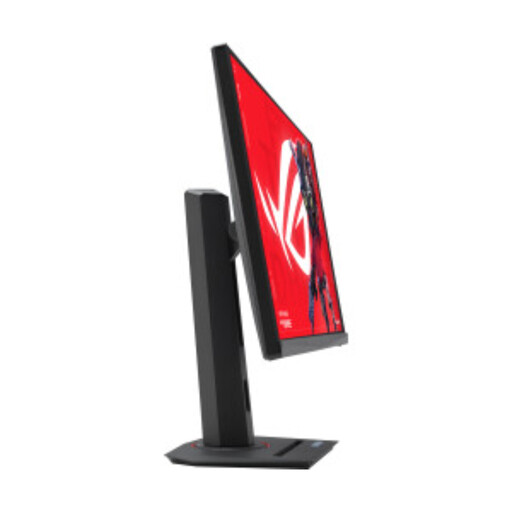
Why it stands out?: Built for esports, the ROG Strix XG27ACMS takes smoothness to another level with its 320?Hz refresh rate. Its Fast IPS panel ensures both extreme responsiveness and excellent colours.
Highlights?:
Who is it for?? For competitive gamers and esports enthusiasts for whom every millisecond counts. Its 320?Hz refresh rate offers a decisive advantage in responsiveness in the most fast-paced games.
View the ASUS ROG Strix XG27ACMS
Our selection highlights specific profiles, but the QHD monitor market is vast. If you're looking for a different size, a different panel technology, or simply want to compare more models, feel free to explore our complete category.
Yes, a 144?Hz QHD monitor remains an excellent foundation for a smooth and detailed gaming experience. However, the trend is moving towards higher refresh rates. Upgrading to a 180?Hz or 200?Hz screen provides a noticeable improvement in smoothness, especially if you play competitive titles and your graphics card can keep up.
To take full advantage of a high-refresh-rate QHD monitor, a mid-range to high-end graphics card is essential. For 2026, models like the NVIDIA GeForce RTX 4060 Ti / 4070 or the AMD Radeon RX 7700 XT / 7800 XT are a good starting point for targeting high frame rates in 1440p on most games.
G-Sync (and its open-standard equivalent, FreeSync) is a huge quality-of-life improvement, as this technology eliminates screen tearing. Most modern gaming monitors are at least G-Sync Compatible, which means they support the FreeSync standard and work flawlessly with NVIDIA cards. It's not mandatory, but it significantly improves visual comfort and perceived smoothness.