
Livraison le jour même ou le lendemain

Qualité garantie

Débloquez vos offres de bienvenue: Livraison GRATUITE | Jusqu'à -80 % | 30 jours d'essai gratuits à JoyPlus
Téléchargez l'application
The PlayStation 5, the centrepiece of any respectable gaming setup, impresses with its power and bold design. But this ecosystem has a downside: where do you charge the controllers? How do you prevent overheating during marathon gaming sessions? And most importantly, how do you store your games and headset without your living room turning into a jungle of cables and accessories?
The solution lies in a single accessory: a well-designed PS5 docking station. Far from being a simple gadget, it's the gamer's Swiss Army knife, centralising charging, cooling, and storage. Our mission? To help you navigate the market and find the model that truly meets your needs, without the marketing jargon. Follow our guide to discover our selection criteria and top products for 2026.
Before taking the plunge, a few essential criteria deserve your attention. These will determine whether your station becomes a daily ally or a quickly forgotten gadget.
First things first: ensure compatibility with your console model. Whether you own the Standard PS5 (with a disc drive), the Digital Edition, the PS5 Slim, or the upcoming PS5 Pro, the station must guarantee a perfect fit. A good PS5 vertical stand should anchor securely to the console, usually with a security screw, to eliminate any risk of tipping over. On this point, stability is non-negotiable.
Not all stations are created equal. It's up to you to identify the features that will genuinely be useful in your daily routine:
Looks matter, too. A good docking station should blend in with your setup, not clash with it. Options range from the most minimalist designs to a PS5 stand with LED lights featuring customisable RGB lighting, perfect for creating an immersive atmosphere. Also, consider the power source: most stations connect to the console's USB ports. This is convenient, but it can sometimes limit the charging speed or the power of the fans.
We've selected two models with distinct approaches, chosen for their relevant features and smart design.
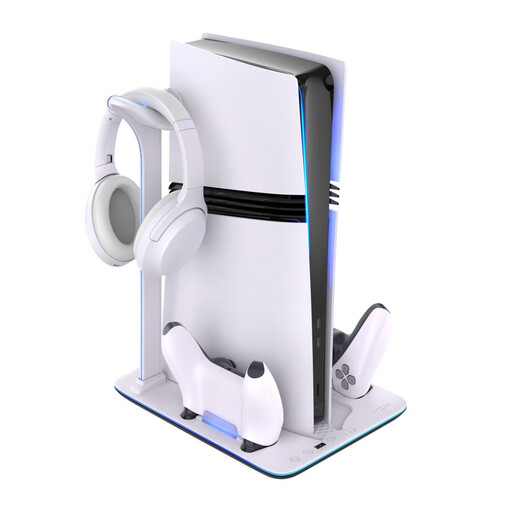
Why we chose it:
This is the ultimate all-in-one solution, designed for gamers who want it all, without compromise. It combines an active cooling system, a dual charging station for DualSense controllers, and integrated storage for games and accessories. Its two-tone design perfectly matches the PS5's aesthetic.
Key features:
Who is it for?
For demanding gamers who want to optimise both the performance and organisation of their gaming corner. If you regularly have long sessions and like to have all your PS5 accessories within reach, charged, and ready for action, this model is for you.
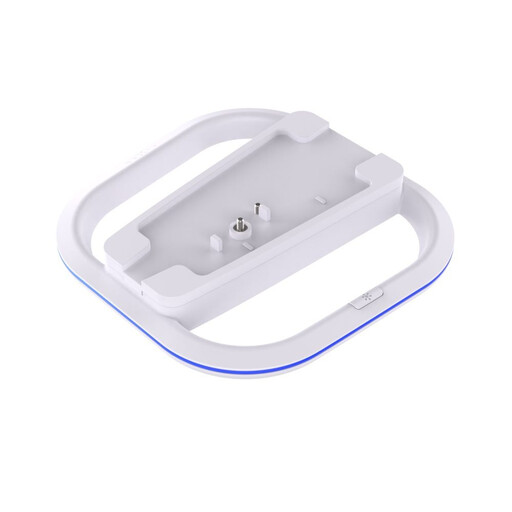
Why we chose it:
This vertical stand focuses on simplicity, security, and style. Its primary function is to stabilise the console in a vertical position while adding a visual touch with its integrated LED lighting. A smart choice for those who don't need extra cooling or charging features.
Key features:
Who is it for?
For PS5 owners who are primarily looking for security and a minimalist design. If your priority is to stabilise your console vertically while adding a discreet touch of light, this stand is a smart choice.
Our selection highlights two different approaches to organising your setup. To explore other types of accessories or compare more models, feel free to browse our full category.
Discover more accessories for consoles and slim consoles
The PS5 already has an excellent built-in cooling system. In a well-ventilated space, an external PS5 cooler isn't essential. However, it becomes a very wise investment if your console is in a poorly ventilated TV cabinet or if you play in a particularly warm room. It's an extra layer of security for logging hours on the most demanding games with peace of mind.
Most stations plug directly into one of the PS5's USB ports. This is the simplest solution and frees up a wall socket. Be aware, however, that the most comprehensive models with large fans and multiple chargers may sometimes require a dedicated external power supply to deliver their full power.
No, not if you choose a quality model. Well-designed stations, like the ones in our selection, include protection against overcharging, overheating, and short circuits. They charge your controllers safely, preserving their battery health. Our advice: always opt for accessories from reputable brands to ensure the longevity of your gear.