What should you check before buying?
Start with your flooring and any obstacles in your home, then check how the robot is programmed and which maintenance tasks you’re happy to keep doing.
| Feature | What to check | Who it matters to |
|---|
| Results on different floor types |
Look for test results on the flooring and types of dirt that matter most to you. Assess mopping separately from vacuuming. |
If I have rugs, pet hair or several types of flooring to maintain, I want to know what the robot will actually pick up in my home; around 33% of consumers prioritise this. |
| Navigation and obstacles |
Check the mapping, no-go zones and stated threshold-climbing ability for your home. |
In a home with several rooms or lots of furniture, I want scheduled cleaning cycles to reach the areas I choose, without assuming every obstacle will be avoided; around 27% of consumers prioritise this. |
| Connected scheduling |
Check the scheduling features, phone compatibility and the model’s Wi-Fi requirements. |
If I plan to set the schedule from my phone, I want to be able to use the app with my device; around 20% of consumers put this compatibility first. |
| Maintenance and dock |
Check which tasks are automated, how much space is needed, and which consumables or parts are specific to the model number. |
If I want to empty the bin less often without neglecting other maintenance, I need to know what the dock actually does; around 20% of consumers make this their priority. |
Robot vacuum cleaners to compare on Joybuy
These models combine scheduled cleaning with navigation features and, depending on the model, a self-emptying dock or one that maintains the mop pads. Compare their features with your flooring, home and the maintenance tasks you’d like to do less often.
 Image unavailable
Eureka E20 Plus with dock, black
Worth considering if you want to schedule cleaning and empty the bin less often; check that its features suit the obstacles in your home.
The product description states that it offers 8000 Pa suction, 3D obstacle avoidance and up to 180 minutes of runtime. These figures don’t indicate how well it will vacuum every type of floor.
Check app and network compatibility, as well as the space needed for the dock.
View on Joybuy
 Image unavailable
ECOVACS DEEBOT X9 PRO OMNI with dock
Consider it if you want scheduled vacuuming and a mopping function, and are happy to maintain a dock.
The product description lists 16 600 Pa suction, the OZMO Roller system and a dock that includes hot-water mop washing and hot-air drying.
Check whether mopping is suitable for your flooring, along with connected features and the consumables required.
View on Joybuy
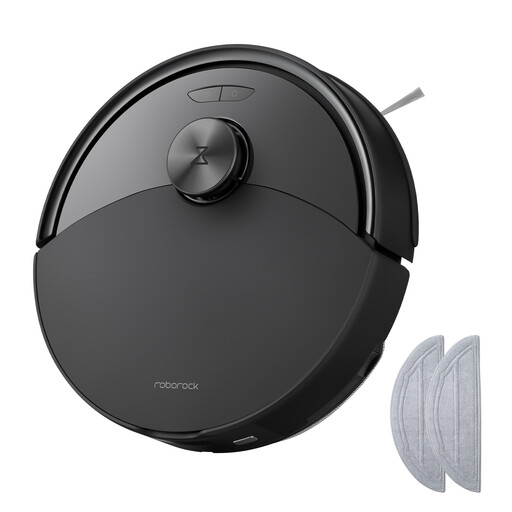 Image unavailable
Roborock Q10 S5 with mopping function, black
Worth considering if you’re looking for scheduled cleaning cycles and want to compare a mopping function for suitable floors.
The product description lists 10 000 Pa HyperForce suction, a dual anti-tangle system and a liftable mop.
If you have rugs, check exactly how the mop behaves during mopping cycles, as well as the connectivity and maintenance requirements.
View on Joybuy
 Image unavailable
JONR T5 Pro with all-in-one dock
Consider it if scheduled cleaning and dock-based mop maintenance suit your needs.
The product description lists laser navigation, obstacle recognition, 8150 Pa suction and hot-air drying.
Remember to check the water-related maintenance tasks, network requirements and compatible consumables.
View on Joybuy
 Image unavailable
ECOVACS DEEBOT T30C OMNI Gen2, black
Worth considering if you want scheduled vacuuming and a dock that also maintains the mop pads.
The product description lists 25 000 Pa suction, the OZMO Turbo 2.0 system and mop pad washing at 75 °C. These features don’t guarantee the same results on every type of floor.
Check app compatibility, how much space the dock needs and which consumables are required for this model.
View on Joybuy
Frequently asked questions
Can a programmable robot vacuum cleaner completely replace manual cleaning?
No. It’s best to think of it as taking care of some of your floor-cleaning tasks. UFC-Que Choisir finds that results vary by floor type, so pay particular attention to rugs, fibres, edges and corners when comparing test results.
Do you need an app and a Wi-Fi connection to schedule a robot?
It depends on the controls available on the model, so check how to set the schedule before buying. For compatible connected robots, iRobot describes scheduling through its app and notes that some models require a 2.4 GHz network; Roborock also states this requirement for the QV 35A.
What do you need to set up the charging base or dock?
You’ll need a power socket and a suitable spot that meets the model’s installation instructions. For a connected robot, also check Wi-Fi coverage in that location; consult the manual for the clearance needed around the dock.
What does a robot vacuum cleaner’s repairability score mean in France?
According to the French Ministry for Ecological Transition, it helps you assess how repairable a product is by giving it a score out of 10. The decree of 22 April 2022 covers robot vacuum cleaners, among other products; check the score for the model you’re considering and whether the parts you may need are available.
What warranty applies when you buy from a professional seller in France?
According to the French Ministry of the Economy, the statutory legal guarantee of conformity applies to new, second-hand and refurbished goods sold by a professional to a private individual. Keep the model description and proof of purchase so you can confirm the terms of sale if a problem arises.


