
Livraison le jour même ou le lendemain

Qualité garantie

Débloquez vos offres de bienvenue: Livraison GRATUITE | Jusqu'à -80 % | 30 jours d'essai gratuits à JoyPlus
Téléchargez l'application
In the cutthroat arena of esports, every millisecond and every gram can make a difference. Choosing your pro wireless gaming mouse is no longer a matter of taste, but a strategic decision that can determine the outcome of a match. The problem? The market is saturated with indecipherable spec sheets and marketing promises designed to confuse you. Our mission? To help you decode the jargon and make the right choice. This guide breaks down the common pitfalls to avoid and the true performance metrics to check before investing in your next gaming weapon.
The gaming industry has mastered the art of marketing. Before you get mesmerised by inflated numbers, here are the three mistakes you shouldn't make.
A stratospheric DPI (Dots Per Inch) number is often the sledgehammer of marketing arguments. But don't fall for it. While a high-DPI gaming mouse promises extreme sensitivity, a figure above 20,000 is practically useless in real-world conditions. Pros, for instance, play with settings between 400 and 1600 DPI for maximum control. What really matters is the quality of the optical sensor: its ability to translate your movements with perfect fidelity, without hardware acceleration or spin-outs, is infinitely more important than its theoretical sensitivity ceiling.
The trend is towards the lightweight gaming mouse, and for good reason: a lower weight facilitates quick flicks and reduces fatigue. However, be warned: a feather-light weight should never mean fragility. Some ultra-light mice sacrifice build quality with low-grade plastics that flex and creak under pressure. A well-designed mouse combines lightness with robustness, thanks to premium materials like magnesium alloy.
The old cliché that wireless mice are inherently slower than their wired counterparts is outdated. But be careful, not all wireless technologies are created equal. Bluetooth is fine for office work, but its latency is a deal-breaker for serious gaming. The only connection that matters is 2.4?GHz, which ensures instantaneous responsiveness. For competitors, the real deciding factor is the polling rate. An 8KHz wireless mouse sends its position to the PC 8,000 times per second, offering fluidity and precision far superior to the standard 1,000?Hz.
To choose a mouse that will boost your performance, forget the marketing fluff and focus on these three essential points.
Rather than a laundry list, here are options tailored for specific player profiles, based on the criteria we've just discussed.
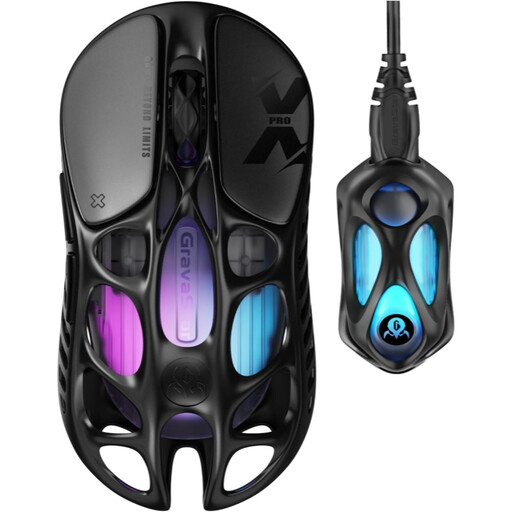
Why we chose it: For the player who demands nothing but pure performance, this model is a speed demon: a feather-light 49-gram weight paired with an 8,000 Hz polling rate. A combo tailor-made for high-level FPS competition.
It's not just light; its hollowed-out magnesium alloy chassis gives it a robustness that plastic mice can only dream of. The promise of low latency is delivered, with an 8K dongle that gets the job done.
The combination of a 49g weight and an 8,000 Hz polling rate offers a measurable advantage in execution speed and aiming fluidity.
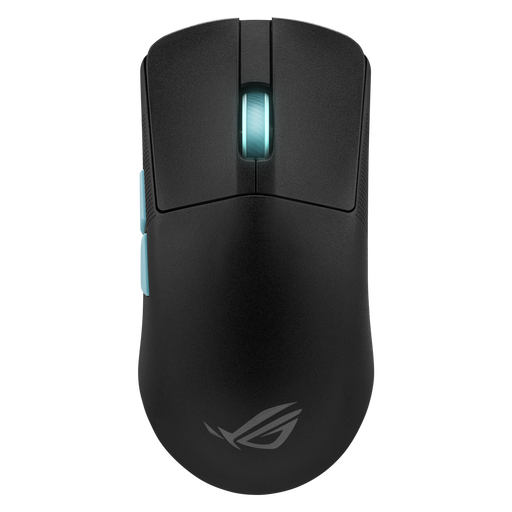
Why we chose it: Perfect for the meticulous player who wants to analyse and perfect their aim. Its contained 54g weight and ultra-precise sensor are enhanced by a software suite that analyses your gameplay to suggest the perfect settings.
Instead of just flaunting a DPI number, it provides a tool (Aim Lab Settings Optimizer) to find YOUR ideal setting. It turns a raw number into a personalised, tangible advantage.
The software integration with Aim Lab helps you find the sensitivity and DPI settings that match your playstyle, and no one else's.
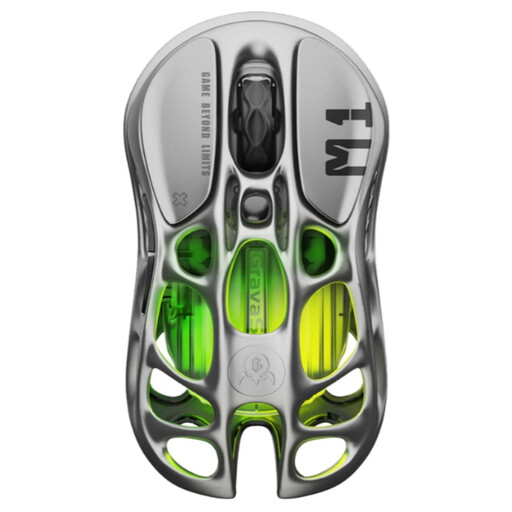
Why we chose it: For the gamer whose setup is also a work of art. This model blends a spectacular industrial design with top-tier performance (26K DPI sensor, 4K Hz compatibility), while offering a more substantial and stable grip (88g).
It bucks the "lighter is always better" myth with an 88g weight that ensures stability and control, a choice favoured by many players. Its hollowed-out design isn't a gimmick, but the result of a robust magnesium alloy chassis.
A radical magnesium alloy design that is visually stunning, while guaranteeing rock-solid durability and a very stable grip.
We've compiled a complete, up-to-date list of products that check all our boxes for performance and reliability.
Absolutely. With modern technologies, the difference is imperceptible to humans. Wireless 2.4?GHz connections using optimised protocols (like ROG SpeedNova) or high-polling-rate receivers (1,000?Hz and up) offer such low latency that they easily compete with wired models. 8KHz wireless mouse technology can even be more responsive than many classic wired mice.
Not at all. A high DPI simply means the cursor moves faster on screen for the same hand movement. Most pros use low settings (between 400 and 1600 DPI) for more precise and consistent control. The quality of the sensor, which ensures flawless tracking, is a far more critical factor for performance than the maximum DPI number.
It's very simple. A blast from a can of compressed air is enough to dislodge any dust that might accumulate inside the shell. For the surface, a dry microfibre cloth works perfectly. Most importantly, never use liquids or cleaning products: moisture could damage the electronic components accessible through the open-shell design.