
Livraison le jour même ou le lendemain

Qualité garantie

Débloquez vos offres de bienvenue: Livraison GRATUITE | Jusqu'à -80 % | 30 jours d'essai gratuits à JoyPlus
Téléchargez l'application
A cartridge that gives up the ghost just as you need to print an important document, a seemingly compatible refill that your printer rejects, or a multi-pack where some colours go unused – these frustrations are all too familiar for households, students, families and remote workers.
To buy printer ink cartridges without any nasty surprises, it pays to look beyond the price tag. The exact reference number, colour, page yield and cartridge format all have a direct impact on your day-to-day use.
An HP 301 ink cartridge won't automatically replace an HP 302, even if they look similar on the outside. The same caution applies to HP 305, HP 303, HP 62, HP 364, HP 903 and HP 912 references, not to mention Canon and Epson cartridges.
Compatibility should always be checked against your printer's exact model, not just the brand. A cartridge that works with your printer must match the series listed in the manual, shown on the printer's display, or printed on your old cartridge.
An ink cartridge multi-pack can be convenient, but it isn't always right for everyone. If you mainly print black-and-white documents, a colour cartridge could sit in its packaging for months. On the other hand, homework, charts and photos typically need cyan, magenta and yellow.
Start by working out whether you need a black cartridge, a colour cartridge or a full CMYK set of individual cartridges.
An XL format means you'll change cartridges less often, but it isn't always better value. The most useful measure is the page yield, usually stated according to the ISO/IEC 24711 standard. Compare this figure with your typical print volume and the price difference between standard and XL formats.
Before placing an order, note down the full reference number. It may include a code such as F6U65AE, F6U68AE, N9J72AE or 6ZC73AE. Then check the list of compatible printers.
For example, the original HP 302 colour cartridge F6U65AE is listed as compatible with several DeskJet 1110, 2130 and 3630 models, as well as certain ENVY and OfficeJet series. This check stops you ending up with a cartridge you can't install or forcing a model into the wrong slot.
Pigment inks are often preferred for crisp text and better water resistance, especially for office documents. Dye-based inks are widely used for solid colour areas and photos.
Some references combine both technologies. The Canon BCI-370 / BCI-371 multi-pack, for instance, pairs a pigment black ink with three dye-based colour inks. The Epson 603 multi-pack also uses a pigment black ink and dye-based colour inks.
Page yield is a standardised figure, but it varies depending on coverage, document type and print settings. As a guide:
These values are most useful for comparing references against each other. They don't guarantee the same page count in every situation.
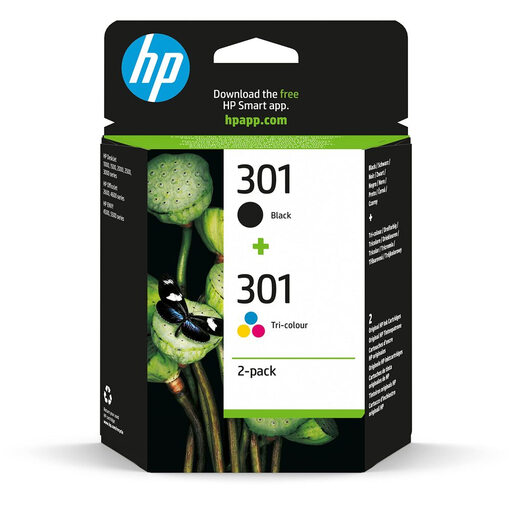
Why this suits this profile: this set includes one black and one tri-colour cartridge, covering everyday needs at home or for student work.
The reference number and compatible printer list are clearly stated, reducing the risk of confusing the HP 301 and HP 302 series.
Approximately 190 pages in black and 165 pages in colour under ISO/IEC 24711, with pigment black ink and dye-based colour inks.
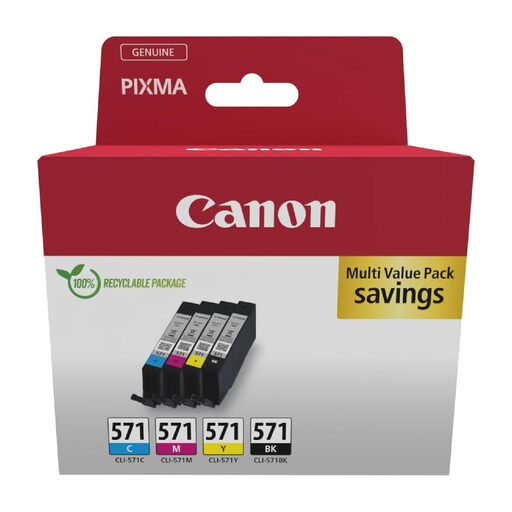
Why this suits this profile: owners of certain PIXMA printers can replace each colour separately and tailor their purchases to their actual needs.
The four BCI-370 and BCI-371 references are clearly separated and intended for precisely listed PIXMA models.
Stated yield of 300 pages for black, then 297 to 323 pages depending on the colour.
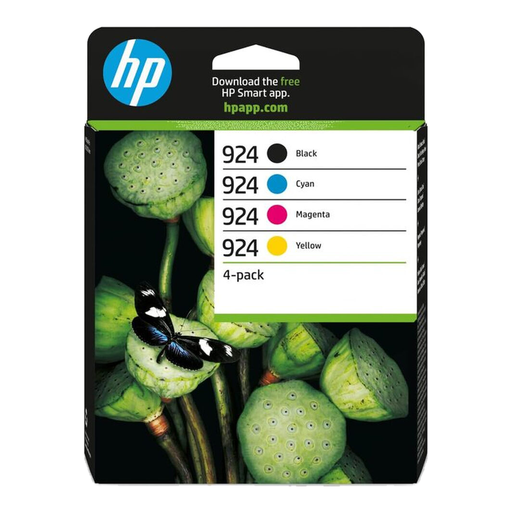
Why this suits this profile: this multi-pack is aimed at OfficeJet Pro users who regularly print both black and colour documents.
The reference explicitly pairs the 924 black cartridge with the three 933 colour cartridges and lists the compatible series.
Approximately 500 pages in black and 400 pages per colour under ISO/IEC 24711.
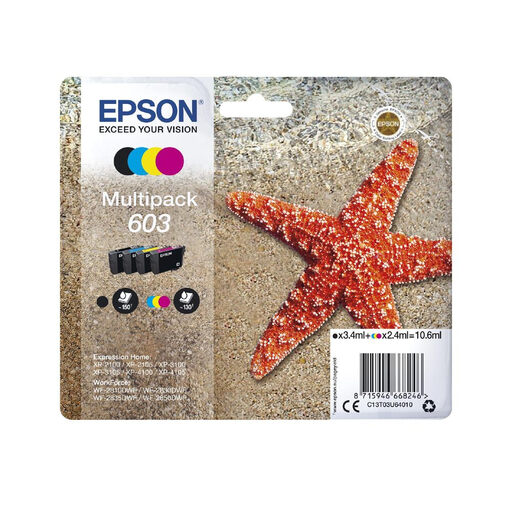
Why this suits this profile: it's ideal for households and small offices equipped with certain Epson Expression Home or WorkForce printers.
The list of compatible devices helps distinguish the 603 series from other Epson references.
Individual cartridges, with approximately 150 pages in black and 130 pages per colour under ISO/IEC 24711.
We've put together a comprehensive, real-time selection of products that meet these exacting standards and European safety regulations.
Whether it's an original Canon PG-540, an HP 303 black, an HP 62, an HP 912 or an HP 305XL, the rule stays the same: check the full reference number before opening the packaging.
Note down the brand, the exact printer model and the reference number on your current cartridge. Then compare this information with the product's compatibility list. The colour or shape of the cartridge alone isn't enough to guarantee compatibility.
Not necessarily. An XL cartridge can offer a higher yield – like the HP 302XL black rated at around 480 pages – but whether it's worthwhile depends on your print volume and its price. For occasional use, the standard format can also stop you keeping an open cartridge for too long.
An opened cartridge should ideally be installed quickly to prevent the nozzles from drying out. When still sealed, store it in a cool, dry place away from light. The manufacturer's recommendations are the best guide for storage duration and conditions.