
Livraison le jour même ou le lendemain

Qualité garantie

Débloquez vos offres de bienvenue: Livraison GRATUITE | Jusqu'à -80 % | 30 jours d'essai gratuits à JoyPlus
Téléchargez l'application
Changing a printer ink cartridge seems simple enough… until your printer flags an incompatibility, a colour disappears from your prints, or the cartridge runs dry after just a few documents. For individuals, students, families, remote workers and small businesses, the choice really comes down to three things: the exact printer model reference, the page yield, and what’s included in the pack.
Simply searching for an HP ink cartridge, a Canon ink cartridge or an Epson ink cartridge isn’t enough. An HP 302 cartridge won’t necessarily work with an HP printer that uses a 305, 303 or 62 series cartridge. The same goes for Canon with its PIXMA range, or Epson with its Expression Home models.
Make a note of the reference number on your old cartridge or check it in your printer’s menu. Then verify the list of compatible models, particularly the DeskJet, ENVY, OfficeJet, PIXMA and WorkForce ranges.
An XL high-capacity cartridge generally contains more ink, but it’s only worth it if your print volume justifies it. If you only print a few pages a month, a standard model stops you from having a half-used consumable sitting around for months. On the other hand, for a household, printed coursework or regular remote working, the cost per page can be significantly lower with an XL cartridge.
Always compare the price against the page yield, rather than relying solely on the ink volume stated in millilitres.
A single black cartridge won’t replace an empty colour cartridge. With a printer that has separate ink tanks, it’s usually better to replace only the colour that’s run out. Conversely, a multipack of ink cartridges can be handy when the black and all three colours are nearing the end of their life.
Also check whether the pack includes photo paper. Some Canon and Kodak sets combine cartridges with sheets designed for photo printing.
Compatibility is the first thing to verify. It must match the brand, series and exact model of your printer. For example, the HP 302 tri-colour is listed as compatible with several HP DeskJet 1110, 2130 and 3630 models, as well as certain HP ENVY 4520 and OfficeJet 3830 printers. That doesn’t mean it works with every HP printer.
With Canon, the PG-540, PG-545, PG-510 and CL-511 references correspond to different PIXMA families. With Epson, the 603 series is intended for certain Expression Home and WorkForce models. Checking before you order will save you an unnecessary return or an impossible installation.
The yield stated according to the ISO/IEC 24711 standard provides a basis for comparing consumables. However, it’s still only a guide: the actual number of pages depends on ink coverage, whether images are included, and your print settings.
Here are some benchmarks taken from product specifications:
To estimate the running cost, divide the cartridge price by its stated yield. The result doesn’t account for promotions or the actual price you pay at the time of purchase, but it does let you compare a standard cartridge and its XL version more fairly.
An original cartridge is made by the printer manufacturer or for its product range. The HP, Canon and Epson references shown below are original consumables, according to their product information. A compatible cartridge, on the other hand, is produced by another brand to work with a given reference.
In either case, check the reference, the compatible models, the pack contents and the storage conditions. Never force a cartridge into its slot, and avoid touching the electrical contacts or the print nozzles. Once the packaging is opened, install the consumable promptly to minimise the risk of it drying out.
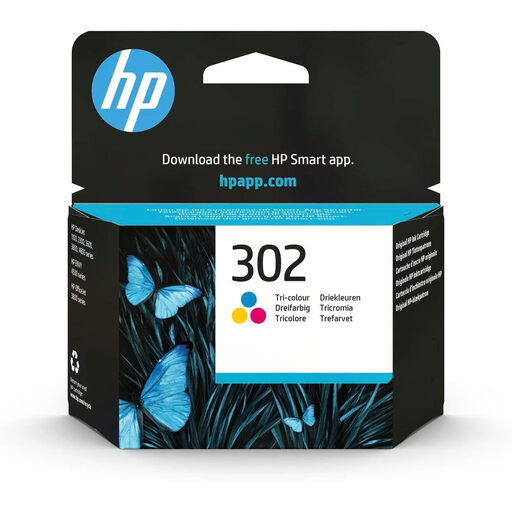
Why this choice suits this profile: This standard colour cartridge is ideal for everyday printing on certain HP DeskJet, ENVY and OfficeJet printers. It lets you replace just the tri-colour consumable when the black cartridge is still working.
The reference and compatible models are clearly stated, with a yield of approximately 165 pages according to the ISO/IEC 24711 standard.
An original HP cartridge with dye-based colour ink and a standard format suited to moderate use.
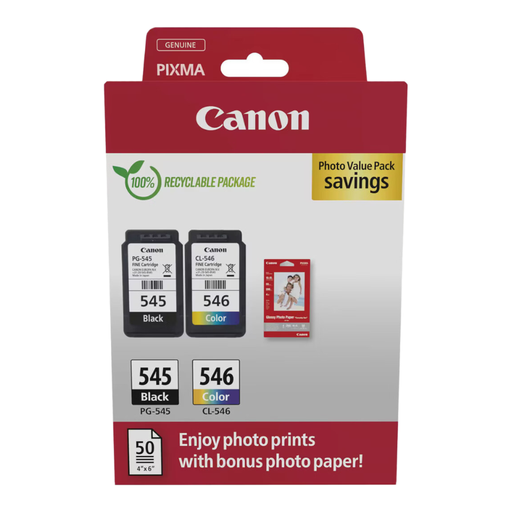
Why this choice suits this profile: This kit is aimed at users of a compatible Canon PIXMA printer who want to replace the black, colour and photo paper in a single order.
The pack contents are detailed: PG-545L and CL-546 cartridges, plus 50 sheets in 10 × 15 cm format.
An original Canon set designed for certain PIXMA printers, combining printing consumables with photo paper.
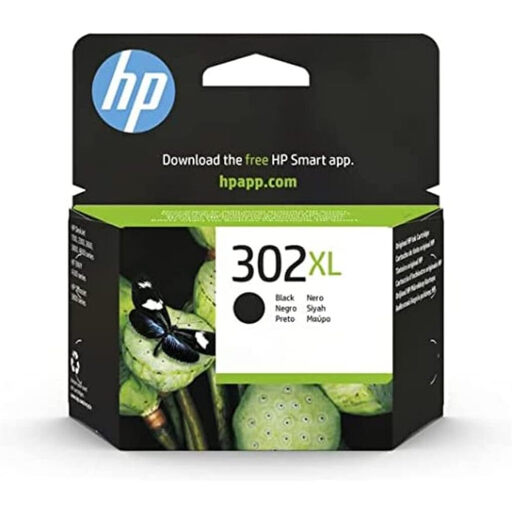
Why this choice suits this profile: With a stated yield of approximately 480 pages, this cartridge is ideal for regular printing of documents, coursework, invoices or professional files on a compatible HP printer.
The XL capacity comes with a stated yield and a list of compatible HP DeskJet, ENVY and OfficeJet models.
A pigment-based black ink, a high-capacity format and stated compatibility with several HP series.
We’ve put together a complete, real-time updated selection of products that meet these exacting criteria, while complying with European safety regulations.
Start by noting the reference on your current cartridge or the one shown in your printer’s manual. Then search for the full model and check the colour, capacity and yield. The brand alone isn’t enough to confirm compatibility.
Not necessarily. It can mean fewer replacements if you print regularly, but its value depends on the price and stated yield. For occasional use, a standard cartridge can sometimes be a smarter choice and stops you keeping a half-used consumable for too long.
Keep it in its sealed packaging, away from heat, humidity and direct light. Once opened, install it promptly. Avoid touching the metal contacts or the print nozzles, then dispose of the used cartridge through an appropriate collection scheme, in line with local guidelines.