
Livraison le jour même ou le lendemain

Qualité garantie

Débloquez vos offres de bienvenue: Livraison GRATUITE | Jusqu'à -80 % | 30 jours d'essai gratuits à JoyPlus
Téléchargez l'application
In an age where our homes and offices are overflowing with electronic devices, finding a spare outlet can be a challenge. But the real headache is choosing a power solution that is practical, safe, and truly suited to our needs. The power strip with USB has emerged as the go-to solution, but be warned: the market is flooded with models making often misleading claims. To ensure a practical purchase doesn't turn into a useless—or even dangerous—gadget, here are the pitfalls to avoid.
As the Head of Product Recommendations at Joybuy, my mission is to help you sort through the noise. Here are the most common mistakes to steer clear of:
To make the right choice, don't rely on slogans. Only a few objective technical specifications truly matter. They are what determine a product's quality and real-world usefulness.
Forget the marketing jargon; only the numbers count. The real charging capability of a USB port can be verified in two ways:
Safety isn't an option; it's a requirement. In France, the NF (Norme Fran?aise) standard is the primary seal of quality. But beyond this essential certification, two protections are a must:
The best product is one that blends in seamlessly while making your life easier.
To illustrate these criteria in action, here are a few models that meet very specific needs.
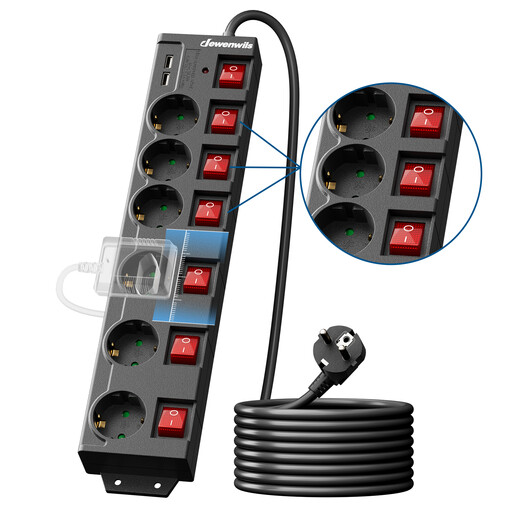
Why it's a great choice: Perfect for a remote work setup or a media corner. With its 6 outlets, 2 USB ports, and a long 5-meter cable, it centralizes all your desk connections (monitor, PC, printer, chargers) while giving you full control over each device.
Its 90°-oriented outlets solve the puzzle of chargers blocking each other. The individual switches let you cut standby power consumption, a detail that makes a real difference on your electricity bill.
Total Control: 6 switches (5 individual + 1 master).
Complete Safety: Surge, overload, and child protection.
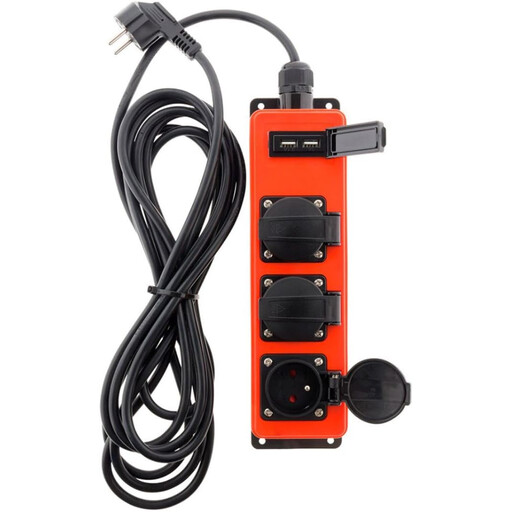
Why it's a great choice: Designed for tough environments (garage, workshop, covered patio), it powers your tools while charging a smartphone or speaker, without ever fearing dust or splashes.
It tackles the safety pitfall head-on by featuring an IP44 protection rating. Using a standard power strip in a garage or outdoors is a major risk that this model completely eliminates.
Robustness: IP44 certified against water splashes and dust.
Practicality: Spring-loaded protective covers on each outlet.
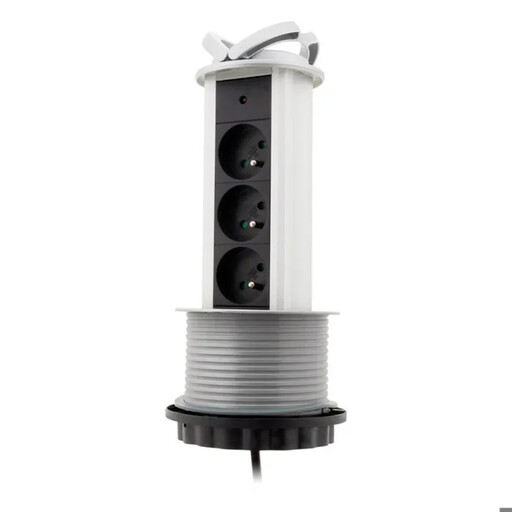
Why it's a great choice: The perfect solution for those who refuse to choose between technology and aesthetics. Embedded in a countertop or desk, this retractable block only appears when you need it, leaving a perfectly clean and streamlined surface the rest of the time.
This model shatters the poorly-designed product pitfall by offering a radically different approach. No more power strips cluttering the floor: it integrates into the furniture for optimal discretion and ergonomics.
Perfect Integration: Vertical "pop-up" system that retracts to sit flush with the countertop.
All-in-One: Combines 230V outlets and USB charging ports.
Our complete selection features dozens of products that meet these quality criteria and French safety standards.
1. What is the difference between a surge protector power strip and a standard one? A standard power strip simply distributes power from a wall outlet to multiple devices. A surge protector power strip, however, integrates a component (a varistor) capable of absorbing sudden voltage spikes. This is what protects your devices' fragile circuits from the sometimes irreversible damage caused by a power surge.
2. Can you plug a power strip into another power strip? Absolutely not! It is strongly advised not to plug power strips in a series (a practice known as daisy-chaining). This can cause an overload on the first power strip or the wall outlet, creating a high risk of overheating and fire. A power strip should always be plugged directly into a wall outlet.
3. How can I tell if a power strip with USB-C offers truly fast charging? Look at the output power indicated for the USB-C port. Look for the PD (Power Delivery) label followed by the power in watts (W), for example, 20W PD or 65W PD. If only the amperage (in amps) is mentioned, make sure it is at least 3A on the USB-C port to expect a faster-than-average charge. Without these indicators, it's a standard USB-C port with no speed optimization.