
Livraison le jour même ou le lendemain

Qualité garantie

Débloquez vos offres de bienvenue: Livraison GRATUITE | Jusqu'à -80 % | 30 jours d'essai gratuits à JoyPlus
Téléchargez l'application
Published by the Joybuy Product Recommendation Officer on 05/07/2026
Computers, smartphones, tablets, monitors, gaming consoles... Our homes and offices are overflowing with electronic devices, creating a critical need for electrical outlets. But today, simply plugging in your equipment isn't enough. You also need to protect it from power surges, optimise charging, and keep an eye on your energy consumption. This is where the power strip with individual switches and USB ports comes in—it's more than just an accessory; it's a true essential.
Faced with an overwhelming number of options, it can be difficult to know where to start. This article will guide you through the key criteria and present a curated selection of products to help you organise and secure your electrical setup.
Before you jump on the first model you see, let's review the key criteria for making an informed decision.
While its primary mission is to power your devices, its ability to protect them is just as crucial. The first step? Opt for a surge protector power strip. This feature shields your expensive and sensitive electronics from power surges and spikes, often caused by lightning or grid instability.
For households with young children, the presence of child safety features is non-negotiable. This shutter system prevents foreign objects from being inserted into the outlet slots, eliminating the risk of domestic accidents. Also, verify that the product complies with European standards (CE marking).
The era of every device having its own charger is long gone. A modern power strip must include USB ports to simplify your life. Take stock of your needs:
Consider the layout of your space. For a desktop power strip, adequate spacing between outlets is crucial for plugging in bulky power adapters without blocking adjacent ports. Some models offer outlets oriented at 45° or 90° for greater flexibility.
The cable length is another decisive factor. A 2, 3, or even 5-meter cable will give you significant placement freedom. If you plan to mount it, check for mounting holes on the back of the housing. Finally, the number of outlets (a 6-outlet model is often a good balance) should cover your current needs while anticipating future ones.
To help you decide, here is our selection of three models that cater to distinct needs, all available on Joybuy.
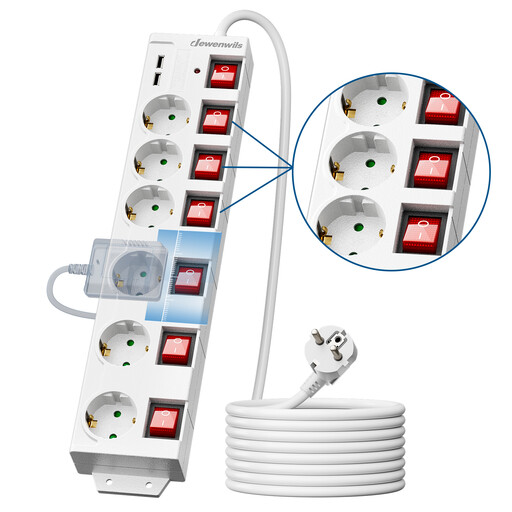
Key Feature: This model is the ultimate all-in-one security solution for dense setups, like a home office or a media centre. Its long cable and wall-mounting options make it particularly versatile.
Highlights:
Who is it for? Ideal for those who have many devices concentrated in one area (office, living room) and want total control over their consumption, with maximum installation flexibility.
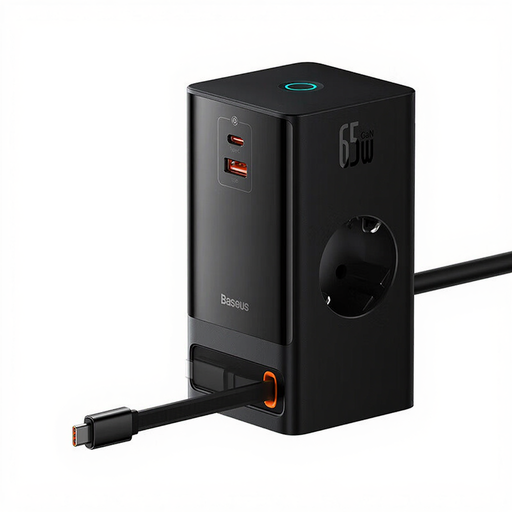
Key Feature: A tech powerhouse with a sleek, modern design. This power block integrates GaN technology for ultra-fast, efficient charging, all in a format designed for minimalist desks.
Highlights:
Who is it for? The perfect companion for professionals and tech enthusiasts looking for a powerful, compact, and elegant charging solution to declutter their workspace.
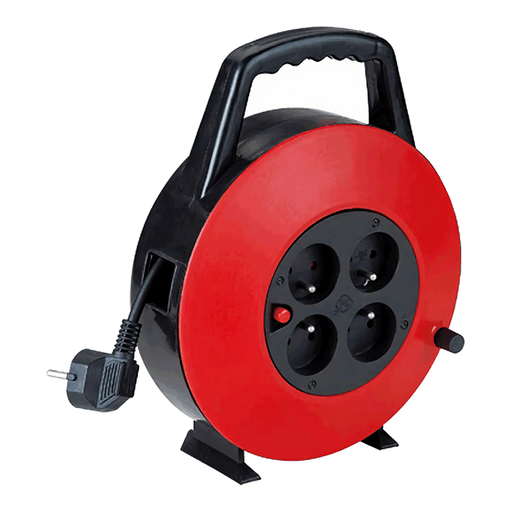
Key Feature: Robustness and safety are the watchwords for this cable reel, the ideal solution for bringing power wherever you need it, whether for indoor DIY projects or a one-off event.
Highlights:
Who is it for? The essential tool for workshops, garages, or any home situation requiring a reliable, safe, and long extension cord.
Our selection highlights specific use cases. If you haven't found what you're looking for, feel free to browse our full catalogue to discover other configurations (number of outlets, cable length, features...).
? Explore Our Full Collection of USB Power Strips on Joybuy
1. Why choose a power strip with individual switches? On one hand, they allow for real energy savings by cutting power to standby devices, which consume electricity unnecessarily even when turned off. On the other hand, it's a matter of convenience: you can manage each device individually without having to unplug everything.
2. Is a surge protector power strip really necessary? Absolutely. It's an insurance policy for your valuable electronics (computer, TV, console, audio system). A power surge, even a brief one, can irreversibly fry their internal components. The surge protector acts as a shield, absorbing this current spike to protect your equipment.
3. What's the difference between USB-A and USB-C ports on a power strip? USB-A is the classic rectangular connector, perfect for standard charging. USB-C, which is smaller and reversible, is the new power standard. It is often compatible with fast-charging protocols like Power Delivery (PD), allowing it to recharge power-hungry devices, including some laptops, much more quickly.