
Livraison le jour même ou le lendemain

Qualité garantie

Débloquez vos offres de bienvenue: Livraison GRATUITE | Jusqu'à -80 % | 30 jours d'essai gratuits à JoyPlus
Téléchargez l'application
Managing the power for our many devices has become a real headache. Between computers, monitors, gaming consoles, and countless chargers, cables get tangled and wall outlets quickly run out. A power strip with individual switches is the ideal solution to bring order to the chaos and regain control over your electricity bill. However, not all models are created equal, and some choices can be disappointing or even dangerous.
As a product expert for the editorial team, I'm here to break down the red flags and essential criteria for a successful purchase.
The market is flooded with products making tempting promises. Unfortunately, some features hide design flaws that only become apparent with use.
To avoid these pitfalls, here are the technical specifications to scrutinise.
Safety is non-negotiable. Ensure the power strip has clear protections:
A good design is, above all, a practical one that adapts to your environment.
Instead of just a list of features, we've matched each product to a specific user profile. The goal: to help you find the model that's truly right for you.
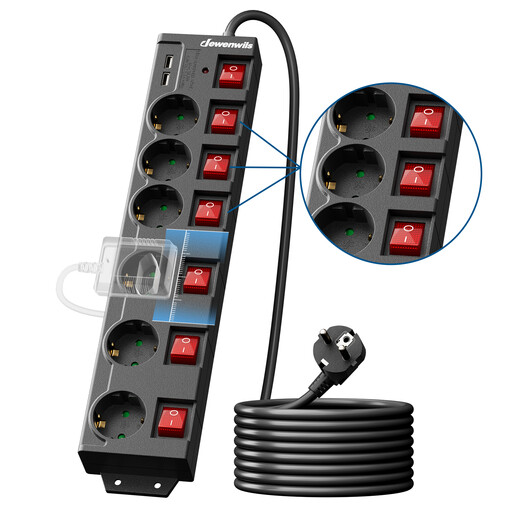
Why it's for you: Perfect for managing a complex setup (PC, multiple monitors, console, peripherals). Its extra-long 5-metre cable offers complete freedom to reach a distant wall outlet, while its 6 sockets and 2 USB ports let you plug everything in one place.
The 90°-oriented and well-spaced outlets solve the headache of bulky adapters. The individual switches allow you to eliminate all standby power consumption, and the product includes overload and lightning protection.
An all-in-one solution that combines a 6-outlet block, a USB power strip, a 5m extension cord, and comprehensive protection. The 5 mounting holes allow for a flawless wall-mounted installation.

Why it's for you: For those who refuse to compromise on design and dream of a seamless integration. This track replaces a flush-mounted socket to offer a solution that is as elegant as it is practical for a modern kitchen, living room, or office. All with no trailing cables.
Its modular design allows you to add, remove, and position the socket blocks freely along the track, eliminating the problem of crowded outlets once and for all. Each module has its own rotary switch, a mechanism that is both elegant and durable.
A high-end, flexible, and scalable wall-mounted power strip solution. Its anodised aluminium frame is robust and easy to clean, while the patented contact mechanism ensures foolproof safety.
If these two models don't check all your boxes, feel free to browse our complete selection. We have gathered hand-picked products that all meet French safety standards and our own strict criteria.
It all depends on the build quality and how you use it. On entry-level models, the switches are often the weakest link. A quality product with robust components can serve you reliably for years. However, be aware: the components in a surge protector power strip have a limited absorption capacity. After it has taken a major surge (like from an indirect lightning strike), it is safest to replace it.
No. When a switch is in the "off" position, the connected device is completely cut off from the circuit. It therefore consumes absolutely no power. That's the whole point of the system—to eliminate hidden "standby" or "phantom" power consumption. Only the small LED indicator on the switch itself might consume an infinitesimal amount of energy, which is completely negligible compared to the savings you'll make.
Absolutely not! This is an extremely dangerous practice known as "daisy-chaining." You risk overloading the first power strip and the wall outlet, creating a major risk of overheating and even fire. A power strip must always, without exception, be plugged directly into a wall outlet.