
Livraison le jour même ou le lendemain

Qualité garantie

Débloquez vos offres de bienvenue: Livraison GRATUITE | Jusqu'à -80 % | 30 jours d'essai gratuits à JoyPlus
Téléchargez l'application
Modernizing your car with the latest navigation and entertainment tech can seem like an impossible, or at least very expensive, mission. Fortunately, the portable wireless CarPlay screen has emerged as a solution that's as simple as it is affordable. The problem? The market is flooded with models making enticing promises, but their performance is often disappointing. Here at the editorial desk, our mission is to separate fact from fiction and help you identify the features that truly matter to make the right choice.
Before taking the plunge, let's review the three most common pitfalls that could turn your great idea into a real headache:
To avoid these pitfalls, a few technical specifications need to be scrutinized. These are what will make all the difference between a gadget and a truly reliable universal car multimedia system.
A worthy wireless Android Auto for cars or CarPlay experience depends first and foremost on a stable connection. Two features are essential:
A 9-inch car screen is a common format, offering a good compromise between readability and footprint. But be careful, the panel technology is far more important than its diagonal size. Here's what to look for:
This is often the Achilles' heel of cheap models. A good external plug-and-play car stereo must offer several audio connection options to adapt to your vehicle:
Rather than getting lost in dozens of models, here is an option that checks all the boxes for performance and versatility, perfect for a CarPlay upgrade for an older car.
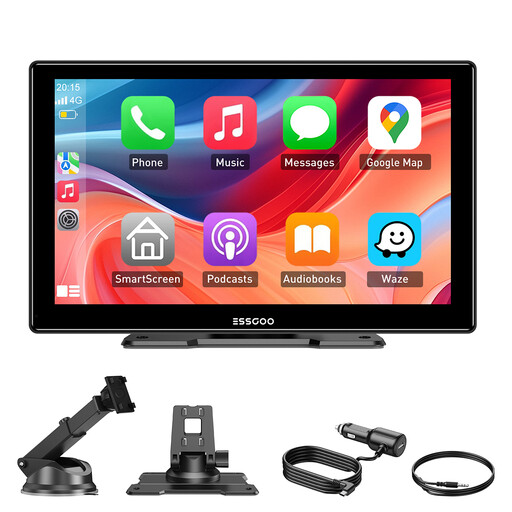
Why it stands out: This model is for those seeking maximum efficiency with minimum hassle. Compatible with almost all vehicles (cars, trucks, RVs) thanks to its 12-24V power supply, it represents a complete and, most importantly, reversible upgrade. Ideal for rental cars, company cars, or anyone who wants to avoid a permanent installation.
It checks all the right boxes: dual-band Wi-Fi for stability, 4 audio output options (including AUX and Bluetooth) to bypass the hit-or-miss quality of the FM transmitter, and a large HD IPS screen that ensures perfect readability in all conditions.
"Plug-and-play" installation in minutes, with no tools required. Universal compatibility thanks to its 12V-24V cigarette lighter plug. Over-the-air (OTA) software updates for lasting performance.
We have selected a full range of products for you that meet our selection criteria and current standards.
Yes, almost certainly. The only requirement is a functional cigarette lighter socket (typically 12V for cars and 24V for trucks and RVs). These screens are designed as a universal car multimedia system: they work independently of your vehicle's make or model.
For flawless sound, prioritize the connection via an AUX cable if your car stereo has a 3.5mm jack input. This guarantees a pure signal with no interference. If your car stereo is Bluetooth-compatible, that's an excellent wireless alternative. The FM transmitter remains a practical backup solution, although you may have to do some trial and error to find a clear frequency and clean sound.
Absolutely. The installation is done in three super-simple steps:
After that, the connection is established automatically every time you start the car. It's the very definition of an external plug-and-play car stereo, accessible to everyone, with no technical skills required.