
Livraison le jour même ou le lendemain

Qualité garantie

Débloquez vos offres de bienvenue: Livraison GRATUITE | Jusqu'à -80 % | 30 jours d'essai gratuits à JoyPlus
Téléchargez l'application
Tidying up cupboards, organising documents, or labelling products for your small business: who hasn't dreamed of flawless organisation? A portable thermal label maker seems like the perfect modern solution. However, the market is flooded with models making tempting promises that too often turn out to be useless, expensive gadgets. Before you buy, it's crucial to know how to avoid the most common pitfalls and invest in a device that will genuinely serve you every day.
As the Head of Product Recommendations at Joybuy, my mission is to help you navigate the options. Let's break down the red flags and essential criteria for choosing the label maker that's perfectly suited to your needs.
An attractive price or a sleek design can hide major deal-breakers. Here are the three most common issues that turn the experience into a nightmare.
To avoid falling into a trap, focus on objective technical specifications. These are the true markers of quality and longevity for your future mini thermal printer.
The key advantage of these devices is their ink-free operation. They rely on direct thermal printing: the print head heats special (heat-sensitive) paper to create the text or image. Simple and effective.
Reliable wireless connectivity is non-negotiable. Prioritise models equipped with Bluetooth Low Energy (BLE) technology, which ensures a stable connection while being highly energy-efficient, thus preserving the battery life of both the printer and your smartphone.
The other half of the equation is the mobile app (iOS/Android). A simple check before you buy: take five minutes to read the reviews on the App Store or Google Play Store. A well-rated and regularly updated app is the best indicator of a reputable manufacturer that won't abandon its product (and its users).
Print resolution, measured in DPI (dots per inch), determines the sharpness of the final result.
Rather than a random list, we've selected products that meet specific needs, based on the objective criteria defined above.
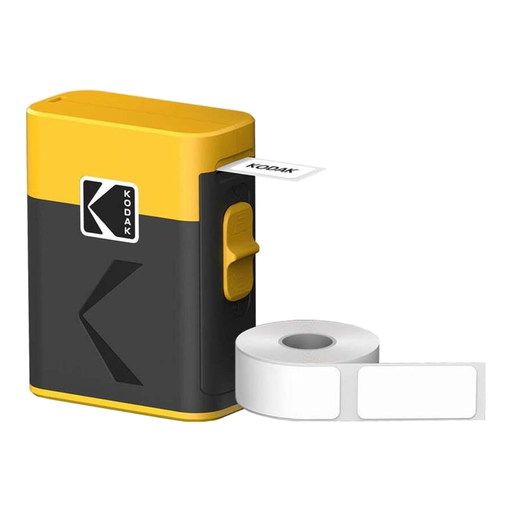
Why we chose it: Ideal for getting started with home organisation, for students, or for small business owners. The starter pack with 12 rolls allows for immediate and intensive use without worrying about refills, offering unbeatable value from the get-go.
This model uses standard direct thermal technology, freeing you from the hassle of cartridges. Its Bluetooth Low Energy connection and the dedicated Kodak Label app ensure a quick and easy setup, far from the usual software frustrations.
The all-in-one starter pack (printer + 12 rolls). Its battery, rechargeable via USB-C, ensures true portability and compatibility with all your modern chargers.
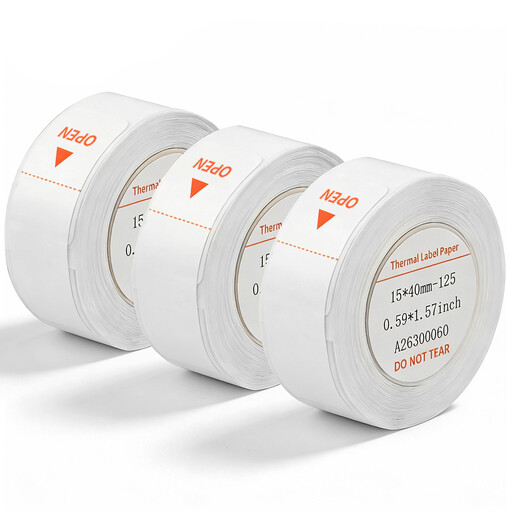
Why we chose it: The perfect solution for owners of a compatible printer (like the D110) who want to stock up on reliable and affordable supplies for regular use, whether for organising documents or labelling products.
By choosing quality compatible rolls, you bypass the trap of overpriced proprietary supplies. This standard format ensures sharp printing and long-lasting adhesion without locking you into a single brand.
A quality adhesive thermal paper that sticks perfectly to multiple surfaces (paper, plastic, glass). The economical 3-pack format (180 labels per roll) gives you great peace of mind.
For more advanced needs, explore our full selection of products that meet our quality charter and current safety standards.
The longevity of a thermal label depends on its exposure to sunlight and heat. Under normal indoor conditions (in a cupboard, binder, or storage box), a label remains perfectly legible for several years. However, it is not designed for outdoor use or for surfaces subject to heavy friction.
No, direct thermal printing technology is inherently monochrome. The print head heats the paper to reveal a black image (or sometimes blue on certain special papers). To date, there are no consumer-grade portable direct thermal label makers capable of printing in multiple colours.
The process is generally simple and nearly identical on all models: