
Livraison le jour même ou le lendemain

Qualité garantie

Débloquez vos offres de bienvenue: Livraison GRATUITE | Jusqu'à -80 % | 30 jours d'essai gratuits à JoyPlus
Téléchargez l'application
Cinema anytime, anywhere?? That's the promise of a portable projector. From movie nights and big-screen gaming sessions to impromptu business presentations, the possibilities are endless. But navigating the dense world of technical specs—lumens, resolution, connectivity—can quickly become a headache. Don't panic! This guide is here to decode the key features and help you find the perfect model for your needs.
To make the right choice, here are the essential criteria to review before you buy.
Don't be fooled by marketing jargon: the distinction between native and supported resolution is crucial. A projector with a Full HD 1080p native resolution guarantees a genuinely sharp and detailed image. Some models claim to be 4K-compatible: this means they can accept a 4K signal and downscale it (a process known as downscaling) to 1080p. This ensures compatibility with modern content, but it is not a native 4K display.
Brightness, measured in ANSI lumens (the most reliable standard), determines the image's visibility in ambient light. For indoor use in a dimly lit room or for an outdoor projector in the evening, a rating of 500 to 900 ANSI lumens is an excellent starting point.
A Wi-Fi-enabled projector is an essential standard today. Prioritise a model with dual-band WiFi 6 (2.4/5?GHz) for smooth, lag-free streaming from Netflix, YouTube, or Disney+. The inclusion of Bluetooth (5.2 or newer) is also a major plus for wirelessly connecting a soundbar, headphones, or a portable speaker.
When it comes to physical ports, don't overlook the HDMI port, which is indispensable for connecting a console (PS5, Switch), a PC, or a Blu-ray player. A USB port is also handy for playing media files from a flash drive.
Portability is about more than just a compact size. Features that simplify everyday life make all the difference. Look for these priorities:
Enough theory, let's get practical! Here are some products that caught our eye for a variety of uses.
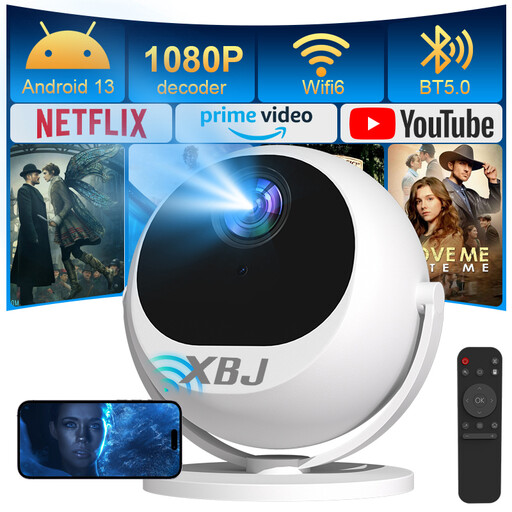
Why It Stands Out
This model is distinguished by its 180° tilting stand, which offers complete projection freedom to aim at a wall, the ceiling, or even the roof of a tent. Combined with automatic focus and keystone correction, it's ready to use in seconds without tedious manual adjustments. The ideal solution for those who prioritise simplicity above all else.
Advantages
Who is it for?
It's perfect for families wanting an easy-to-set-up home cinema, gamers seeking an immersive experience, mobile professionals, and fans of movie nights under the stars.
A great picture is good. A polished atmosphere is better. Here are a few accessories to perfect your outdoor evenings.
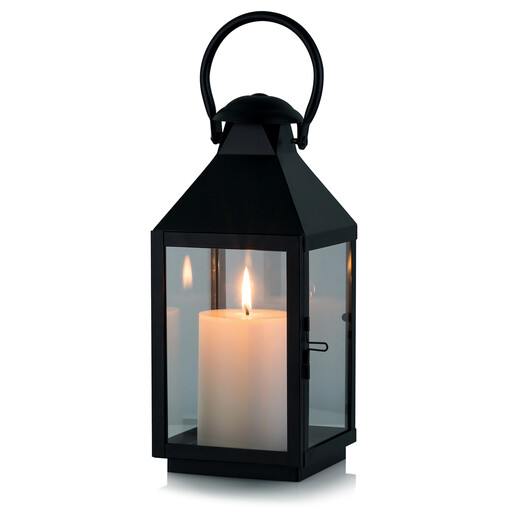
Why We Love It
With its vintage black metal design, this lantern adds an instant touch of charm and elegance. Versatile, it can be placed on a table or hung by its ring to illuminate a patio, living room, or light a pathway.
Advantages
Who is it for?
For anyone looking to create a warm, subdued atmosphere, both indoors and out, with a statement decor piece.
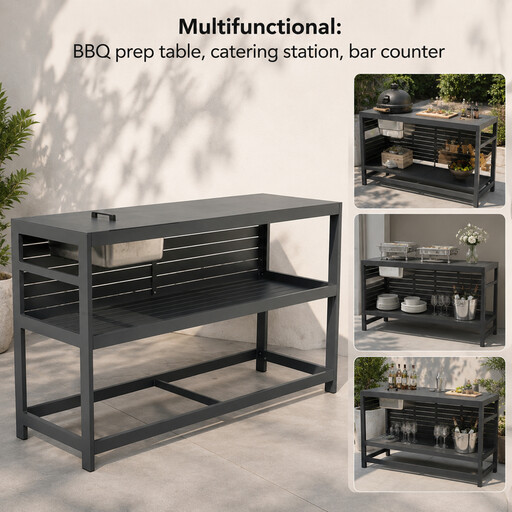
Why It's So Practical
This cart is the perfect partner for your outdoor gatherings. Made entirely of aluminium, it is resistant to both rain and rust and can be transformed as needed into a barbecue prep station or a pop-up bar.
Advantages
Who is it for?
A must-have for grill masters and terrace cocktail enthusiasts looking for a prep station that is both practical and stylish.
Looking to take your outdoor space to the next level?? Discover our complete selection of Outdoor Table Accessories.
1. What is the difference between native resolution and supported resolution? Native resolution is the actual number of pixels the projector can display; it's the true indicator of image sharpness. A native 1080p mini projector guarantees an authentic Full HD image. Supported resolution simply means the device can receive a higher-definition signal (like 4K) and downscale it to its native resolution. It's a mark of compatibility, not display quality.
2. Can you use a portable projector in broad daylight? It's very difficult, even for the brightest models. Ambient light washes out the colours and destroys the contrast. For a satisfying viewing experience, it's essential to use the projector in a dark room or wait until nightfall for an outdoor session.
3. How do I connect my phone to a Wi-Fi-enabled projector? Most smart projectors support screen mirroring via protocols like Miracast (Android) or AirPlay (iOS). You typically just need to connect your phone and the projector to the same Wi-Fi network, then launch the screen mirroring function from your smartphone to see its display projected on the big screen.