
Livraison le jour même ou le lendemain

Qualité garantie

Débloquez vos offres de bienvenue: Livraison GRATUITE | Jusqu'à -80 % | 30 jours d'essai gratuits à JoyPlus
Téléchargez l'application
Enjoying a 100-inch cinema screen in your bedroom, living room, or even out in nature is no longer an impossible dream. The portable projector has it all: it's compact, versatile, and increasingly powerful, turning any white wall into a projection room. The problem: the market is a jungle of models with indecipherable spec sheets and often misleading marketing promises.
As a product expert at Joybuy, my mission is to help you see things more clearly. Here is our guide to avoiding the most common traps and identifying the features that truly matter for your needs.
Buying a portable projector can quickly turn into a headache. Too many buyers end up disappointed with a device that doesn't live up to its promises. To avoid unpleasant surprises, here are the three mistakes you should never make.
The most common trap concerns brightness. You will inevitably come across staggering numbers like "9000 lumens" advertised on entry-level products. Be wary! This is almost always a proprietary measurement, often called "light source lumens." The only reliable and comparable value between models is the ANSI lumen, an international standard that measures the actual brightness of the image projected onto the screen. Simply put: a 300 ANSI lumen projector will often be brighter than another one advertising 8000 "lumens" without the ANSI designation.
Many projectors boast of being "4K compatible" or "4K supported." Be careful, this is a classic bait-and-switch. It simply means the device can receive a 4K signal, but the image it projects will be downscaled to its native resolution, which is often much lower (sometimes a paltry 480p). The result is a blurry mess, a far cry from the sharpness you'd expect from 4K. The native resolution is the actual number of pixels the projector can display. It is THE essential criterion for a sharp image.
A Wi-Fi-connected projector with an integrated Android TV operating system is the promise of an all-in-one solution. On paper, it sounds ideal. In reality, many models come with uncertified or outdated versions of Android. The direct consequence: apps like Netflix, Prime Video, or Disney+ refuse to launch or are simply not available on the app store due to digital rights management (DRM). You then end up with a so-called "smart" device that forces you to plug in an HDMI stick or an external box to watch your favorite shows. How ironic!
To make the right choice, forget the marketing jargon and focus on these few objective technical specifications. They are the guarantee of quality and ease of use for your future projector.
As you've gathered, the ANSI lumen is your only reliable benchmark. For use in a dark room (a bedroom or living room at night), a brightness of 300 to 500 ANSI lumens is more than enough for a vibrant image. If you plan to use it during the day or in a room with ambient light, aim for models with 700 ANSI lumens or more.
Don't be fooled by marketing anymore: only native resolution matters.
A good portable projector should, above all, be easy to set up and use daily.
Because every user has different needs, here are three models that cater to specific uses, all selected based on our objective criteria.
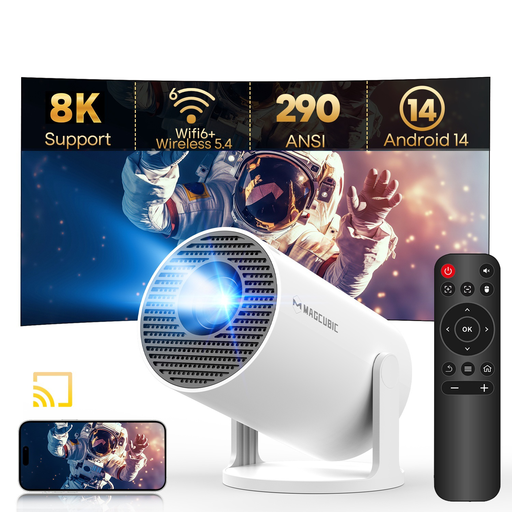
Why we recommend it: Perfect for a student's room or as a first projector, this model offers maximum flexibility with its 180° rotating stand. It lets you easily project onto the ceiling for a movie night in bed. Its integrated Android 14 system and modern connectivity (Wi-Fi 6) make it an all-in-one solution with unbeatable value for money.
It plays it straight by advertising a native 720p resolution (while still being 4K compatible), avoiding confusion. Its recent Android 14 system and Wi-Fi 6 connectivity protect it from the "fake smart" projector trap.
Its 180° rotating stand, combined with automatic keystone correction, offers installation versatility that is stunning for its price.
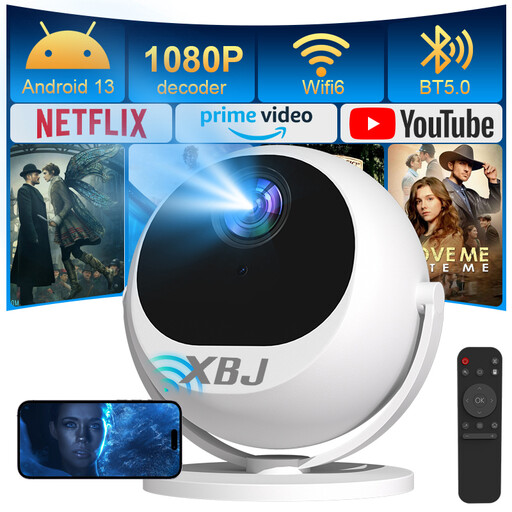
Why we recommend it: For those who refuse to compromise on image quality. With its native Full HD 1080p resolution and high brightness of 900 ANSI lumens, it delivers a large, bright image, even in a living room that isn't completely dark. An excellent choice for movie and video game lovers seeking a truly immersive experience.
It checks the two most important boxes: high, certified ANSI lumen brightness and a true native Full HD 1080p resolution. No unpleasant surprises here: the image quality delivers.
The combination of high brightness (900 ANSI) and **native 1080p** resolution guarantees top-tier visual performance for a portable model.
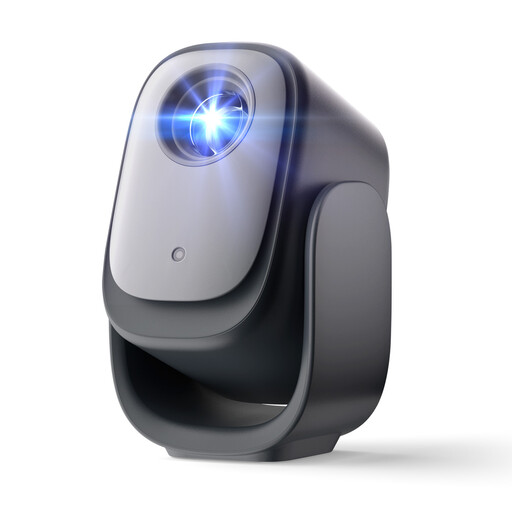
Why we recommend it: For those who want to turn on their projector and launch Netflix without a second thought. Its official Netflix license is a guarantee of peace of mind and long-term compatibility. Its advanced features (autofocus, auto-correction, and even obstacle avoidance) make it a disarmingly simple device to use every day.
It brilliantly sidesteps the "fake smart" projector trap thanks to its official Netflix license. This ensures direct, stable, and high-definition access to the platform, without any workarounds or external devices.
The native and certified Netflix integration, combined with a full suite of automatic features (autofocus, correction, obstacle avoidance), provides an exceptionally smooth user experience.
Discover our full selection of portable projectors, all chosen for their quality and compliance with current safety standards.
Almost all modern portable models use an LED light source. Their lifespan generally ranges from 20,000 to 30,000 hours. To put that in perspective, that's over 10 years of use at 5 hours per day. Lamp replacement has therefore become a thing of the past.
No, it's not essential. A smooth, matte white wall does the job perfectly for occasional use. However, a real projection screen is specifically designed to reflect light optimally. It will visibly improve contrast, brightness, and color fidelity. The improvement in image quality is noticeable, especially if the room is not in complete darkness.
This is a very common problem related to Digital Rights Management (DRM). To work in high definition, apps like Netflix require official certification. However, many entry-level projectors equipped with unofficial versions of Android lack this certification. To avoid this issue, the easiest solution is to choose a model with an official Netflix license or a Google-certified system (like Google TV). The other solution is to use an external media player (like an Amazon Fire TV Stick or Google Chromecast) plugged into your projector's HDMI port.